
GNU PROLOG
A Native Prolog Compiler with Constraint Solving over Finite Domains Edition 1.50, for GNU Prolog version 1.5.0
by Daniel Diaz |
Copyright (C) 1999-2021 Daniel Diaz
Permission is granted to make and distribute verbatim copies of this manual provided the copyright notice and this permission notice are preserved on all copies.
Permission is granted to copy and distribute modified versions of this manual under the conditions for verbatim copying, provided that the entire resulting derived work is distributed under the terms of a permission notice identical to this one.
Permission is granted to copy and distribute translations of this manual into another language, under the above conditions for modified versions, except that this permission notice may be stated in a translation approved by the Free Software Foundation, 51 Franklin St, Fifth Floor, Boston, MA 02110-1301, USA.
I am grateful to the members of the Loco project at INRIA Rocquencourt for their encouragement. Their involvement in this work led to useful feedback and exchange (1995).
Many thanks to all those people at GNU who helped me to finalize the GNU Prolog project (1999).
I would like to thank everybody who tested preliminary releases and helped me to put the finishing touches to this system (1999).
I would particularly like to thank Jonathan Hodgson for the time and effort he put into the proofreading of this manual. His suggestions, both regarding ISO technical aspects as well as the language in which it was expressed, proved invaluable (1999-2017).
Thanks to Richard A. O’Keefe for his advice regarding the implementation of some Prolog built-in predicates and for suggesting me the in-place installation feature (1999).
The on-line HTML version of this document was created using HEVEA developed by Luc Maranget who kindly devoted so much of his time extending the capabilities of HEVEA in order to handle such a sizeable manual (2000).
Jean-Christophe Aude kindly improved the visual aspect of both the illustrations and the GNU Prolog web pages (2000).
Many thanks to the following contributors:
Many thanks to Paulo Moura for his continuous help (in particular about Darwin ports), for his ISO Prolog unit tests and for including GNU Prolog in his logtalk system (2000-).
Many thanks to John Collins, the latexmk maintainer, who greatly helped me to simplify the building of the documentation using latexmk (2021).
GNU Prolog is free software. Since version 1.4.0, GNU Prolog distributed under a dual license: LGPL or GPL. So, you can redistribute it and/or modify it under the terms of either:
GNU Prolog is distributed in the hope that it will be useful, but WITHOUT ANY WARRANTY; without even the implied warranty of MERCHANTABILITY or FITNESS FOR A PARTICULAR PURPOSE. See the GNU General Public License for more details.
You should have received copies of the GNU General Public License and the GNU Lesser General Public License along with this program. If not, see http://www.gnu.org/licenses/.
Remark: versions of GNU Prolog prior to 1.4.0 were entirely released under the GNU General Public License (GPL).
GNU Prolog [5] is a free Prolog compiler with constraint solving over finite domains. For recent information about GNU Prolog please consult the GNU Prolog page.
GNU Prolog is a Prolog compiler based on the Warren Abstract Machine (WAM) [9, 1]. It first compiles a Prolog program to a WAM file which is then translated to a low-level machine independent language called mini-assembly specifically designed for GNU Prolog. The resulting file is then translated to the assembly language of the target machine (from which an object is obtained). This allows GNU Prolog to produce a native stand alone executable from a Prolog source (similarly to what does a C compiler from a C program). The main advantage of this compilation scheme is to produce native code and to be fast. Another interesting feature is that executables are small. Indeed, the code of most unused built-in predicates is not included in the executables at link-time.
A lot of work has been devoted to the ISO compatibility. Indeed, GNU Prolog is very close to the ISO standard for Prolog [6].
GNU Prolog also offers various extensions very useful in practice (global variables, OS interface, sockets,...). In particular, GNU Prolog contains an efficient constraint solver over Finite Domains (FD). This opens constraint logic programming to the user combining the power of constraint programming to the declarativity of logic programming. The key feature of the GNU Prolog solver is the use of a single (low-level) primitive to define all (high-level) FD constraints. There are many advantages of this approach: constraints can be compiled, the user can define his own constraints (in terms of the primitive), the solver is open and extensible (as opposed to black-box solvers like CHIP),…Moreover, the GNU Prolog solver is rather efficient, often more than commercial solvers.
GNU Prolog is inspired from two systems:
Here are some features of GNU Prolog:
GNU Prolog offers two ways to execute a Prolog program:
Running a program under the interactive interpreter allows the user to list it and to make full use of the debugger on it (section 5). Compiling a program to native code makes it possible to obtain a stand alone executable, with a reduced size and optimized for speed. Running a Prolog program compiled to native-code is around 3-5 times faster than running it under the interpreter. However, it is not possible to make full use of the debugger on a program compiled to native-code. Nor is it possible to list the program. In general, it is preferable to run a program under the interpreter for debugging and then use the native-code compiler to produce an autonomous executable. It is also possible to combine these two modes by producing an executable that contains some parts of the program (e.g. already debugged predicates whose execution-time speed is crucial) and interpreting the other parts under this executable. In that case, the executable has the same facilities as the GNU Prolog interpreter but also integrates the native-code predicates. This way to define a new enriched interpreter is detailed later (section 4.4.5).
GNU Prolog offers a classical Prolog interactive interpreter also called top-level. It allows the user to execute queries, to consult Prolog programs, to list them, to execute them and to debug them. The top-level can be invoked using the following command:
| % gprolog [OPTION]… | (the % symbol is the operating system shell prompt) |
Options:
The main role of the gprolog command is to execute the top-level itself, i.e. to execute the built-in predicate top_level/0 (section 8.18.1) which will produce something like:
GNU Prolog 1.5.0 (64 bits)
Compiled May  3 2021, 16:36:43 with gcc
Copyright (C) 1999-2021 Daniel Diaz

| ?-
The top-level is ready to execute your queries as explained in the next section.
To quit the top-level type the end-of-file key sequence (Ctl-D) or its term representation: end_of_file. It is also possible to use the built-in predicate halt/0 (section 8.18.1).
However, before entering the top-level itself, the command-line is processed to treat all known options (those listed above). All unrecognized arguments are collected together to form the argument list which will be available using argument_value/2 (section 8.27.2) or argument_list/1 (section 8.27.3). The -- option stops the parsing of the command-line, all remainding options are collected into the argument list.
Several options are provided to execute a goal before entering the interaction with the user:
The above order is thus the order in which each kind of goal (init, entry, query) is executed. If there are several goals of a same kind they are executed in the order of appearance. Thus, all init goals are executed (in the order of appearance) before all entry goals and all entry goals are executed before all query goals.
Each GOAL is passed as a shell argument (i.e. one shell string) and should not contain a terminal dot. Example: --init-goal ’write(hello), nl’ under a sh-like. To be executed, a GOAL is transformed into a term using read_term_from_atom(Goal, Term, [end_of_term(eof)]). Respecting both the syntax of shell strings and of Prolog can be heavy. For instance, passing a backslash character \ can be difficult since it introduces an escape sequence both in sh and inside Prolog quoted atoms. The use of back quotes can then be useful since, by default, no escape sequence is processed inside back quotes (this behavior can be controlled using the back_quotes Prolog flag (section 8.22.1)).
Since the Prolog argument list is created when the whole command-line is parsed, if a --init-goal option uses argument_value/2 or argument_list/1 it will obtained the original command-line arguments (i.e. including all recognized arguments).
Here is an example of using execution goal options:
will produce the following:
before
GNU Prolog 1.5.0 (64 bits)
Compiled May  3 2021, 16:36:43 with gcc
Copyright (C) 1999-2021 Daniel Diaz

inside
| ?- append([a,b],[c,d],X).

X = [a,b,c,d]

yes
| ?-
NB: depending on the used shell it may be necessary to use other string delimiters (e.g. use " under Windows cmd.exe).
The GNU Prolog top-level is built on a classical read-execute-write loop that also allows for re-executions (when the query is not deterministic) as follows:
Here is an example of execution of a query (“find the lists X and Y such that the concatenation of X and Y is [a,b]”):
| | ?- append(X,Y,[a,b,c]). | ||
| X = [] | ||
| Y = [a,b,c] ? ; | (here the user presses ; to compute another solution) | |
| X = [a] | ||
| Y = [b,c] ? a | (here the user presses a to compute all remaining solutions) | |
| X = [a,b] | ||
| Y = [c] | (here the user is not asked and the next solution is computed) | |
| X = [a,b,c] | ||
| Y = [] | (here the user is not asked and the next solution is computed) | |
| no | (no more solution) | |
In some cases the top-level can detect that the current solution is the last one (no more alternatives remaining). In such a case it does not display the ? symbol (and does not ask the user). Example:
| | ?- (X=1 ; X=2). | ||
| X = 1 ? ; | (here the user presses ; to compute another solution) | |
| X = 2 | (here the user is not prompted since there are no more alternatives) | |
| yes | ||
The user can stop the execution even if there are more alternatives by typing RETURN.
| | ?- (X=1 ; X=2). | ||
| X = 1 ? | (here the user presses RETURN to stop the execution) | |
| yes | ||
The top-level tries to display the values of the variables of the query in a readable manner. For instance, when a variable is bound to a query variable, the name of this variable appears. When a variable is a singleton an underscore symbol _ is displayed (_ is a generic name for a singleton variable, it is also called an anonymous variable). Other variables are bound to new brand variable names. When a query variable name X appears as the value of another query variable Y it is because X is itself not instantiated otherwise the value of X is displayed. In such a case, nothing is output for X itself (since it is a variable). Example:
| | ?- X=f(A,B,_,A), A=k. | ||
| A = k | (the value of A is displayed also in f/3 for X) | |
| X = f(k,B,_,k) | (since B is a variable which is also a part of X, B is not displayed) | |
| | ?- functor(T,f,3), arg(1,T,X), arg(3,T,X). | ||
| T = f(X,_,X) | (the 1st and 3rd args are equal to X, the 2nd is an anonymous variable) | |
| | ?- read_from_atom(’k(X,Y,X).’,T). | ||
| T = k(A,_,A) | (the 1st and 3rd args are unified, a new variable name A is introduced) | |
The top-level uses variable binding predicates (section 8.5). To display the value of a variable, the top-level calls write_term/3 with the following option list: [quoted(true),numbervars(false), namevars(true)] (section 8.14.6). A term of the form ’$VARNAME’(Name) where Name is an atom is displayed as a variable name while a term of the form ’$VAR’(N) where N is an integer is displayed as a normal compound term (such a term could be output as a variable name by write_term/3). Example:
| | ?- X=’$VARNAME’(’Y’), Y=’$VAR’(1). | ||
| X = Y | (the term ’$VARNAME’(’Y’) is displayed as Y) | |
| Y = ’$VAR’(1) | (the term ’$VAR’(1) is displayed as is) | |
| | ?- X=Y, Y=’$VAR’(1). | ||
| X = ’$VAR’(1) | ||
| Y = ’$VAR’(1) |
In the first example, X is explicitly bound to ’$VARNAME’(’Y’) by the query so the top-level displays Y as the value of X. Y is unified with ’$VAR’(1) so the top-level displays it as a normal compound term. It should be clear that X is not bound to Y (whereas it is in the second query). This behavior should be kept in mind when doing variable binding operations.
Finally, the top-level computes the user-time (section 8.24.2) taken by a query and displays it when it is significant. Example:
| | ?- retractall(p(_)), assertz(p(0)), | ||
| repeat, | ||
| retract(p(X)), | ||
| Y is X + 1, | ||
| assertz(p(Y)), | ||
| X = 1000, !. | ||
| X = 1000 | ||
| Y = 1001 | ||
| (180 ms) yes | (the query took 180ms of user time) | |
The top-level allows the user to consult Prolog source files. Consulted predicates can be listed, executed and debugged (while predicates compiled to native-code cannot). For more information about the difference between a native-code predicate and a consulted predicate refer to the introduction of this section (section 4.1) and to the part devoted to the compiler (section 4.4.1).
To consult a program use the built-in predicate consult/1 (section 8.23.1). The argument of this predicate is a Prolog file name or user to specify the terminal. This allows the user to directly input the predicates from the terminal. In that case the input shall be terminated by the end-of-file key sequence (Ctl-D) or its term representation: end_of_file. A shorthand for consult(FILE) is [FILE]. Example:
| | ?- [user]. | ||
| {compiling user for byte code...} | ||
| even(0). | ||
| even(s(s(X))):- | ||
| even(X). | ||
| (here the user presses Ctl-D to end the input) | ||
| {user compiled, 3 lines read - 350 bytes written, 1180 ms} | ||
| | ?- even(X). | ||
| X = 0 ? ; | (here the user presses ; to compute another solution) | |
| X = s(s(0)) ? ; | (here the user presses ; to compute another solution) | |
| X = s(s(s(s(0)))) ? | (here the user presses RETURN to stop the execution) | |
| yes | ||
| | ?- listing. | ||
| even(0). | ||
| even(s(s(A))) :- | ||
| even(A). | ||
When consult/1 (section 8.23.1) is invoked on a Prolog file it first runs the GNU Prolog compiler (section 4.4) as a child process to generate a temporary WAM file for byte-code. If the compilation fails a message is displayed and nothing is loaded. If the compilation succeeds, the produced file is loaded into memory using load/1 (section 8.23.2). Namely, the byte-code of each predicate is loaded. When a predicate P is loaded if there is a previous definition for P it is removed (i.e. all clauses defining P are erased). We say that P is redefined. Note that only consulted predicates can be redefined. If P is a native-code predicate, trying to redefine it will produce an error at load-time: the predicate redefinition will be ignored and the following message displayed:
Finally, an existing predicate will not be removed if it is not re-loaded. This means that if a predicate P is loaded when consulting the file F, and if later the definition of P is removed from the file F, consulting F again will not remove the previously loaded definition of P from the memory.
Consulted predicates can be debugged using the Prolog debugger. Use the debugger predicate trace/0 or debug/0 (section 5.3.1) to activate the debugger.
Since version 1.4.0 it is possible to use a Prolog source file as a Unix script-file (shebang support). A PrologScript file should begin as follows:
#!/usr/bin/gprolog --consult-file
GNU Prolog will be invoked as
/usr/bin/gprolog --consult-file FILE
Then FILE will be consulted. In order to correctly deal with the #! first line, consult/1 treats as a comment a first line of a file which begins with # (if you want to use a predicate name starting with a #, simply skip a line before its definition).
Remark: it is almost never possible to pass additionnal parameters (e.g. query-goal) this way since in most systems the shebang implementation deliver all arguments (following #!/usr/bin/gprolog) as a single string (which cannot then correctly be recognized by gprolog).
Under the top-level it is possible to interrupt the execution of a query by typing the interruption key (Ctl-C). This can be used to abort a query, to stop an infinite loop, to activate the debugger,…When an interruption occurs the top-level displays the following message: Prolog interruption (h for help) ? The user can then type one of the following commands:
| Command | Name | Description |
| a | abort | abort the current execution. Same as abort/0 (section 8.18.1) |
| e | exit | quit the current Prolog process. Same as halt/0 (section 8.18.1) |
| b | break | invoke a recursive top-level. Same as break/0 (section 8.18.1) |
| c | continue | resume the execution |
| t | trace | start the debugger using trace/0 (section 5.3.1) |
| d | debug | start the debugger using debug/0 (section 5.3.1) |
| h or ? | help | display a summary of available commands |
The line editor (linedit) allows the user to build/update the current input line using a variety of commands. This facility is available if the linedit part of GNU Prolog has been installed. linedit is implicitly called by any built-in predicate reading from a terminal (e.g. get_char/1, read/1,…). This is the case when the top-level reads a query.
Bindings: each command of linedit is activated using a key. For some commands another key is also available to invoke the command (on some terminals this other key may not work properly while the primary key always works). Here is the list of available commands:
| Key | Alternate key | Description |
| Ctl-B | ← | go to the previous character |
| Ctl-F | → | go to the next character |
| Esc-B | Ctl-← | go to the previous word |
| Esc-F | Ctl-→ | go to the next word |
| Ctl-A | Home | go to the beginning of the line |
| Ctl-E | End | go to the end of the line |
| Ctl-H | Backspace | delete the previous character |
| Ctl-D | Delete | delete the current character |
| Ctl-U | Ctl-Home | delete from beginning of the line to the current character |
| Ctl-K | Ctl-End | delete from the current character to the end of the line |
| Esc-L | lower case the next word | |
| Esc-U | upper case the next word | |
| Esc-C | capitalize the next word | |
| Ctl-T | exchange last two characters | |
| Ctl-V | Insert | switch on/off the insert/replace mode |
| Ctl-I | Tab | complete word (twice displays all possible completions) |
| Esc-Ctl-I | Esc-Tab | insert spaces to emulate a tabulation |
| Ctl-space | mark beginning of the selection | |
| Esc-W | copy (from the begin selection mark to the current character) | |
| Ctl-W | cut (from the begin selection mark to the current character) | |
| Ctl-Y | paste | |
| Ctl-P | ↑ | recall previous history line |
| Ctl-N | ↓ | recall next history line |
| Esc-P | recall previous history line beginning with the current prefix | |
| Esc-N | recall next history line beginning with the current prefix | |
| Esc-< | Page Up | recall first history line |
| Esc-> | Page Down | recall last history line |
| Ctl-C | generate an interrupt signal (section 4.2.5) | |
| Ctl-D | generate an end-of-file character (at the begin of the line) | |
| RETURN | validate a line | |
| Esc-? | display a summary of available commands |
History: when a line is entered (i.e. terminated by RETURN), linedit records it in an internal list called history. It is later possible to recall history lines using appropriate commands (e.g. Ctl-P recall the last entered line) and to modify them as needed. It is also possible to recall a history line beginning with a given prefix. For instance to recall the previous line beginning with write simply type write followed by Esc-P. Another Esc-P will recall an earlier line beginning with write,…
Completion: another important feature of linedit is its completion facility. Indeed, linedit maintains a list of known words and uses it to complete the prefix of a word. Initially this list contains all predefined atoms and the atoms corresponding to available predicates. This list is dynamically updated when a new atom appears in the system (whether read at the top-level, created with a built-in predicate, associated with a new consulted predicate,…). When the completion key (Tab) is pressed linedit acts as follows:
Example:
| | ?- argu | (here the user presses Tab to complete the word) | |
| | ?- argument_ | (linedit completes argu with argument_ and emits a beep) | |
| (the user presses again Tab to see all possible completions) | ||
| argument_counter | (linedit shows 3 possible completions) | |
| argument_list | ||
| argument_value | ||
| | ?- argument_ | (linedit redisplays the input line) | |
| | ?- argument_c | (to select argument_counter the user presses c and Tab) | |
| | ?- argument_counter | (linedit completes with argument_counter) | |
Balancing: linedit allows the user to check that (square/curly) brackets are well balanced. For this, when a close bracket symbol, i.e. ), ] or }, is typed, linedit determines the associated open bracket, i.e. (, [ or {, and temporarily repositions the cursor on it to show the match.
Customization: the behavior of linedit can be controlled via an environment variable called LINEDIT. This variable can contain the following substrings:
GNU Prolog uses several stacks to execute a Prolog program. Each stack has a static size and cannot be dynamically increased during the execution. For each stack there is a default size but the user can define a new size by setting an environment variable. When a GNU Prolog program is run it first consults these variables and if they are not defined uses the default sizes. The following table presents each stack of GNU Prolog with its default size and the name of its associated environment variable:
Since version 1.4.2, the size of the atom table (the table recording all atoms) is managed similarly to stacks. It is then included in the following table (even if actually it is not a stack but an hash table). In this table, the associated name is atoms which is the key used in statistics (section 8.24.1). The environment variable name is derived from the corresponding Prolog flag max_atom, see (section 8.22.1).
| Stack | Default | Environment | Description |
| name | size (Kb) | variable | |
| local | 16384 | LOCALSZ | control stack (environments and choice-points) |
| global | 32768 | GLOBALSZ | heap (compound terms) |
| trail | 16384 | TRAILSZ | conditional bindings (bindings to undo at backtracking) |
| cstr | 16384 | CSTRSZ | finite domain constraint stack (FD variables and constraints) |
| atoms | 32768 | MAX_ATOM | atom table |
In addition, under Windows (since version 1.4.0), registry keys are consulted (key names are the same as environment names). The keys are stored in HKEY_CURRENT_USER\Software\GnuProlog\.
If the size of a stack is too small an overflow will occur during the execution. In that case GNU Prolog emits the following error message before stopping:
where S is the name of the stack, N is the current stack size in Kb and E the name of the associated environment variable. When such a message occurs it is possible to (re)define the variable E with the new size. For instance to allocate Kb to the local stack under a Unix shell use:
| LOCALSZ=32768; export LOCALSZ | (under sh or bash) | |
| setenv LOCALSZ 32768 | (under csh or tcsh) |
This method allows the user to adjust the size of Prolog stacks. However, in some cases it is preferable not to allow the user to modify these sizes. For instance, when providing a stand alone executable whose behavior should be independent of the environment in which it is run. In that case the program should not consult environment variables and the programmer should be able to define new default stack sizes. The GNU Prolog compiler offers this facilities via several command-line options such as --local-size or --fixed-sizes (section 4.4.3).
Finally note that GNU Prolog stacks are virtually allocated (i.e. use virtual memory). This means that a physical memory page is allocated only when needed (i.e. when an attempt to read/write it occurs). Thus it is possible to define very large stacks. At the execution, only the needed amount of space will be physically allocated.
One of the main advantages of GNU Prolog is its ability to produce stand alone executables. A Prolog program can be compiled to native code to give rise to a machine-dependent executable using the GNU Prolog compiler. However native-code predicates cannot be listed nor fully debugged. So there is an alternative to native-code compilation: byte-code compilation. By default the GNU Prolog compiler produces native-code but via a command-line option it can produce a file ready for byte-code loading. This is exactly what consult/1 does as was explained above (section 4.2.3). GNU Prolog also manages interpreted code using a Prolog interpreter written in Prolog. Obviously interpreted code is slower than byte-code but does not require the invocation of the GNU Prolog compiler. This interpreter is used each time a meta-call is needed as by call/1 (section 7.2.3). This also the case of dynamically asserted clauses. The following table summarizes these three kinds of codes:
| Type | Speed | Debug ? | For what |
| interpreted-code | slow | yes | meta-call and dynamically asserted clauses |
| byte-code | medium | yes | consulted predicates |
| native-code | fast | no | compiled predicates |
Native-code compilation: a Prolog source is compiled in several stages to produce an object file that is linked to the GNU Prolog libraries to produce an executable. The Prolog source is first compiled to obtain a WAM [9] file. For a detailed study of the WAM the interested reader can refer to “Warren’s Abstract Machine: A Tutorial Reconstruction” [1]. The WAM file is translated to a machine-independent language specifically designed for GNU Prolog. This language is close to a (universal) assembly language and is based on a very reduced instruction set. For this reason this language is called mini-assembly (MA). The mini-assembly file is then mapped to the assembly language of the target machine. This assembly file is assembled to give rise to an object file which is then linked with the GNU Prolog libraries to provide an executable. The compiler also takes into account Finite Domain constraint definition files. It translates them to C and invoke the C compiler to obtain object files. The following figure presents this compilation scheme:
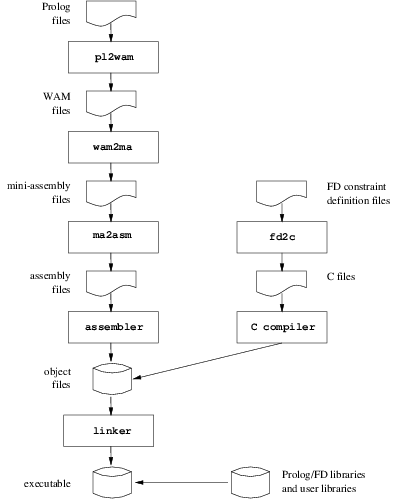
Obviously all intermediate stages are hidden to the user who simply invokes the compiler on his Prolog file(s) (plus other files: C,…) and obtains an executable. However, it is also possible to stop the compiler at any given stage. This can be useful, for instance, to see the WAM code produced (perhaps when learning the WAM). Finally it is possible to give any kind of file to the compiler which will insert it in the compilation chain at the stage corresponding to its type. The type of a file is determined using the suffix of its file name. The following table presents all recognized types/suffixes:
| Suffix of the file | Type of the file | Handled by: |
| .pl, .pro, .prolog | Prolog source file | pl2wam |
| .wam | WAM source file | wam2ma |
| .ma | Mini-assembly source file | ma2asm |
| .s | Assembly source file | the assembler |
| .c, .C, .CC, .cc, .cxx, .c++, .cpp | C or C++ source file | the C compiler |
| .fd | Finite Domain constraint source file | fd2c |
| any other suffix (.o, .a,…) | any other type (object, library,…) | the linker (C linker) |
Byte-code compilation: the same compiler can be used to compile a source Prolog file for byte-code. In that case the Prolog to WAM compiler is invoked using a specific option and produces a WAM for byte-code source file (suffixed .wbc) that can be later loaded using load/1 (section 8.23.2). Note that this is exactly what consult/1 (section 8.23.1) does as explained above (section 4.2.3).
The GNU Prolog compiler is a command-line compiler similar in spirit to a Unix C compiler like gcc. To invoke the compiler use the gplc command as follows:
| % gplc [OPTION]… FILE… | (the % symbol is the operating system shell prompt) |
The arguments of gplc are file names that are dispatched in the compilation scheme depending on the type determined from their suffix as was explained previously (section 4.4.2). All object files are then linked to produce an executable. Note however that GNU Prolog has no module facility (since there is not yet an ISO reference for Prolog modules) thus a predicate defined in a Prolog file is visible from any other predicate defined in any other file. GNU Prolog allows the user to split a big Prolog source into several files but does not offer any way to hide a predicate from others.
The simplest way to obtain an executable from a Prolog source file prog.pl is to use:
This will produce an native executable called prog which can be executed as follows:
However, there are several options that can be used to control the compilation:
General options:
Prolog to WAM compiler options:
WAM to mini-assembly translator options:
| --comment | include comments in the output file |
Mini-assembly to assembly translator options:
| --comment | include comments in the output file |
| --pic | produce position independent code (PIC) |
C compiler options:
| --c-compiler FILE | use FILE as C compiler/linker |
| -C OPTION | pass OPTION to the C compiler |
Assembler options:
| -A OPTION | pass OPTION to the assembler |
Linker options:
It is possible to only give the prefix of an option if there is no ambiguity.
The name of the output file is controlled via the -o FILE option. If present the output file produced will be named FILE. If not specified, the output file name depends on the last stage reached by the compiler. If the link is not done the output file name(s) is the input file name(s) with the suffix associated with the last stage. If the link is done, the name of the executable is the name (without suffix) of the first file name encountered in the command-line. Note that if the link is not done -o has no sense in the presence of multiple input file names. For this reason, several meta characters are available for substitution in FILE:
By default the compiler runs in the native-code compilation scheme. To generate a WAM file for byte-code use the --wam-for-byte-code option. The resulting file can then be loaded using load/1 (section 8.23.2).
To execute the Prolog to WAM compiler in a given read environment (operator definitions, character conversion table,…) use --pl-state FILE. The state file should be produced by write_pl_state_file/1 (section 8.22.5).
By default the Prolog to WAM compiler inlines calls to some deterministic built-in predicates (e.g. arg/3 and functor/3). Namely a call to such a predicate will not yield a classical predicate call but a simple C function call (which is obviously faster). It is possible to avoid this using --no-inline.
Another optimization performed by the Prolog to WAM compiler is unification reordering. The arguments of a predicate are reordered to optimize unification. This can be deactivated using --no-reorder. The compiler also optimizes the unification/loading of nested compound terms. More precisely, the compiler emits optimized instructions when the last subterm of a compound term is itself a compound term (e.g. lists). This can be deactivated using --no-opt-last-subterm.
By default the Prolog to WAM compiler fully optimizes the allocation of registers to decrease both the number of instruction produced and the number of used registers. A good allocation will generate many void instructions that are removed from the produced file except if --keep-void-inst is specified. To prevent any optimization use --no-reg-opt while --min-reg-opt forces the compiler to only perform simple register optimizations.
The Prolog to WAM compiler emits an error when a control construct or a built-in predicate is redefined. This can be avoided using --no-redef-error. The compiler also emits warnings for suspicious predicate definitions like -/2 since this often corresponds to an earlier syntax error (e.g. - instead of _. This can be deactivated by specifying --no-susp-warn. Finally, the compiler warns when a singleton variable has a name (i.e. not the generic anonymous name _). This can be deactivated specifying --no-singl-warn.
Internally, predicate names are encoded to fit the syntax of (assembly) identifiers. For this GNU Prolog uses it own name mangling scheme. This is explained in more detail later (section 4.4.6). By default the error messages from the linker (e.g. multiple definitions for a given predicate, reference to an undefined predicate,…) are filtered to replace an internal name representation by the real predicate name (demangling). Specifying the --no-demangling prevents gplc from filtering linker output messages (internal identifiers are then shown).
When producing an executable it is possible to specify default stack sizes (using --STACK_NAME-size) and to prevent it from consulting environment variables (using --fixed-sizes) as was explained above (section 4.3). By default the produced executable will include the top-level, the Prolog/WAM debugger and all Prolog and FD built-in predicates. It is possible to avoid linking the top-level (section 4.2) by specifying --no-top-level. In this case, at least one initialization/1 directive (section 7.1.14) should be defined. The option --no-debugger does not link the debugger. To include only used built-in predicates that are actually used the options --no-pl-bips and/or --no-fd-bips can be specified. For the smallest executable all these options should be specified. This can be abbreviated by using the shorthand option --min-bips. By default, executables are not stripped, i.e. their symbol table is not removed. This table is only useful for the C debugger (e.g. when interfacing Prolog and C). To remove the symbol table (and then to reduce the size of the final executable) use --strip. Finally --min-size is a shortcut for --min-bips and --strip, i.e. the produced executable is as small as possible.
Example: compile and link two Prolog sources prog1.pl and prog2.pl. The resulting executable will be named prog1 (since -o is not specified):
Example: compile the Prolog file prog.pl to study basic WAM code. The resulting file will be named prog.wam:
Example: compile the Prolog file prog.pl and its C interface file utils.c to provide an autonomous executable called mycommand. The executable is not stripped to allow the use of the C debugger:
Example: detail all steps to compile the Prolog file prog.pl (the resulting executable is stripped). All intermediate files are produced (prog.wam, prog.ma, prog.s, prog.o and the executable prog):
% gplc -W prog.pl
% gplc -M --comment prog.wam
% gplc -S --comment prog.ma
% gplc -c prog.s
% gplc -o prog -s prog.o
In this section we explain what happens when running an executable produced by the GNU Prolog native-code compiler. The default main function first starts the Prolog engine. This function collects all linked objects (issued from the compilation of Prolog files) and initializes them. The initialization of a Prolog object file consists in adding to appropriate tables new atoms, new predicates and executing its system directives. A system directive is generated by the Prolog to WAM compiler to reflect a (user) directive executed at compile-time such as op/3 (section 7.1.11). Indeed, when the compiler encounters such a directive it immediately executes it and also generates a system directive to execute it at the start of the executable. When all system directives have been executed the Prolog engine executes all initialization directives defined with initialization/1 (section 7.1.14). If several initialization directives appear in the same file they are executed in the order of appearance. If several initialization directives appear in different files the order in which they are executed is machine-dependant. However, on most machines the order will be the reverse order in which the associated files have been linked (this is not true under native win32). When all initialization directives have been executed the default main function looks for the GNU Prolog top-level. If present (i.e. it has been linked) it is called otherwise the program simply ends. Note that if the top-level is not linked and if there is no initialization directive the program is useless since it simply ends without doing any work. The default main function detects such a behavior and emits a warning message.
Example: compile an empty file prog.pl without linking the top-level and execute it:
% gplc --no-top-level prog.pl
% prog
Warning: no initial goal executed
   use a directive :- initialization(Goal)
   or remove the link option --no-top-level (or --min-bips or --min-size)
In this section we show how to define a new top-level extending the GNU Prolog interactive interpreter with new predicate definitions. The obtained top-level can then be considered as an enriched version of the basic GNU Prolog top-level (section 4.2). Indeed, each added predicate can be viewed as a predefined predicate just like any other built-in predicate. This can be achieved by compiling these predicates and including the top-level at link-time.
The real question is: why would we include some predicates in a new top-level instead of simply consulting them under the GNU Prolog top-level ? There are two reasons for this:
To define a new top-level simply compile the set of desired predicates and linking them with the GNU Prolog top-level (this is the default) using gplc (section 4.4.3).
Example: let us define a new top-level called my_top_level including all predicates defined in prog.pl:
By the way, note that if prog.pl is an empty Prolog file the previous command will simply create a new interactive interpreter similar to the GNU Prolog top-level.
Example: as before where some predicates of prog.pl call C functions defined in utils.c:
To obtain a fully extended executable, it is desirable to accept the same set of opions as the original top-level, see (section 4.2), e.g. --init-goal. For this it is necessary to link main() function used by the original top-level. This can be achieved passing the --new-top-level to gplc:
In conclusion, defining a particular top-level is nothing else but a particular case of the native-code compilation. It is simple to do and very useful in practice.
When the GNU Prolog compiler compiles a Prolog source to an object file it has to associate a symbol to each predicate name. However, the syntax of symbols is restricted to identifiers: string containing only letters, digits or underscore characters. On the other hand, predicate names (i.e. atoms) can contain any character with quotes if necessary (e.g. ’x+y=z’ is a valid predicate name). The compiler may thus have to encode predicate names respecting the syntax of identifiers. In addition, Prolog allows the user to define several predicates with the same name and different arities, for this GNU Prolog encodes predicate indicators (predicate name followed by the arity). Finally, to support modules in the future, the module name is also encoded.
Since version 1.4.0, GNU Prolog adopts the following name mangling scheme. A predicate indicator of the form [MODULE:]PRED/N (where the MODULE can be omitted) will give rise to an identifier of the following form: XK_[E(MODULE)__]E(PRED)__aN where:
Examples:
| Predicate indicator | internal identifier |
| father/2 | X0_father__a2 |
| ’x+y=z’/3 | X1_782B793D7A__a3 |
| util:same/2 | X2_util__same__a2 |
| util:same__1/3 | X3_util__73616D655F5F31__a3 |
So, from the mini-assembly stage, each predicate indicator is handled via its name mangling identifier. The knowledge of this scheme is normally not of interest for the user, i.e. the Prolog programmer. For this reason the GNU Prolog compiler hides this mangling. When an error occurs on a predicate (undefined predicate, predicate with multiple definitions,…) the compiler has to decode the symbol associated with the predicate indicator (name demangling). For this gplc filters each message emitted by the linker to locate and decode eventual predicate indicators. This filtering can be deactivated specifying --no-demangling when invoking gplc (section 4.4.3).
This filter is provided as an utility that can be invoked using the hexgplc command as follows:
| % hexgplc [OPTION]… FILE… | (the % symbol is the operating system shell prompt) |
Options:
It is possible to give a prefix of an option if there is no ambiguity.
Without arguments hexgplc runs in decoding mode reading its standard input and decoding (demangling) each symbol corresponding to a predicate indicator. To use hexgplc in the encoding (mangling) mode the --encode option must be specified. By default hexgplc only decodes predicate indicators, this can be relaxed using --relax to also take into account simple predicate names (the arity can be omitted). It is possible to format the output of an encoded/decoded string using --printf FORMAT in that case each string S is passed to the C printf(3) function as printf(FORMAT,S).
Auxiliary predicates are generated by the Prolog to WAM compiler when simplifying some control constructs like ’;’/2 present in the body of a clause. They are of the form ’$NAME/ARITY_$auxN’ where NAME/ARITY is the predicate indicator of the simplified (i.e. father) predicate and N is a sequential number (a predicate can give rise to several auxiliary predicates). It is possible to force hexgplc to decode an auxiliary predicate as its father predicate indicator using --aux-father or as its father predicate indicator followed by the sequential number using --aux-father2.
If no file is specified, hexgplc processes its standard input otherwise each file is treated sequentially. Specifying the --cmd-line option informs hexgplc that each argument is not a file name but a string that must be encoded (or decoded). This is useful to encode/decode a particular string. For this reason the option -E (encode) and -D (decode) are provided as shorthand. Then, to obtain the mangling representation of a predicate PRED use:
NB: if PRED is a complex atom it is necessary to quote it (the quotes must be passed to hexgplc). Here is an example under bash:
% hexgplc -E \'x+y=z\'/3
X1_782B793D7A__a3
Or even more safely (using bash quotes to prevent bash from interpreting special characters):
% hexgplc -E \''x+y=z'\'/3
X1_782B793D7A__a3
The GNU Prolog debugger provides information concerning the control flow of the program. The debugger can be fully used on consulted predicates (i.e. byte-code). For native compiled code only the calls/exits are traced, no internal behavior is shown. Under the debugger it is possible to exhaustively trace the execution or to set spy-points to only debug a specific part of the program. Spy-points allow the user to indicate on which predicates the debugger has to stop to allow the user to interact with it. The debugger uses the “procedure box control flow model”, also called the Byrd Box model since it is due to Lawrence Byrd.
The procedure box model of Prolog execution provides a simple way to show the control flow. This model is very popular and has been adopted in many Prolog systems (e.g. SICStus Prolog, Quintus Prolog,…). A good introduction is the chapter 8 of “Programming in Prolog” of Clocksin & Mellish [2]. The debugger executes a program step by step tracing an invocation to a predicate (call) and the return from this predicate due to either a success (exit) or a failure (fail). When a failure occurs the execution backtracks to the last predicate with an alternative clause. The predicate is then re-invoked (redo). Another source of change of the control flow is due to exceptions. When an exception is raised from a predicate (exception) by throw/1 (section 7.2.4) the control is given back to the most recent predicate that has defined a handler to recover this exception using catch/3 (section 7.2.4). The procedure box model shows these different changes in the control flow, as illustrated here:
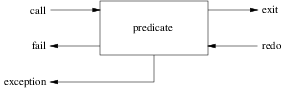
Each arrow corresponds to a port. An arrow to the box indicates that the control is given to this predicate while an arrow from the box indicates that the control is given back from the procedure. This model visualizes the control flow through these five ports and the connections between the boxes associated with subgoals. Finally, it should be clear that a box is associated with one invocation of a given predicate. In particular, a recursive predicate will give raise to a box for each invocation of the predicate with different entries/exits in the control flow. Since this might get confusing for the user, the debugger associates with each box a unique identifier (i.e. the invocation number).
trace/0 activates the debugger. The next invocation of a predicate will be traced.
debug/0 activates the debugger. The next invocation of a predicate on which a spy-point has been set will be traced.
It is important to understand that the information associated with the control flow is only available when the debugger is on. For efficiency reasons, when the debugger is off the information concerning the control flow (i.e. the boxes) is not retained. So, if the debugger is activated in the middle of a computation (by a call to debug/0 or trace/0 in the program or after the interrupt key sequence (Ctl-C) by choosing trace or debug), information prior to this point is not available.
debugging/0: prints onto the terminal information about the current debugging state (whether the debugger is switched on, what are the leashed ports, spy-points defined,…).
notrace/0 or nodebug/0 switches the debugger off.
wam_debug/0 invokes the sub-debugger devoted to the WAM data structures (section 5.6). It can be also invoked using the W debugger command (section 5.5).
leash(Ports) requests the debugger to prompt the user, as he creeps through the program, for every port defined in the Ports list. Each element of Ports is an atom in call, exit, redo, fail, exception. Ports can also be an atom defining a shorthand:
When an unleashed port is encountered the debugger continues to show the associated goal but does not stop the execution to prompt the user.
When dealing with big sources it is not very practical to creep through the entire program. It is preferable to define a set of spy-points on interesting predicates to be prompted when the debugger reaches one of these predicates. Spy-points can be added either using spy/1 (or spypoint_condition/3) or dynamically when prompted by the debugger using the + (or *) debugger command (section 5.5). The current mode of leashing does not affect spy-points in the sense that user interaction is requested on every port.
spy(PredSpec) sets a spy-point on all the predicates given by PredSpec. PredSpec defines one or several predicates and has one of the following forms:
It is not possible to set a spy-point on an undefined predicate.
The following predicate is used to remove one or several spy-points:
nospy(PredSpec) removes the spy-points from the specified predicates.
nospyall/0 removes all spy-points:
It is also possible to define conditional spy-points.
spypoint_condition(Goal, Port, Test) sets a conditional spy-point on the predicate for Goal. When the debugger reaches a conditional spy-point it only shows the associated goal if the following conditions are verified:
We here described which information is displayed by the debugger when it shows a goal. The basic format is as follows:
S is a spy-point indicator: if there is a spy-point on the current goal the + symbol is displayed else a space is displayed. N is the invocation number. This unique number can be used to correlate the trace messages for the various ports, since it is unique for every invocation. M is an index number which represents the number of direct ancestors of the goal (i.e. the current depth of the goal). Port specifies the particular port (call, exit, fail, redo, exception). Goal is the current goal (it is then possible to inspect its current instantiation) which is displayed using write_term/3 with quoted(true) and max_depth(D) options (section 8.14.6). Initially D (the print depth) is set to 10 but can be redefined using the < debugger command (section 5.5). The ? symbol is displayed when the debugger is waiting a command from the user. (i.e. Port is a leashed port). If the port is unleashed, this symbol is not displayed and the debugger continues the execution displaying the next goal.
When the debugger reaches a leashed port it shows the current goal followed by the ? symbol. At this point there are many commands available. Typing RETURN will creep into the program. Continuing to creep will show all the control flow. The debugger shows every port for every predicate encountered during the execution. It is possible to select the ports at which the debugger will prompt the user using the built-in predicate leash/1 (section 5.3.2). Each command is only one character long:
| Command | Name | Description |
| RET or c | creep | single-step to the next port |
| l | leap | continue the execution only stopping when a goal with a spy-point is reached |
| s | skip | skip over the entire execution of the current goal. No message will be shown until control returns |
| G | go to | ask for an invocation number and continue the execution until a port is reached for that invocation number |
| r | retry | try to restart the invocation of the current goal by failing until reaching the invocation of the goal. The state of execution is the same as when the goal was initially invoked (except when using side-effect predicates) |
| f | fail | force the current goal to fail immediately |
| w | write | show the current goal using write/2 (section 8.14.6) |
| d | display | show the current goal using display/2 (section 8.14.6) |
| p | show the current goal using print/2 (section 8.14.6) | |
| e | exception | show the pending exception. Only applicable to an exception port |
| g | ancestors | show the list of ancestors of the current goal |
| A | alternatives | show the list of ancestors of the current goal combined with choice-points |
| u | unify | ask for a term and unify the current goal with this term. This is convenient for getting a specific solution. Only available at a call port |
| . | father file | show the Prolog file name and the line number where the current predicate is defined |
| n | no debug | switch the debugger off. Same as nodebug/0 (section 5.3.1) |
| = | debugging | show debugger information. Same as debugging/0 (section 5.3.1) |
| + | spy this | set a spy-point on the current goal. Uses spy/1 (section 5.3.3) |
| - | nospy this | remove a spy-point on the current goal. Uses nospy/1 (section 5.3.3) |
| * | spy conditionally | ask for a term Goal, Port, Test (terminated by a dot) and set a conditional spy-point on the current predicate. Goal and the current goal must have the same predicate indicator. Uses spypoint_condition/3 (section 5.3.3) |
| L | listing | list all the clauses associated with the current predicate. Uses listing/1 (section 8.23.3) |
| a | abort | abort the current execution. Same as abort/0 (section 8.18.1) |
| b | break | invoke a recursive top-level. Same as break/0 (section 8.18.1) |
| @ | execute goal | ask for a goal and execute it |
| < | set print depth | ask for an integer and set the print depth to this value (-1 for no depth limit) |
| h or ? | help | display a summary of available commands |
| W | WAM debugger | invoke the low-level WAM debugger (section 5.6) |
In some cases it is interesting to have access to the WAM data structures. This sub-debugger allows the user to inspect/modify the contents of any stack or register of the WAM. The WAM debugger is invoked using the built-in predicate wam_debug/0 (section 5.3.1) or the W debugger command (section 5.5). The following table presents the specific commands of the WAM debugger:
| Command | Description |
| write A [N] | write N terms starting at the address A using write/1 (section 8.14.6) |
| data A [N] | display N words starting at the address A |
| modify A [N] | display and modify N words starting at the address A |
| where A | display the real address corresponding to A |
| what RA | display what corresponds to the real address RA |
| deref A | display the dereferenced word starting at the address A |
| envir [SA] | display the contents of the environment located at SA (or the current one) |
| backtrack [SA] | display the contents of the choice-point located at SA (or the current one) |
| backtrack all | display all choice-points |
| quit | quit the WAM debugger |
| help | display a summary of available commands |
In the above table the following conventions apply:
It is possible to only use the first letters of a commands and bank names when there is no ambiguity. Also the square brackets [ ] enclosing the index of a bank name can be omitted. For instance the following command (showing the contents of 25 consecutive words of the global stack from the index 3): data global[3] 25 can be abbreviated as: d g 3 25.
The definition of control constructs, directives and built-in predicates is presented as follows:
Templates
Specifies the types of the arguments and which of them shall be instantiated (mode). Types and modes are described later (section 6.2).
Description
Describes the behavior (in the absence of any error conditions). It is explicitly mentioned when a built-in predicate is re-executable on backtracking. Predefined operators involved in the definition are also mentioned.
Errors
Details the error conditions. Possible errors are detailed later (section 6.3). For directives, this part is omitted.
Portability
Specifies whether the definition conforms to the ISO standard or is a GNU Prolog extension.
The templates part defines, for each argument of the concerned built-in predicate, its mode and type. The mode specifies whether or not the argument must be instantiated when the built-in predicate is called. The mode is encoded with a symbol just before the type. Possible modes are:
The type of an argument is defined by the following table:
| Type | Description |
| TYPE_list | a list whose the type of each element is TYPE |
| TYPE1_or_TYPE2 | a term whose type is either TYPE1 or TYPE2 |
| atom | an atom |
| atom_property | an atom property (section 8.19.11) |
| boolean | the atom true or false |
| byte | an integer ≥ 0 and ≤ 255 |
| callable_term | an atom or a compound term |
| character | a single character atom |
| character_code | an integer ≥ 1 and ≤ 255 |
| clause | a clause (fact or rule) |
| close_option | a close option (section 8.10.7) |
| compound_term | a compound term |
| evaluable | an arithmetic expression (section 8.6.1) |
| fd_bool_evaluable | a boolean FD expression (section 9.7.1) |
| fd_labeling_option | an FD labeling option (section 9.9.1) |
| fd_evaluable | an arithmetic FD expression (section 9.6.1) |
| fd_variable | an FD variable |
| flag | a Prolog flag (section 8.22.1) |
| float | a floating point number |
| head | a head of a clause (atom or compound term) |
| integer | an integer |
| in_byte | an integer ≥ 0 and ≤ 255 or -1 (for the end-of-file) |
| in_character | a single character atom or the atom end_of_file (for the end-of-file) |
| in_character_code | an integer ≥ 1 and ≤ 255 or -1 (for the end-of-file) |
| io_mode | an atom in: read, write or append |
| list | the empty list [] or a non-empty list [_|_] |
| nonvar | any term that is not a variable |
| number | an integer or a floating point number |
| operator_specifier | an operator specifier (section 8.14.10) |
| os_file_property | an operating system file property (section 8.27.11) |
| predicate_indicator | a term Name/Arity where Name is an atom and Arity an integer ≥ 0. A callable term can be given if the strict_iso Prolog flag is switched off (section 8.22.1) |
| predicate_property | a predicate property (section 8.8.2) |
| read_option | a read option (section 8.14.1) |
| socket_address | a term of the form ’AF_UNIX’(A) or ’AF_INET’(A,N) where A is an atom and N an integer |
| socket_domain | an atom in: ’AF_UNIX’ or ’AF_INET’ |
| source_sink | an atom identifying a source or a sink |
| stream | a stream-term: a term of the form ’$stream’(N) where N is an integer ≥ 0 |
| stream_option | a stream option (section 8.10.6) |
| stream_or_alias | a stream-term or an alias (atom) |
| stream_position | a stream position: a term ’$stream_position’(I1, I2, I3, I4) where I1, I2, I3 and I4 are integers |
| stream_property | a stream property (section 8.10.10) |
| stream_seek_method | an atom in: bof, current or eof |
| term | any term |
| var_binding_option | a variable binding option (section 8.5.3) |
| write_option | a write option (section 8.14.6) |
When an error occurs an exception of the form: error(ErrorTerm, Caller) is raised. ErrorTerm is a term specifying the error (detailed in next sections) and Caller is a term specifying the context of the error. The context is either the predicate indicator of the last invoked built-in predicate or an atom giving general context information.
Using exceptions allows the user both to recover an error using catch/3 (section 7.2.4) and to raise an error using throw/1 (section 7.2.4).
To illustrate how to write error cases, let us write a predicate my_pred(X) where X must be an integer:
my_pred(X) :-
        (   nonvar(X) ->
            true
        ;   throw(error(instantiation_error, my_pred/1)),
        ),
        (   integer(X) ->
            true
        ;   throw(error(type_error(integer, X), my_pred/1))
        ),
        ...
To help the user to write these error cases, a set of system predicates is provided to raise errors. These predicates are of the form ’$pl_err_...’ and they all refer to the implicit error context. The predicates set_bip_name/2 (section 8.22.3) and current_bip_name/2 (section 8.22.4) are provided to set and recover the name and the arity associated with this context (an arity < 0 means that only the atom corresponding to the functor is significant). Using these system predicates the user could define the above predicate as follow:
my_pred(X) :-
        set_bip_name(my_pred,1),
        (   nonvar(X) ->
            true
        ;   '$pl_err_instantiation'
        ),
        (   integer(X) ->
            true
        ;   '$pl_err_type'(integer, X)
        ),
        ...
The following sections detail each kind of errors (and associated system predicates).
An instantiation error occurs when an argument or one of its components is variable while an instantiated argument was expected. ErrorTerm has the following form: instantiation_error.
The system predicate ’$pl_err_instantiation’ raises this error in the current error context (section 6.3.1).
An uninstantiation Error when an argument or one of its components is not a variable, and a variable or a component as variable is required. ErrorTerm has the following form: uninstantiation_error(Culprit) where Culprit is the argument or one of its components which caused the error.
The system predicate ’$pl_err_uninstantiation’(Culprit) raises this error in the current error context (section 6.3.1).
A type error occurs when the type of an argument or one of its components is not the expected type (but not a variable). ErrorTerm has the following form: type_error(Type, Culprit) where Type is the expected type and Culprit the argument which caused the error. Type is one of:
The system predicate ’$pl_err_type’(Type, Culprit) raises this error in the current error context (section 6.3.1).
A domain error occurs when the type of an argument is correct but its value is outside the expected domain. ErrorTerm has the following form: domain_error(Domain, Culprit) where Domain is the expected domain and Culprit the argument which caused the error. Domain is one of:
The system predicate ’$pl_err_domain’(Domain, Culprit) raises this error in the current error context (section 6.3.1).
an existence error occurs when an object on which an operation is to be performed does not exist. ErrorTerm has the following form: existence_error(Object, Culprit) where Object is the type of the object and Culprit the argument which caused the error. Object is one of:
The system predicate ’$pl_err_existence’(Object, Culprit) raises this error in the current error context (section 6.3.1).
A permission error occurs when an attempt to perform a prohibited operation is made. ErrorTerm has the following form: permission_error(Operation, Permission, Culprit) where Operation is the operation which caused the error, Permission the type of the tried permission and Culprit the argument which caused the error. Operation is one of:
and Permission is one of:
The system predicate ’$pl_err_permission’(Operation, Permission, Culprit) raises this error in the current error context (section 6.3.1).
A representation error occurs when an implementation limit has been breached. ErrorTerm has the following form: representation_error(Limit) where Limit is the name of the reached limit. Limit is one of:
The errors max_integer and min_integer are not currently implemented.
The system predicate ’$pl_err_representation’(Limit) raises this error in the current error context (section 6.3.1).
An evaluation error occurs when an arithmetic expression gives rise to an exceptional value. ErrorTerm has the following form: evaluation_error(Error) where Error is the name of the error. Error is one of:
The errors float_overflow, int_overflow, undefined and underflow are not currently implemented.
The system predicate ’$pl_err_evaluation’(Error) raises this error in the current error context (section 6.3.1).
A resource error occurs when GNU Prolog does not have enough resources. ErrorTerm has the following form: resource_error(Resource) where Resource is the name of the resource. Resource is one of:
The system predicate ’$pl_err_resource’(Resource) raises this error in the current error context (section 6.3.1).
A syntax error occurs when a sequence of character does not conform to the syntax of terms. ErrorTerm has the following form: syntax_error(Error) where Error is an atom explaining the error.
The system predicate ’$pl_err_syntax’(Error) raises this error in the current error context (section 6.3.1).
A system error can occur at any stage. A system error is generally associated with an external component (e.g. operating system). ErrorTerm has the following form: system_error(Error) where Error is an atom explaining the error. This is an extension to ISO which only defines system_error without arguments.
The system predicate ’$pl_err_system’(Error) raises this error in the current error context (section 6.3.1).
Prolog directives are annotations inserted in Prolog source files for the compiler. A Prolog directive is used to specify:
Templates
Description
dynamic(Pred) specifies that the procedure whose predicate indicator is Pred is a dynamic procedure. This directive makes it possible to alter the definition of Pred by adding or removing clauses. For more information refer to the section about dynamic clause management (section 8.7.1).
This directive shall precede the definition of Pred in the source file.
If there is no clause for Pred in the source file, Pred exists however as an empty predicate (this means that current_predicate(Pred) succeeds).
In order to allow multiple definitions, Pred can also be a list of predicate indicators or a sequence of predicate indicators using ’,’/2 as separator.
Portability
ISO directive.
Templates
Description
public(Pred) specifies that the procedure whose predicate indicator is Pred is a public procedure. This directive makes it possible to inspect the clauses of Pred. For more information refer to the section about dynamic clause management (section 8.7.1).
This directive shall precede the definition of Pred in the source file. Since a dynamic procedure is also public. It is useless (but correct) to define a public directive for a predicate already declared as dynamic.
In order to allow multiple definitions, Pred can also be a list of predicate indicators or a sequence of predicate indicators using ’,’/2 as separator.
Portability
GNU Prolog directive. The ISO reference does not define any directive to declare a predicate public but it does distinguish public predicates. It is worth noting that in most Prolog systems the public/1 directive is as a visibility declaration. Indeed, declaring a predicate as public makes it visible from any predicate defined in any other file (otherwise the predicate is only visible from predicates defined in the same source file as itself). When a module system is incorporated in GNU Prolog a more general visibility declaration shall be provided conforming to the ISO reference.
Templates
Description
multifile(Pred) specifies that the procedure whose predicate indicator is Pred is a multifle procedure (the clauses of Pred can reside in several source files). This directive is only supported by GNU Prolog since version 1.4.0.
The native compilation scheme of GNU Prolog requires that each Prolog source file refering to a multifile predicate Pred must include a multifile(Pred) directive even if no clause are defined in this file for Pred (i.e. Pred is only called by other predicates in this source file).
Portability
ISO directive.
Templates
Description
discontiguous(Pred) specifies that the procedure whose predicate indicator is Pred is a discontiguous procedure. Namely, the clauses defining Pred are not restricted to be consecutive but can appear anywhere in the source file.
This directive shall precede the definition of Pred in the source file.
In order to allow multiple definitions, Pred can also be a list of predicate indicators or a sequence of predicate indicators using ’,’/2 as separator.
A multifile predicate (declared with a multifile/1 directive) cannot be directly called from a file where it is not declared as multifile (the native compiler must know the called predicate is multifile). Workarounds: either call it via a meta-call (e.g. using call/1) or declare it as multifile in the calling source file). A good habit is to encapsulate a multifile predicate in a monofile predicate which invokes it (external call only invoke the monofile wrapper predicate).
Portability
ISO directive.
Templates
Description
ensure_linked(Pred) specifies that the procedure whose predicate indicator is Pred must be included by the linker. This directive is useful when compiling to native code to force the linker to include the code of a given predicate. Indeed, if the gplc is invoked with an option to reduce the size of the executable (section 4.4.3), the linker only includes the code of predicates that are statically referenced. However, the linker cannot detect dynamically referenced predicates (used as data passed to a meta-call predicate). The use of this directive prevents it to exclude the code of such predicates.
In order to allow multiple definitions, Pred can also be a list of predicate indicators or a sequence of predicate indicators using ’,’/2 as separator.
Portability
GNU Prolog directive.
Templates
Description
built_in specifies that the procedures defined from now have the built_in property (section 8.8.2).
built_in(Pred) is similar to built_in/0 but only affects the procedure whose predicate indicator is Pred.
This directive shall precede the definition of Pred in the source file.
In order to allow multiple definitions, Pred can also be a list of predicate indicators or a sequence of predicate indicators using ’,’/2 as separator.
built_in_fd (resp. built_in_fd(Pred)) is similar to built_in (resp. built_in(Pred)) but sets the built_in_fd predicate property (section 8.8.2).
Portability
GNU Prolog directives.
Templates
Description
include(File) specifies that the content of the Prolog source File shall be inserted. The resulting Prolog text is identical to the Prolog text obtained by replacing the directive by the content of the Prolog source File.
In case of File is a relative file name, it is searched in the current directory. If it is not found it is then searched in each directory of parent includers.
See absolute_file_name/2 for information about the syntax of File (section 8.26.1).
Portability
ISO directive.
Templates
Description
These directives are for conditional compilation.
if(Goal) compile subsequent code only if Goal succeeds. Goal is first processed by expand_term/2 (section 8.17.2). If Goal raises an exception it is printed and Goal fails.
else introduces the else part.
endif terminates a conditional compilation part.
elif(Goal) is a shorthand for :- else. :- if(Goal). … :- endif.
Portability
GNU Prolog directive. Also in SWI and YAP.
Templates
Description
ensure_loaded(File) is not supported by GNU Prolog. When such a directive is encountered it is simply ignored.
Portability
ISO directive. Not supported.
Templates
Description
op(Priority, OpSpecifier, Operator) alters the operator table. This directive is executed as soon as it is encountered by calling the built-in predicate op/3 (section 8.14.10). A system directive is also generated to reflect the effect of this directive at run-time (section 4.4.4).
Portability
ISO directive.
Templates
Description
char_conversion(InChar, OutChar) alters the character-conversion mapping. This directive is executed as soon as it is encountered by a call to the built-in predicate char_conversion/2 (section 8.14.12). A system directive is also generated to reflect the effect of this directive at run-time (section 4.4.4).
Portability
ISO directive.
Templates
Description
set_prolog_flag(Flag, Value) sets the value of the Prolog flag Flag to Value. This directive is executed as soon as it is encountered by a call to the built-in predicate set_prolog_flag/2 (section 8.22.1). A system directive is also generated to reflect the effect of this directive at run-time (section 4.4.4).
Portability
ISO directive.
Templates
Description
initialization(Goal) adds Goal to the set of goal which shall be executed at run-time. A user directive is generated to execute Goal at run-time. If several initialization directives appear in the same file they are executed in the order of appearance (section 4.4.4).
Portability
ISO directive.
Templates
Description
foreign(Template, Options) defines an interface predicate whose prototype is Template according to the options given by Options. Refer to the foreign code interface for more information (section 10.3).
foreign(Template) is equivalent to foreign(Template, []).
Portability
GNU Prolog directive.
GNU Prolog follows the ISO notion of control constructs.
Templates
Description
true always succeeds.
fail always fails (enforces backtracking).
! always succeeds and the for side-effect of removing all choice-points created since the invocation of the predicate activating it.
Errors
None.
Portability
ISO control constructs.
Templates
Description
Goal1 , Goal2 executes Goal1 and, in case of success, executes Goal2.
Goal1 ; Goal2 first creates a choice-point and executes Goal1. On backtracking Goal2 is executed.
Goal1 -> Goal2 first executes Goal1 and, in case of success, removes all choice-points created by Goal1 and executes Goal2. This control construct acts like an if-then (Goal1 is the test part and Goal2 the then part). Note that if Goal1 fails ->/2 fails also. ->/2 is often combined with ;/2 to define an if-then-else as follows: Goal1 -> Goal2 ; Goal3. Note that Goal1 -> Goal2 is the first argument of the (;)/2 and Goal3 (the else part) is the second argument. Such an if-then-else control construct first creates a choice-point for the else-part (intuitively associated with ;/2) and then executes Goal1. In case of success, all choice-points created by Goal1 together with the choice-point for the else-part are removed and Goal2 is executed. If Goal1 fails then Goal3 is executed.
Goal1 *-> Goal2 ; Goal3 implements the so-called soft-cut. It acts as the above if-then-else except that if Goal1 succeeds only Goal3 is cut (the alternative solutions of Goal1 are preserved and can be found by backtracking). Note that Goal1 *-> Goal2 alone (i.e. without an else branch Goal3) is equivalent to (Goal1 , Goal2).
’,’, ;, -> and *-> are predefined infix operators (section 8.14.10).
Errors
| Goal1 or Goal2 is a variable | instantiation_error | |
| Goal1 is neither a variable nor a callable term | type_error(callable, Goal1) | |
| Goal2 is neither a variable nor a callable term | type_error(callable, Goal2) | |
| The predicate indicator Pred of Goal1 or Goal2 does not correspond to an existing procedure and the value of the unknown Prolog flag is error (section 8.22.1) | existence_error(procedure, Pred) | |
Portability
ISO control constructs except (*->)/2 which is GNU Prolog specific.
Templates
Description
call(Goal) executes Goal. call/1 succeeds if Goal represents a goal which is true. When Goal contains a cut symbol ! (section 7.2.1) as a subgoal, the effect of ! does not extend outside Goal.
Errors
| Goal is a variable | instantiation_error | |
| Goal is neither a variable nor a callable term | type_error(callable, Goal) | |
| The predicate indicator Pred of Goal does not correspond to an existing procedure and the value of the unknown Prolog flag is error (section 8.22.1) | existence_error(procedure, Pred) | |
Portability
ISO control construct.
Templates
Description
catch(Goal, Catcher, Recovery) is similar to call(Goal) (section 7.2.3). If this succeeds or fails, so does the call to catch/3. If however, during the execution of Goal, there is a call to throw(Ball), the current flow of control is interrupted, and control returns to a call of catch/3 that is being executed. This can happen in one of two ways:
throw(Ball) causes the normal flow of control to be transferred back to an existing call of catch/3. When a call to throw(Ball) happens, Ball is copied and the stack is unwound back to the call to catch/3, whereupon the copy of Ball is unified with Catcher. If this unification succeeds, then catch/3 executes the goal Recovery using call/1 (section 7.2.3) in order to determine the success or failure of catch/3. Otherwise, in case the unification fails, the stack keeps unwinding, looking for an earlier invocation of catch/3. Ball may be any non-variable term.
Errors
| Ball is a variable | instantiation_error | |
If Ball does not unify with the Catcher argument of any call of catch/3, a system error message is displayed and throw/1 fails.
When catch/3 calls Goal or Recovery it uses call/1 (section 7.2.3), an instantiation_error, a type_error or an existence_error can then occur depending on Goal or Recovery.
Portability
ISO control constructs.
Templates
Description
var(Term) succeeds if Term is currently uninstantiated (which therefore has not been bound to anything, except possibly another uninstantiated variable).
nonvar(Term) succeeds if Term is currently instantiated (opposite of var/1).
atom(Term) succeeds if Term is currently instantiated to an atom.
integer(Term) succeeds if Term is currently instantiated to an integer.
float(Term) succeeds if Term is currently instantiated to a floating point number.
number(Term) succeeds if Term is currently instantiated to an integer or a floating point number.
atomic(Term) succeeds if Term is currently instantiated to an atom, an integer or a floating point number.
compound(Term) succeeds if Term is currently instantiated to a compound term, i.e. a term of arity > 0 (a list or a structure).
callable(Term) succeeds if Term is currently instantiated to a callable term, i.e. an atom or a compound term.
ground(Term) succeeds if Term is a ground term.
list(Term) succeeds if Term is currently instantiated to a list, i.e. the atom [] (empty list) or a term with principal functor ’.’/2 and with second argument (the tail) a list.
is_list(Term) behaves like list(Term) (for compatibility purpose).
partial_list(Term) succeeds if Term is currently instantiated to a partial list, i.e. a variable or a term whose the main functor is ’.’/2 and the second argument (the tail) is a partial list.
list_or_partial_list(Term) succeeds if Term is currently instantiated to a list or a partial list.
Errors
None.
Portability
var/1, nonvar/1, atom/1, integer/1, float/1, number/1, atomic/1, compound/1 callable/1 and ground/1 are ISO predicates.
list/1, partial_list/1 and list_or_partial_list/1 are GNU Prolog predicates.
Templates
Description
Term1 = Term2 unifies Term1 and Term2. No occurs check is done, i.e. this predicate does not check if a variable is unified with a compound term containing this variable (this can lead to an infinite loop).
= is a predefined infix operator (section 8.14.10).
Errors
None.
Portability
ISO predicate.
Templates
Description
unify_with_occurs_check(Term1, Term2) unifies Term1 and Term2. The occurs check test is done (i.e. the unification fails if a variable is unified with a compound term containing this variable).
Errors
None.
Portability
ISO predicate.
Templates
Description
Term1 \= Term2 succeeds if Term1 and Term2 are not unifiable (no occurs check is done).
\= is a predefined infix operator (section 8.14.10).
Errors
None.
Portability
ISO predicate.
The built-in predicates described in this section allows the user to compare Prolog terms. Prolog terms are totally ordered according to the standard total ordering of terms which is as follows (from the smallest term to the greatest):
A list is treated as a compound term (whose principal functor is ’.’/2).
The portability of the order of variables is not guaranteed (in the ISO reference the order of variables is system dependent).
Templates
Description
These predicates compare two terms according to the standard total ordering of terms (section 8.3.1).
Term1 == Term2 succeeds if Term1 and Term2 are equal.
Term1 \== Term2 succeeds if Term1 and Term2 are different.
Term1 @< Term2 succeeds if Term1 is less than Term2.
Term1 @=< Term2 succeeds if Term1 is less than or equal to Term2.
Term1 @> Term2 succeeds if Term1 is greater than Term2.
Term1 @>= Term2 succeeds if Term1 is greater than or equal to Term2.
==, \==, @<, @=<, @> and @>= are predefined infix operators (section 8.14.10).
Errors
None.
Portability
ISO predicates.
Templates
Description
compare(Order, Term1, Term2) compares Term1 and Term2 according to the standard (section 8.3.1) and unifies Order with:
Errors
| Order is neither a variable nor an atom | type_error(atom, Order) | |
| Order is an atom but not <, = or > | domain_error(order, Order) | |
Portability
ISO predicate.
Templates
Description
functor(Term, Name, Arity) succeeds if the principal functor of Term is Name and its arity is Arity. This predicate can be used in two ways:
Errors
| Term and Name are both variables | instantiation_error | |
| Term and Arity are both variables | instantiation_error | |
| Term is a variable and Name is neither a variable nor an atomic term | type_error(atomic, Name) | |
| Term is a variable and Arity is neither a variable nor an integer | type_error(integer, Arity) | |
| Term is a variable, Name is a constant but not an atom and Arity is an integer > 0 | type_error(atom, Name) | |
| Term is a variable and Arity is an integer > max_arity flag (section 8.22.1) | representation_error(max_arity) | |
| Term is a variable and Arity is an integer < 0 | domain_error(not_less_than_zero, Arity) | |
Portability
ISO predicate.
Templates
Description
arg(N, Term, Arg) succeeds if the Nth argument of Term is Arg.
Errors
| N is a variable | instantiation_error | |
| Term is a variable | instantiation_error | |
| N is neither a variable nor an integer | type_error(integer, N) | |
| Term is neither a variable nor a compound term | type_error(compound, Term) | |
| N is an integer < 0 | domain_error(not_less_than_zero, N) | |
Portability
ISO predicate.
Templates
Description
Term =.. List succeeds if List is a list whose head is the atom corresponding to the principal functor of Term and whose tail is a list of the arguments of Term.
=.. is a predefined infix operator (section 8.14.10).
Errors
| Term is a variable and List is a partial list | instantiation_error | |
| List is neither a partial list nor a list | type_error(list, List) | |
| Term is a variable and List is a list whose head is a variable | instantiation_error | |
| List is a list whose head H is neither an atom nor a variable and whose tail is not the empty list | type_error(atom, H) | |
| List is a list whose head H is a compound term and whose tail is the empty list | type_error(atomic, H) | |
| Term is a variable and List is the empty list | domain_error(non_empty_list, []) | |
| Term is a variable and the tail of List has a length > max_arity flag (section 8.22.1) | representation_error(max_arity) | |
Portability
ISO predicate.
Templates
Description
copy_term(Term1, Term2) succeeds if Term2 unifies with a term T which is a renamed copy of Term1.
Errors
None.
Portability
ISO predicate.
Templates
Description
term_variables(Term, List) succeeds if List unifies with a list of variables (including FD variables), each sharing with a unique variable of Term. The variables in List are ordered in order of appearance traversing Term depth-first and left-to-right.
term_variables(Term, List, Tail) is a difference-list version of the above predicate, i.e. Tail is the tail of the variable-list List.
Errors
| in term_variables/2 List is neither a partial list nor a list | type_error(list, List) | |
Portability
term_variables/2 is an ISO Predicate. term_variables/3 is a GNU Prolog predicate.
Templates
Description
subsumes_term(General, Specific) succeeds if General can be made equivalent to Specific by binding variables in General leaving Specific unaffected. The current implementation performs the unification (with occurs check) and ensures that the variable set of Specific is not changed by the unification (which is then undone). Note that this predicate fails in the presence of FD variables in Specific.
Errors
None.
Portability
ISO predicate.
Templates
Description
acyclic_term(Term) succeeds if Term does not contain a cyclic (sub-)term. In this case, Term may be processed safely. If acyclic_term(Term) fails, Term contains a cycle and processing Term is not safe, because GNU Prolog does not support the unification of cyclic terms but permits their creation. Cycles can be safely undone by failing over their creation. The use of acyclic_term/1 shall thus be reserved to protect critical predicates against cyclic terms.
Errors
None.
Portability
ISO predicate.
Templates
Description
term_hash(Term, Depth, Range, Hash) succeeds if Hash is the hash code of Term. If Term is not ground (see ground/1 (section 8.1.1)), the predicate simply succeeds (Hash is not unified). Depth is the depth limit to scan Term (starting from 1 for the top-level term). With Depth = 0 nothing is hashed, with 1 only atomic terms and the main functors/arity are hashed,... With Depth = -1 the full term is considered.
The hash code is as follows: 0 ≤ Hash < Range. If Range = 0 then Hash is not restricted (currently it is < 268435456).
term_hash(Term, Hash) is equivalent to term_hash(Term, -1, 0, Hash).
NB: the computed hash code is independent of any runtime context (i.e. it is constant across different executions). It is also independent on the underlying machine.
These predicates are useful to implement hash tables or argument indexing.
Errors
| Depth is a variable | instantiation_error | |
| Depth is neither a variable nor an integer | type_error(integer, Depth) | |
| Range is a variable | instantiation_error | |
| Range is neither a variable nor an integer | type_error(integer, Range) | |
| Range is an integer < 0 | domain_error(not_less_than_zero, Range) | |
| Hash is neither a variable nor an integer | type_error(integer, Hash) | |
Portability
GNU Prolog predicate.
Templates
Description
setarg(N, Term, NewValue, Undo) replaces destructively the Nth argument of Term with NewValue. This assignment is undone on backtracking if Undo = true. This should only used if there is no further use of the old value of the replaced argument. If Undo = false then NewValue must be either an atom or an integer.
setarg(N, Term, NewValue) is equivalent to setarg(N, Term, NewValue, true).
Errors
| N is a variable | instantiation_error | |
| N is neither a variable nor an integer | type_error(integer, N) | |
| N is an integer < 0 | domain_error(not_less_than_zero, N) | |
| Term is a variable | instantiation_error | |
| Term is neither a variable nor a compound term | type_error(compound, Term) | |
| NewValue is neither an atom nor an integer and Undo = false | type_error(atomic, NewValue) | |
| Undo is a variable | instantiation_error | |
| Undo is neither a variable nor a boolean | type_error(boolean, Undo) | |
Portability
GNU Prolog predicate.
Templates
Description
name_singleton_vars(Term) binds each singleton variable appearing in Term with a term of the form ’$VARNAME’(’_’). Such a term can be output by write_term/3 as a variable name (section 8.14.6).
Errors
None.
Portability
GNU Prolog predicates.
Templates
Description
name_query_vars(List, Rest) for each element of List of the form Name = Var where Name is an atom and Var a variable, binds Var with the term ’$VARNAME’(Name). Such a term can be output by write_term/3 as a variable name (section 8.14.6). Rest is unified with the list of elements of List that have not given rise to a binding. This predicate is provided as a way to name the variable lists obtained returned by read_term/3 with variable_names(List) or singletons(List) options (section 8.14.1).
Errors
| List is a partial list | instantiation_error | |
| List is neither a partial list nor a list | type_error(list, List) | |
| Rest is neither a partial list nor a list | type_error(list, Rest) | |
Portability
GNU Prolog predicate.
Templates
Description
bind_variables(Term, Options) binds each variable appearing in Term according to the options given by Options.
Variable binding options: Options is a list of variable binding options. If this list contains contradictory options, the rightmost option is the one which applies. Possible options are:
numbervars(Term, From, Next) is equivalent to bind_variables(Term, [from(From), next(Next)], i.e. each variable of Term is bound to ’$VAR’(N) where From ≤ N < Next.
numbervars(Term) is equivalent to numbervars(Term, 0, _).
See also term_variables (section 8.4.5) which returns the set of variables of a term.
Errors
| Options is a partial list or a list with an element E which is a variable | instantiation_error | |
| Options is neither a partial list nor a list | type_error(list, Options) | |
| an element E of the Options list is neither a variable nor a variable binding option | domain_error(var_binding_option, E) | |
| From is a variable | instantiation_error | |
| From is neither a variable nor an integer | type_error(integer, From) | |
| Next is neither a variable nor an integer | type_error(integer, Next) | |
| List is a partial list | instantiation_error | |
| List is neither a partial list nor a list | type_error(list, List) | |
Portability
GNU Prolog predicates.
Templates
Description
term_ref(Term, Ref) succeeds if the internal reference of Term is Ref. This predicate can be used either to obtain the internal reference of a term or to obtain the term associated with a given reference. Note that two identical terms can have different internal references. A good way to use this predicate is to first record the internal reference of a given term and to later re-obtain the term via this reference.
Errors
| Term and Ref are both variables | instantiation_error | |
| Ref is neither a variable nor an integer | type_error(integer, Ref) | |
| Ref is an integer < 0 | domain_error(not_less_than_zero, Ref) | |
Portability
GNU Prolog predicate.
An arithmetic expression is a Prolog term built from numbers, variables, and functors (or operators) that represent arithmetic functions. When an expression is evaluated each variable must be bound to a non-variable expression. An expression evaluates to a number, which may be an integer or a floating point number. The following table details the components of an arithmetic expression, how they are evaluated, the types expected/returned and if they are ISO or an extension:
Expression Signature ISO a variable IF → IF Y an integer number I Y a floating point number F Y pi F Y e F N epsilon F N + E IF → IF Y - E IF → IF Y inc(E) IF → IF N dec(E) IF → IF N E1 + E2 IF, IF → IF Y E1 - E2 IF, IF → IF Y E1 * E2 IF, IF → IF Y E1 / E2 IF, IF → F Y E1 // E2 I, I → I Y E1 rem E2 I, I → I Y E1 div E2 I, I → I Y E1 mod E2 I, I → I Y E1 /\ E2 I, I → I Y E1 \/ E2 I, I → I Y xor(E1,E2) I, I → I Y \ E I → I Y E1 << E2 I, I → I Y E1 >> E2 I, I → I Y lsb(E) I → I N msb(E) I → I N popcount(E) I → I N abs(E) IF → IF Y sign(E) IF → IF Y min(E1,E2) IF, IF → ? Y max(E1,E2) IF, IF → ? Y gcd(E1,E2) I, I → I N E1 ^ E2 IF, IF → IF Y E1 ** E2 IF, IF → F Y sqrt(E) IF → F Y tan(E) IF → F Y atan(E) IF → F Y atan2(Y,X) IF → F Y cos(E) IF → F Y acos(E) IF, IF → F Y sin(E) IF → F Y asin(E) IF → F Y tanh(E) IF → F N atanh(E) IF → F N cosh(E) IF → F N acosh(E) IF, IF → F N sinh(E) IF → F N asinh(E) IF → F N exp(E) IF → F Y log(E) IF → F Y log10(E) IF → F N log(R, E) F, IF → F N float(E) IF → F Y ceiling(E) F → I Y floor(E) F → I Y round(E) F → I Y truncate(E) F → I Y float_fractional_part(E) F → F Y float_integer_part(E) F → F Y
The meaning of the signature field is as follows:
is, +, -, *, /, //, div, rem, mod, /\, \/, <<, >>, ** and ^ are predefined infix operators. +, - and \, are predefined prefix operators (section 8.14.10).
Integer division rounding function: the integer division rounding function rnd(X) rounds the floating point number X to an integer. There are two possible definitions (depending on the target machine) for this function which differ on negative numbers:
The definition of this function determines the definition of the integer division and remainder ((//)/2 and (rem)/2). It is possible to test the value (toward_zero or down) of the integer_rounding_function Prolog flag to determine which function being used (section 8.22.1). Since rounding toward zero is the most common case, two additional evaluable functors ((div)/2 and (mod)/2) are available which consider rounding toward −∞.
Fast mathematical mode: in order to speed-up integer computations, the GNU Prolog compiler can generate faster code when invoked with the --fast-math option (section 4.4.3). In this mode only integer operations are allowed and a variable in an expression must be bound at evaluation time to an integer. No type checking is done.
Errors
| a sub-expression E is a variable | instantiation_error | |
| a sub-expression E is neither a number nor an evaluable functor | type_error(evaluable, E) | |
| a sub-expression E is a floating point number while an integer is expected | type_error(integer, E) | |
| a sub-expression E is an integer while a floating point number is expected | type_error(float, E) | |
| a division by zero occurs | evaluation_error(zero_divisor) | |
Portability
Refer to the above table to determine which evaluable functors are ISO and which are GNU Prolog extensions. For efficiency reasons, GNU Prolog does not detect the following ISO arithmetic errors: float_overflow, int_overflow, int_underflow, and undefined.
Templates
Description
Result is Expression succeeds if Result can be unified with eval(Expression). Refer to the evaluation of an arithmetic expression for the definition of the eval function (section 8.6.1).
is is a predefined infix operator (section 8.14.10).
Errors
Refer to the evaluation of an arithmetic expression for possible errors (section 8.6.1).
Portability
ISO predicate.
Templates
Description
Expr1 =:= Expr2 succeeds if eval(Expr1) = eval(Expr2).
Expr1 =\= Expr2 succeeds if eval(Expr1) ≠ eval(Expr2).
Expr1 < Expr2 succeeds if eval(Expr1) < eval(Expr2).
Expr1 =< Expr2 succeeds if eval(Expr1) ≤ eval(Expr2).
Expr1 > Expr2 succeeds if eval(Expr1) > eval(Expr2).
Expr1 >= Expr2 succeeds if eval(Expr1) ≥ eval(Expr2).
Refer to the evaluation of an arithmetic expression for the definition of the eval function (section 8.6.1).
=:=, =\=, <, =<, > and >= are predefined infix operators (section 8.14.10).
Errors
Refer to the evaluation of an arithmetic expression for possible errors (section 8.6.1).
Portability
ISO predicates.
Templates
Description
succ(X, Y) is true iff Y is the successor of the non-negative integer X.
Errors
| X and Y are both variables | instantiation_error | |
| X is neither a variable nor an integer | type_error(integer, X) | |
| Y is neither a variable nor an integer | type_error(integer, Y) | |
| X is an integer < 0 | domain_error(not_less_than_zero, X) | |
| Y is an integer < 0 | domain_error(not_less_than_zero, Y) | |
Portability
GNU Prolog predicate.
Static and dynamic procedures: a procedure is either dynamic or static. All built-in predicates are static. A user-defined procedure is static by default unless a dynamic/1 directive precedes its definition (section 7.1.2). Adding a clause to a non-existent procedure creates a dynamic procedure. The clauses of a dynamic procedure can be altered (e.g. using asserta/1), the clauses of a static procedure cannot be altered.
Private and public procedures: each procedure is either public or private. A dynamic procedure is always public. Each built-in predicate is private, and a static user-defined procedure is private by default unless a public/1 directive precedes its definition (section 7.1.3). If a dynamic declaration exists it is unnecessary to add a public declaration since a dynamic procedure is also public. A clause of a public procedure can be inspected (e.g. using clause/2), a clause of a private procedure cannot be inspected.
A logical database update view: any change in the database that occurs as the result of executing a goal (e.g. when a sub-goal is a call of assertz/1 or retract/1) only affects subsequent activations. The change does not affect any activation that is currently being executed. Thus the database is frozen during the execution of a goal, and the list of clauses defining a predication is fixed at the moment of its execution.
Templates
Description
asserta(Clause) first converts the term Clause to a clause and then adds it to the current internal database. The predicate concerned must be dynamic (section 8.7.1) or undefined and the clause is inserted before the first clause of the predicate. If the predicated is undefined it is created as a dynamic procedure.
assertz(Clause) acts like asserta/1 except that the clause is added at the end of all existing clauses of the concerned predicate.
Converting a term Clause to a clause Clause1:
Converting a term T to a goal:
Errors
| Head is a variable | instantiation_error | |
| Head is neither a variable nor a callable term | type_error(callable, Head) | |
| Body cannot be converted to a goal | type_error(callable, Body) | |
| The predicate indicator Pred of Head is that of a static procedure | permission_error(modify, static_procedure, Pred) | |
Portability
ISO predicates.
Templates
Description
retract(Clause) erases the first clause of the database that unifies with Clause. The concerned predicate must be a dynamic procedure (section 8.7.1). Removing all clauses of a procedure does not erase the procedure definition. To achieve this use abolish/1 (section 8.7.6). retract/1 is re-executable on backtracking.
Errors
| Head is a variable | instantiation_error | |
| Head is neither a variable nor a callable term | type_error(callable, Head) | |
| The predicate indicator Pred of Head is that of a static procedure | permission_error(modify, static_procedure, Pred) | |
Portability
ISO predicate. In the ISO reference, the operation associated with the permission_error is access while it is modify in GNU Prolog. This seems to be an error of the ISO reference since for asserta/1 (which is similar in spirit to retract/1) the operation is also modify.
Templates
Description
retractall(Head) erases all clauses whose head unifies with Head. The concerned predicate must be a dynamic procedure (section 8.7.1). The procedure definition is not removed so that it is found by current_predicate/1 (section 8.8.1). abolish/1 should be used to remove the procedure (section 8.7.6).
Errors
| Head is a variable | instantiation_error | |
| Head is not a callable term | type_error(callable, Head) | |
| The predicate indicator Pred of Head is that of a static procedure | permission_error(modify, static_procedure, Pred) | |
Portability
ISO predicate.
Templates
Description
clause(Head, Body) succeeds if there exists a clause in the database that unifies with Head :- Body. The predicate in question must be a public procedure (section 8.7.1). Clauses are delivered from the first to the last. This predicate is re-executable on backtracking.
Errors
| Head is a variable | instantiation_error | |
| Head is neither a variable nor a callable term | type_error(callable, Head) | |
| The predicate indicator Pred of Head is that of a private procedure | permission_error(access, private_procedure, Pred) | |
| Body is neither a variable nor a callable term | type_error(callable, Body) | |
Portability
ISO predicate.
Templates
Description
abolish(Pred) removes from the database the procedure whose predicate indicator is Pred. The concerned predicate must be a dynamic procedure (section 8.7.1).
Errors
| Pred is a variable | instantiation_error | |
| Pred is a term Name/Arity and either Name or Arity is a variable | instantiation_error | |
| Pred is neither a variable nor a predicate indicator | type_error(predicate_indicator, Pred) | |
| Pred is a term Name/Arity and Arity is neither a variable nor an integer | type_error(integer, Arity) | |
| Pred is a term Name/Arity and Name is neither a variable nor an atom | type_error(atom, Name) | |
| Pred is a term Name/Arity and Arity is an integer < 0 | domain_error(not_less_than_zero, Arity) | |
| Pred is a term Name/Arity and Arity is an integer > max_arity flag (section 8.22.1) | representation_error(max_arity) | |
| The predicate indicator Pred is that of a static procedure | permission_error(modify, static_procedure, Pred) | |
Portability
ISO predicate.
Templates
Description
current_predicate(Pred) succeeds if there exists a predicate indicator of a defined procedure that unifies with Pred. All user defined procedures are found, whether static or dynamic. Internal system procedures whose name begins with ’$’ are not found. A user-defined procedure is found even when it has no clauses. A user-defined procedure is not found if it has been abolished. To conform to the ISO reference, built-in predicates are not found except if the strict_iso Prolog flag is switched off (section 8.22.1). This predicate is re-executable on backtracking.
Errors
| Pred is neither a variable nor a predicate indicator | type_error(predicate_indicator, Pred) | |
| Pred is a term Name/Arity and Arity is neither a variable nor an integer | type_error(integer, Arity) | |
| Pred is a term Name/Arity and Name is neither a variable nor an atom | type_error(atom, Name) | |
| Pred is a term Name/Arity and Arity is an integer < 0 | domain_error(not_less_than_zero, Arity) | |
| Pred is a term Name/Arity and Arity is an integer > max_arity flag (section 8.22.1) | representation_error(max_arity) | |
Portability
ISO predicate.
Templates
Description
predicate_property(Head, Property) succeeds if Head refers to a predicate that has a property Property. All user defined procedures and built-in predicates are found. Internal system procedures whose name begins with ’$’ are not found. This predicate is re-executable on backtracking.
Since version 1.4.0, predicate_property/2 no longer accepts a predicate indicator. Control constructs are now returned. Properties built_in_fd and control_construct now imply the property built_in.
Predicate properties:
Errors
| Head is neither a variable nor a callable term | type_error(callable, Head) | |
| Property is neither a variable nor a predicate property term | domain_error(predicate_property, Property) | |
| Property = prolog_file(File) and File is neither a variable nor an atom | type_error(atom, File) | |
| Property = prolog_line(Line) and Line is neither a variable nor an integer | type_error(integer, Line) | |
Portability
GNU Prolog predicate.
It is sometimes useful to collect all solutions for a goal. This can be done by repeatedly backtracking and gradually building the list of solutions. The following built-in predicates are provided to automate this process.
The built-in predicates described in this section invoke call/1 (section 7.2.3) on the argument Goal. When efficiency is crucial and Goal is complex it is better to define an auxiliary predicate which can then be compiled, and have Goal call this predicate.
Templates
Description
findall(Template, Goal, Instances) succeeds if Instances unifies with the list of values to which a variable X not occurring in Template or Goal would be instantiated by successive re-executions of call(Goal), X = Template after systematic replacement of all variables in X by new variables. Thus, the order of the list Instances corresponds to the order in which the proofs are found.
findall(Template, Goal, Instances, Tail) is the difference list version of findall/3. The result is the difference list Instances-Tail. Thus findall(Template, Goal, Instances) is equivalent to findall(Template, Goal, Instances, []).
Errors
| Goal is a variable | instantiation_error | |
| Goal is neither a variable nor a callable term | type_error(callable, Goal) | |
| The predicate indicator Pred of Goal does not correspond to an existing procedure and the value of the unknown Prolog flag is error (section 8.22.1) | existence_error(procedure, Pred) | |
| Instances is neither a partial list nor a list | type_error(list, Instances) | |
| Tail is neither a partial list nor a list | type_error(list, Tail) | |
Portability
findall/3 is an ISO predicate. findall/4 is a GNU Prolog predicate.
Templates
Description
bagof(Template, Goal, Instances) assembles as a list the set of solutions of Goal for each different instantiation of the free variables in Goal. The elements of each list are in order of solution, but the order in which each list is found is undefined. This predicate is re-executable on backtracking.
Free variable set: bagof/3 groups the solutions of Goal according to the free variables in Goal. This set corresponds to all variables occurring in Goal but not in Template. It is sometimes useful to exclude some additional variables of Goal. For that, bagof/3 recognizes a goal of the form T^Goal and exclude all variables occurring in T from the free variable set. (^)/2 can be viewed as an existential quantifier (the logical reading of X^Goal being “there exists an X such that Goal is true”). The use of this existential qualifier is superfluous outside bagof/3 (and setof/3) and then is not recognized.
(^)/2 is a predefined infix operator (section 8.14.10).
setof(Template, Goal, Instances) is equivalent to bagof(Template,Goal,I), sort(I,Instances). Each list is then a sorted list (duplicate elements are removed).
From the implementation point of view setof/3 is as fast as bagof/3. Both predicates use an in-place (i.e. destructive) sort (section 8.20.15) and require the same amount of memory.
Errors
| Goal is a variable | instantiation_error | |
| Goal is neither a variable nor a callable term | type_error(callable, Goal) | |
| The predicate indicator Pred of Goal does not correspond to an existing procedure and the value of the unknown Prolog flag is error (section 8.22.1) | existence_error(procedure, Pred) | |
| Instances is neither a partial list nor a list | type_error(list, Instances) | |
Portability
ISO predicates.
A stream provides a logical view of a source/sink.
Sources and sinks: a program can output results to a sink or input data from a source. A source/sink may be a file (regular file, terminal, device,…), a constant term, a pipe, a socket,…
Associating a stream to a source/sink: to manipulate a source/sink it must be associated with a stream. This provides a logical and uniform view of the source/sink whatever its type. Once this association has been established, i.e. a stream has been created, all subsequent references to the source/sink are made by referring the stream. A stream is unidirectional: it is either an input stream or an output stream. For a classical file, the association is done by opening the file (whose name is specified as an atom) with the open/4 (section 8.10.6). GNU Prolog makes it possible to treat a Prolog constant term as a source/sink and provides built-in predicates to associate a stream to such a term (section 8.11). GNU Prolog provides operating system interface predicates defining pipes between GNU Prolog and child processes with streams associated with these pipes, e.g. popen/3 (section 8.27.21). Similarly, socket interface predicates associate streams to a socket to allow the communication, e.g. socket_connect/4 (section 8.28.5).
Stream-term: a stream-term identifies a stream during a call of an input/output built-in predicate. It is created as a result of associating a stream to a source/sink (section above). A stream-term is a compound term of the form ’$stream’(I) where I is an integer.
Stream aliases: any stream may be associated with a stream alias which is an atom which may be used to refer to that stream. The association can be done at open time or using add_stream_alias/2 (section 8.10.20). Such an association automatically ends when the stream is closed. A particular alias only refers to at most one stream at any one time. However, more than one alias can be associated with a stream. Most built-in predicates which have a stream-term as an input argument also accept a stream alias as that argument. However, built-in predicates which return a stream-term do not accept a stream alias.
Standard streams: three streams are predefined and open during the execution of every goal: the standard input stream which has the alias user_input, the standard output stream which has the alias user_output and the standard error stream which has the alias user_error. A goal which attempts to close either standard stream succeeds, but does not close the stream.
Current streams: during execution there is a current input stream and a current output stream. By default, the current input and output streams are the standard input and output streams, but the built-in predicates set_input/1 (section 8.10.4) and set_output/1 (section 8.10.5) can be used to change them. When the current input stream is closed, the standard input stream becomes the current input stream. When the current output stream is closed, the standard output stream becomes the current output stream.
Text streams and binary streams: a text stream is a sequence of characters. A text stream is also regarded as a sequence of lines where each line is a possibly empty sequence of characters followed by a new line character. GNU Prolog may add or remove space characters at the ends of lines in order to conform to the conventions for representing text streams in the operating system. A binary stream is a sequence of bytes. Only a few built-in predicates can deal with binary streams, e.g. get_byte/2 (section 8.13).
Stream positions: the stream position of a stream identifies an absolute position of the source/sink to which the stream is connected and defines where in the source/sink the next input or output will take place. A stream position is a ground term of the form ’$stream_position’(I1, I2, I3, I4) where I1, I2, I3 and I4 are integers. Stream positions are used to reposition a stream (when possible) using for instance set_stream_position/2 (section 8.10.13).
The position end of stream: when all data of a stream S has been input S has a stream position end-of-stream. At this stream position a goal to input more data will return a specific value to indicate that end of stream has been reached (e.g. -1 for get_code/2 or end_of_file for get_char/2,…). When this terminating value has been input, the stream has a stream position past-end-of-stream.
Buffering mode: input/output on a stream can be buffered (line-buffered or block-buffered) or not buffered at all. The buffering mode can be specified at open time or using set_stream_buffering/2 (section 8.10.27). Line buffering is used on output streams, output data are only written to the sink when a new-line character is output (or at the close time). Block buffering is used on input or output. On input streams, when an input is requested on the source, if the buffer is empty, all available characters are read (within the limits of the size of the buffer), subsequent reads will first use the characters in the buffer. On output streams, output data are stored in the buffer and only when the buffer is full is it physically written on the sink. Thus, an output to a buffered stream may not be sent immediately to the sink connected to that stream. When it is necessary to be certain that output has been delivered, the built-in predicate flush_output/1 (section 8.10.8) should be used. Finally, it is also possible to use non-buffered streams, in that case input/output are directly done on the connected source/sink. This can be useful for communication purposes (e.g. sockets) or when a precise control is needed, e.g. select/5 (section 8.27.25).
Stream mirrors: any stream may be associated with mirror streams specified at open time or using add_stream_mirror/2 (section 8.10.22). Then, all characters/bytes read from/written to the stream are also written on each mirror stream. The association automatically ends when either the stream or the mirror stream is closed. It is also possible to explicitly remove a mirror stream using remove_stream_mirror/2 (section 8.10.23).
Templates
Description
current_input(Stream) unifies Stream with the stream-term identifying the current input stream.
Errors
| Stream is neither a variable nor a stream | domain_error(stream, Stream) | |
Portability
ISO predicate.
Templates
Description
current_output(Stream) unifies Stream with the stream-term identifying the current output stream.
Errors
| Stream is neither a variable nor a stream | domain_error(stream, Stream) | |
Portability
ISO predicate.
Templates
Description
set_input(SorA) sets the current input stream to be the stream associated with the stream-term or alias SorA.
Errors
| SorA is a variable | instantiation_error | |
| SorA is neither a variable nor a stream-term or alias | domain_error(stream_or_alias, SorA) | |
| SorA is not associated with an open stream | existence_error(stream, SorA) | |
| SorA is an output stream | permission_error(input, stream, SorA) | |
Portability
ISO predicate.
Templates
Description
set_output(SorA) sets the current output stream to be the stream associated with the stream-term or alias SorA.
Errors
| SorA is a variable | instantiation_error | |
| SorA is neither a variable nor a stream-term or alias | domain_error(stream_or_alias, SorA) | |
| SorA is not associated with an open stream | existence_error(stream, SorA) | |
| SorA is an input stream | permission_error(output, stream, SorA) | |
Portability
ISO predicate.
Templates
Description
open(SourceSink, Mode, Stream, Options) opens the source/sink SourceSink for input or output as indicated by Mode and the list of stream-options Options and unifies Stream with the stream-term which is associated with this stream. See absolute_file_name/2 for information about the syntax of SourceSink (section 8.26.1).
Input/output modes: Mode is an atom which defines the input/output operations that may be performed the stream. Possible modes are:
Stream options: Options is a list of stream options. If this list contains contradictory options, the rightmost option is the one which applies. Possible options are:
The default value is eof_code.
The default value is line for a terminal (TTY), block otherwise.
open(SourceSink, Mode, Stream) is equivalent to open(SourceSink, Mode, Stream, []).
Errors
| SourceSink is a variable | instantiation_error | |
| Mode is a variable | instantiation_error | |
| Options is a partial list or a list with an element E which is a variable | instantiation_error | |
| Mode is neither a variable nor an atom | type_error(atom, Mode) | |
| Options is neither a partial list nor a list | type_error(list, Options) | |
| Stream is not a variable | uninstantiation_error(Stream) | |
| SourceSink is neither a variable nor a source/sink | domain_error(source_sink, SourceSink) | |
| Mode is an atom but not an input/output mode | domain_error(io_mode, Mode) | |
| an element E of the Options list is neither a variable nor a stream-option | domain_error(stream_option, E) | |
| the source/sink specified by SourceSink does not exist | existence_error(source_sink, SourceSink) | |
| the source/sink specified by SourceSink cannot be opened | permission_error(open, source_sink, SourceSink) | |
| an element E of the Options list is alias(A) and A is already associated with an open stream | permission_error(open, source_sink, alias(A)) | |
| an element E of the Options list is mirror(M) and M is not associated with an open stream | existence_error(stream, M) | |
| an element E of the Options list is mirror(M) and M is an input stream | permission_error(output, stream, M) | |
| an element E of the Options list is reposition(true) and it is not possible to reposition this stream | permission_error(open, source_sink, reposition(true)) | |
Portability
ISO predicates. The mirror and buffering stream options are GNU Prolog extensions.
Templates
Description
close(SorA, Options) closes the stream associated with the stream-term or alias SorA. If SorA is the standard input stream or the standard output stream close/2 simply succeeds else the associated source/sink is physically closed. If SorA is the current input stream the current input stream becomes the standard input stream user_input. If SorA is the current output stream the current output stream becomes the standard output stream user_output.
Close options: Options is a list of close options. For the moment only one option is available:
close(SorA) is equivalent to close(SorA, []).
Errors
| SorA is a variable | instantiation_error | |
| Options is a partial list or a list with an element E which is a variable | instantiation_error | |
| Options is neither a partial list nor a list | type_error(list, Options) | |
| SorA is neither a variable nor a stream-term or alias | domain_error(stream_or_alias, SorA) | |
| an element E of the Options list is neither a variable nor a close-option | domain_error(close_option, E) | |
| SorA is not associated with an open stream | existence_error(stream, SorA) | |
| SorA needs a special close (section 8.11) | system_error(needs_special_close) | |
Portability
ISO predicates. The system_error(needs_special_close) is a GNU Prolog extension.
Templates
Description
flush_output(SorA) sends any buffered output characters/bytes to the stream.
flush_output/0 applies to the current output stream.
Errors
| SorA is a variable | instantiation_error | |
| SorA is neither a variable nor a stream-term or alias | domain_error(stream_or_alias, SorA) | |
| SorA is not associated with an open stream | existence_error(stream, SorA) | |
| SorA is an input stream | permission_error(output, stream, SorA) | |
Portability
ISO predicates.
Templates
Description
current_stream(Stream) succeeds if there exists a stream-term that unifies with Stream. This predicate is re-executable on backtracking.
Errors
| Stream is neither a variable nor a stream-term | domain_error(stream, Stream) | |
Portability
GNU Prolog predicate.
Templates
Description
stream_property(Stream, Property) succeeds if current_stream(Stream) succeeds (section 8.10.9) and if Property unifies with one of the properties of the stream. This predicate is re-executable on backtracking.
Stream properties:
Errors
| Stream is a variable | instantiation_error | |
| Stream is neither a variable nor a stream-term | domain_error(stream, Stream) | |
| Property is neither a variable nor a stream property | domain_error(stream_property, Property) | |
| Property = file_name(E), mode(E), alias(E), end_of_stream(E), eof_action(E), reposition(E), type(E) or buffering(E) and E is neither a variable nor an atom | type_error(atom, E) | |
Portability
ISO predicate. The buffering/1 property is a GNU Prolog extension.
Templates
Description
at_end_of_stream(SorA) succeeds if the stream associated with stream-term or alias SorA has a stream position end-of-stream or past-end-of-stream. This predicate can be defined using stream_property/2 (section 8.10.10).
at_end_of_stream/0 applies to the current input stream.
Errors
| SorA is a variable | instantiation_error | |
| SorA is neither a variable nor a stream-term or alias | domain_error(stream_or_alias, SorA) | |
| SorA is not associated with an open stream | existence_error(stream, SorA) | |
| SorA is an output stream | permission_error(input, stream, SorA) | |
Portability
ISO predicates. The permission_error(input, stream, SorA) is a GNU Prolog extension.
Templates
Description
stream_position(SorA, Position) succeeds unifying Position with the stream-position term associated with the current position of the stream-term or alias SorA. This predicate can be defined using stream_property/2 (section 8.10.10).
Errors
| SorA is a variable | instantiation_error | |
| SorA is neither a variable nor a stream-term or alias | domain_error(stream_or_alias, SorA) | |
| Position is neither a variable nor a stream-position term | domain_error(stream_position, Position) | |
| SorA is not associated with an open stream | existence_error(stream, SorA) | |
Portability
GNU Prolog predicate.
Templates
Description
set_stream_position(SorA, Position) sets the position of the stream associated with the stream-term or alias SorA to Position. Position should have previously been returned by stream_property/2 (section 8.10.10) or by stream_position/2 (section 8.10.12).
Errors
| SorA is a variable | instantiation_error | |
| Position is a variable | instantiation_error | |
| SorA is neither a variable nor a stream-term or alias | domain_error(stream_or_alias, SorA) | |
| Position is neither a variable nor a stream-position term | domain_error(stream_position, Position) | |
| SorA is not associated with an open stream | existence_error(stream, SorA) | |
| SorA has stream property reposition(false) | permission_error(reposition, stream, SorA) | |
Portability
ISO predicate.
Templates
Description
seek(SorA, Whence, Offset, NewOffset) sets the position of the stream associated with the stream-term or alias SorA to Offset according to Whence and unifies NewOffset with the new offset from the beginning of the file. seek/4 can only be used on binary streams. Whence is an atom from:
This predicate is an interface to the C Unix function lseek(2).
Errors
| SorA is a variable | instantiation_error | |
| Whence is a variable | instantiation_error | |
| Offset is a variable | instantiation_error | |
| SorA is neither a variable nor a stream-term or alias | domain_error(stream_or_alias, SorA) | |
| Whence is neither a variable nor an atom | type_error(atom, Whence) | |
| Whence is an atom but not a valid stream seek method | domain_error(stream_seek_method, Whence) | |
| Offset is neither a variable nor an integer | type_error(integer, Offset) | |
| NewOffset is neither a variable nor an integer | type_error(integer, NewOffset) | |
| SorA is not associated with an open stream | existence_error(stream, SorA) | |
| SorA has stream property reposition(false) | permission_error(reposition, stream, SorA) | |
| SorA is associated with a text stream | permission_error(reposition, text_stream, SorA) | |
Portability
GNU Prolog predicate.
Templates
Description
character_count(SorA, Count) unifies Count with the number of characters/bytes read/written on the stream associated with stream-term or alias SorA.
Errors
| SorA is a variable | instantiation_error | |
| Count is neither a variable nor an integer | type_error(integer, Count) | |
| SorA is neither a variable nor a stream-term or alias | domain_error(stream_or_alias, SorA) | |
| SorA is not associated with an open stream | existence_error(stream, SorA) | |
Portability
GNU Prolog predicate.
Templates
Description
line_count(SorA, Count) unifies Count with the number of lines read/written on the stream associated with the stream-term or alias SorA. This predicate can only be used on text streams.
Errors
| SorA is a variable | instantiation_error | |
| Count is neither a variable nor an integer | type_error(integer, Count) | |
| SorA is neither a variable nor a stream-term or alias | domain_error(stream_or_alias, SorA) | |
| SorA is not associated with an open stream | existence_error(stream, SorA) | |
| SorA is associated with a binary stream | permission_error(access, binary_stream, SorA) | |
Portability
GNU Prolog predicate.
Templates
Description
line_position(SorA, Count) unifies Count with the number of characters read/written on the current line of the stream associated with the stream-term or alias SorA. This predicate can only be used on text streams.
Errors
| SorA is a variable | instantiation_error | |
| Count is neither a variable nor an integer | type_error(integer, Count) | |
| SorA is neither a variable nor a stream-term or alias | domain_error(stream_or_alias, SorA) | |
| SorA is not associated with an open stream | existence_error(stream, SorA) | |
| SorA is associated with a binary stream | permission_error(access, binary_stream, SorA) | |
Portability
GNU Prolog predicate.
Templates
Description
stream_line_column(SorA, Line, Column) unifies Line (resp. Column) with the current line number (resp. column number) of the stream associated with the stream-term or alias SorA. This predicate can only be used on text streams. Note that Line corresponds to the value returned by line_count/2 + 1 (section 8.10.16) and Column to the value returned by line_position/2 + 1 (section 8.10.17).
Errors
| SorA is a variable | instantiation_error | |
| Line is neither a variable nor an integer | type_error(integer, Line) | |
| Column is neither a variable nor an integer | type_error(integer, Column) | |
| SorA is neither a variable nor a stream-term or alias | domain_error(stream_or_alias, SorA) | |
| SorA is not associated with an open stream | existence_error(stream, SorA) | |
| SorA is associated with a binary stream | permission_error(access, binary_stream, SorA) | |
Portability
GNU Prolog predicate.
Templates
Description
set_stream_line_column(SorA, Line, Column) sets the stream position of the stream associated with the stream-term or alias SorA according to the line number Line and the column number Column. This predicate can only be used on text streams. It first repositions the stream to the beginning of the file and then reads character by character until the required position is reached.
Errors
| SorA is a variable | instantiation_error | |
| Line is a variable | instantiation_error | |
| Column is a variable | instantiation_error | |
| Line is neither a variable nor an integer | type_error(integer, Line) | |
| Column is neither a variable nor an integer | type_error(integer, Column) | |
| SorA is neither a variable nor a stream-term or alias | domain_error(stream_or_alias, SorA) | |
| SorA is not associated with an open stream | existence_error(stream, SorA) | |
| SorA is associated with a binary stream | permission_error(reposition, binary_stream, SorA) | |
| SorA has stream property reposition(false) | permission_error(reposition, stream, SorA) | |
Portability
GNU Prolog predicate.
Templates
Description
add_stream_alias(SorA, Alias) adds Alias as a new alias to the stream associated with the stream-term or alias SorA.
Errors
| SorA is a variable | instantiation_error | |
| Alias is a variable | instantiation_error | |
| Alias is neither a variable nor an atom | type_error(atom, Alias) | |
| SorA is neither a variable nor a stream-term or alias | domain_error(stream_or_alias, SorA) | |
| SorA is not associated with an open stream | existence_error(stream, SorA) | |
| Alias is already associated with an open stream | permission_error(add_alias, source_sink, alias(Alias)) | |
Portability
GNU Prolog predicate.
Templates
Description
current_alias(Stream, Alias) succeeds if current_stream(Stream) succeeds (section 8.10.9) and if Alias unifies with one of the aliases of the stream. It can be defined using stream_property/2 (section 8.10.10). This predicate is re-executable on backtracking.
Errors
| Stream is neither a variable nor a stream-term | domain_error(stream, Stream) | |
| Alias is neither a variable nor an atom | type_error(atom, Alias) | |
Portability
GNU Prolog predicate.
Templates
Description
add_stream_mirror(SorA, Mirror) adds the stream associated with the stream-term or alias Mirror as a new mirror to the stream associated with the stream-term or alias SorA. After this, all characters (or bytes) read from (or written to) SorA are also written to Mirror. This mirroring occurs until Mirror is explicitly removed using remove_stream_mirror/2 (section 8.10.23) or implicitly when Mirror is closed. Several mirror streams can be associated with a same stream. If Mirror represents the same stream as SorA or if Mirror is already a mirror for SorA, no mirror is added.
Errors
| SorA is a variable | instantiation_error | |
| Mirror is a variable | instantiation_error | |
| SorA is neither a variable nor a stream-term or alias | domain_error(stream_or_alias, SorA) | |
| Mirror is neither a variable nor a stream-term or alias | domain_error(stream_or_alias, Mirror) | |
| SorA is not associated with an open stream | existence_error(stream, SorA) | |
| Mirror is not associated with an open stream | existence_error(stream, Mirror) | |
| Mirror is an input stream | permission_error(output, stream, Mirror) | |
Portability
GNU Prolog predicate.
Templates
Description
remove_stream_mirror(SorA, Mirror) removes the stream associated with the stream-term or alias Mirror from the list of mirrors of the stream associated with the stream-term or alias SorA. This predicate fails if Mirror is not a mirror stream for SorA.
Errors
| SorA is a variable | instantiation_error | |
| Mirror is a variable | instantiation_error | |
| SorA is neither a variable nor a stream-term or alias | domain_error(stream_or_alias, SorA) | |
| Mirror is neither a variable nor a stream-term or alias | domain_error(stream_or_alias, Mirror) | |
| SorA is not associated with an open stream | existence_error(stream, SorA) | |
| Mirror is not associated with an open stream | existence_error(stream, Mirror) | |
Portability
GNU Prolog predicate.
Templates
Description
current_mirror(Stream, M) succeeds if current_stream(Stream) succeeds (section 8.10.9) and if M unifies with one of the mirrors of the stream. It can be defined using stream_property/2 (section 8.10.10). This predicate is re-executable on backtracking.
Errors
| Stream is neither a variable nor a stream-term | domain_error(stream, Stream) | |
| M is neither a variable nor a stream-term | domain_error(stream, M) | |
Portability
GNU Prolog predicate.
Templates
Description
set_stream_type(SorA, Type) updates the type associated with stream-term or alias SorA. The value of Type is an atom in text or binary as for open/4 (section 8.10.6). The type of a stream can only be changed before any input/output operation is executed.
Errors
| SorA is a variable | instantiation_error | |
| Type is a variable | instantiation_error | |
| Type is neither a variable nor a valid type | domain_error(stream_type, Type) | |
| SorA is neither a variable nor a stream-term or alias | domain_error(stream_or_alias, SorA) | |
| SorA is not associated with an open stream | existence_error(stream, SorA) | |
| An I/O operation has already been executed on SorA | permission_error(modify, stream, SorA) | |
Portability
GNU Prolog predicate.
Templates
Description
set_stream_eof_action(SorA, Action) updates the eof_action option associated with the stream-term or alias SorA. The value of Action is one of the atoms error, eof_code, reset as for open/4 (section 8.10.6).
Errors
| SorA is a variable | instantiation_error | |
| Action is a variable | instantiation_error | |
| Action is neither a variable nor a valid eof action | domain_error(eof_action, Action) | |
| SorA is neither a variable nor a stream-term or alias | domain_error(stream_or_alias, SorA) | |
| SorA is not associated with an open stream | existence_error(stream, SorA) | |
| SorA is an output stream | permission_error(modify, stream, SorA) | |
Portability
GNU Prolog predicate.
Templates
Description
set_stream_buffering(SorA, Buffering) updates the buffering mode associated with the stream-term or alias SorA. The value of Buffering is one of the atoms none, line or block as for open/4 (section 8.10.6). This predicate may only be used after opening a stream and before any other operations have been performed on it.
Errors
| SorA is a variable | instantiation_error | |
| Buffering is a variable | instantiation_error | |
| Buffering is neither a variable nor a valid buffering mode | domain_error(buffering_mode, Buffering) | |
| SorA is neither a variable nor a stream-term or alias | domain_error(stream_or_alias, SorA) | |
| SorA is not associated with an open stream | existence_error(stream, SorA) | |
Portability
GNU Prolog predicate.
Constant term streams allow the user to consider a constant term (atom, character list or character code list) as a source/sink by associating to them a stream. Reading from a constant term stream will deliver the characters of the constant term as if they had been read from a standard file. Characters written on a constant term stream are stored to form the final constant term when the stream is closed. The built-in predicates described in this section allow the user to open and close a constant term stream for input or output. However, very often, a constant term stream is created to be only read or written once and then closed. To avoid the creation and the destruction of such a stream, GNU Prolog offers several built-in predicates to perform single input/output from/to constant terms (section 8.15).
Templates
Description
open_input_atom_stream(Atom, Stream) unifies Stream with the stream-term which is associated with a new input text-stream whose data are the characters of Atom.
open_input_chars_stream(Chars, Stream) is similar to open_input_atom_stream/2 except that data are the content of the character list Chars.
open_input_codes_stream(Codes, Stream) is similar to open_input_atom_stream/2 except that data are the content of the character code list Codes.
Errors
| Stream is not a variable | uninstantiation_error(Stream) | |
| Atom is a variable | instantiation_error | |
| Chars is a partial list or a list with an element E which is a variable | instantiation_error | |
| Codes is a partial list or a list with an element E which is a variable | instantiation_error | |
| Atom is neither a variable nor a an atom | type_error(atom, Atom) | |
| Chars is neither a partial list nor a list | type_error(list, Chars) | |
| Codes is neither a partial list nor a list | type_error(list, Codes) | |
| an element E of the Chars list is neither a variable nor a character | type_error(character, E) | |
| an element E of the Codes list is neither a variable nor an integer | type_error(integer, E) | |
| an element E of the Codes list is an integer but not a character code | representation_error(character_code) | |
Portability
GNU Prolog predicates.
Templates
Description
close_input_atom_stream(SorA) closes the constant term stream associated with the stream-term or alias SorA. SorA must a stream open with open_input_atom_stream/2 (section 8.11.1).
close_input_chars_stream(SorA) acts similarly for a character list stream.
close_input_codes_stream(SorA) acts similarly for a character code list stream.
Errors
| SorA is a variable | instantiation_error | |
| SorA is neither a variable nor a stream-term or alias | domain_error(stream_or_alias, SorA) | |
| SorA is not associated with an open stream | existence_error(stream, SorA) | |
| SorA is an output stream | permission_error(close, stream, SorA) | |
| SorA is a stream-term or alias but does not refer to a constant term stream. | domain_error(term_stream_or_alias, SorA) | |
Portability
GNU Prolog predicates.
Templates
Description
open_output_atom_stream(Stream) unifies Stream with the stream-term which is associated with a new output text-stream. All characters written to this stream are collected and will be returned as an atom when the stream is closed by close_output_atom_stream/2 (section 8.11.5).
open_output_chars_stream(Stream) is similar to open_output_atom_stream/1 except that the result will be a character list.
open_output_codes_stream(Stream) is similar to open_output_atom_stream/1 except that the result will be a character code list.
Errors
| Stream is not a variable | uninstantiation_error(Stream) | |
Portability
GNU Prolog predicates.
Templates
Description
close_output_atom_stream(SorA, Atom) closes the constant term stream associated with the stream-term or alias SorA. SorA must be associated with a stream open with open_output_atom_stream/1 (section 8.11.4). Atom is unified with an atom formed with all characters written on the stream.
close_output_chars_stream(SorA, Chars) acts similarly for a character list stream.
close_output_codes_stream(SorA, Codes) acts similarly for a character code list stream.
Errors
| SorA is a variable | instantiation_error | |
| Atom is neither a variable nor an atom | type_error(atom, Atom) | |
| Chars is neither a partial list nor a list | type_error(list, Chars) | |
| Codes is neither a partial list nor a list | type_error(list, Codes) | |
| an element E of the Chars list is neither a variable nor a character | type_error(character, E) | |
| an element E of the Codes list is neither a variable nor an integer | type_error(integer, E) | |
| an element E of the Codes list is an integer but not a character code | representation_error(character_code) | |
| SorA is neither a variable nor a stream-term or alias | domain_error(stream_or_alias, SorA) | |
| SorA is not associated with an open stream | existence_error(stream, SorA) | |
| SorA is an input stream | permission_error(close, stream, SorA) | |
| SorA is a stream-term or alias but does not refer to a constant term stream | domain_error(term_stream_or_alias, SorA) | |
Portability
GNU Prolog predicates.
These built-in predicates enable a single character or character code to be input from and output to a text stream. The atom end_of_file is returned as character to indicate the end-of-file. -1 is returned as character code to indicate the end-of-file.
Templates
Description
get_char(SorA, Char) succeeds if Char unifies with the next character read from the stream associated with the stream-term or alias SorA.
get_code/2 is similar to get_char/2 but deals with character codes.
get_char/1 and get_code/1 apply to the current input stream.
Errors
| SorA is a variable | instantiation_error | |
| Char is neither a variable nor an in-character | type_error(in_character, Char) | |
| Code is neither a variable nor an integer | type_error(integer, Code) | |
| SorA is neither a variable nor a stream-term or alias | domain_error(stream_or_alias, SorA) | |
| SorA is not associated with an open stream | existence_error(stream, SorA) | |
| SorA is an output stream | permission_error(input, stream, SorA) | |
| SorA is associated with a binary stream | permission_error(input, binary_stream, SorA) | |
| SorA has stream properties end_of_stream(past) and eof_action(error) | permission_error(input, past_end_of_stream, SorA) | |
| The entity input from the stream is not a character | representation_error(character) | |
| Code is an integer but not an in-character code | representation_error(in_character_code) | |
Portability
ISO predicates.
Templates
Description
get_key(SorA, Code) succeeds if Code unifies with the character code of the next key read from the stream associated with the stream-term or alias SorA. It is intended to read a single key from the keyboard (thus SorA should refer to current input stream). No buffering is performed (a character is read as soon as available) and function keys can also be read (in that case, Code is an integer > 255). The read character is echoed if it is printable.
This facility is only possible if the linedit facility has been installed (section 4.2.6) otherwise get_key/2 behaves similarly to get_code/2 (section 8.12.1) (the code of the first character is returned) but also pumps remaining characters until a character < space (0x20) is read (in particular RETURN). The same behavior occurs if SorA does not refer to the current input stream or if this stream is not attached to a terminal.
get_key_no_echo/2 behaves similarly to get_key/2 except that the read character is not echoed.
get_key/1 and get_key_no_echo/1 apply to the current input stream.
Errors
| SorA is a variable | instantiation_error | |
| Code is neither a variable nor an integer | type_error(integer, Code) | |
| SorA is neither a variable nor a stream-term or alias | domain_error(stream_or_alias, SorA) | |
| SorA is not associated with an open stream | existence_error(stream, SorA) | |
| SorA is an output stream | permission_error(input, stream, SorA) | |
| SorA is associated with a binary stream | permission_error(input, binary_stream, SorA) | |
| SorA has stream properties end_of_stream(past) and eof_action(error) | permission_error(input, past_end_of_stream, SorA) | |
Portability
GNU Prolog predicates.
Templates
Description
peek_char(SorA, Char) succeeds if Char unifies with the next character that will be read from the stream associated with the stream-term or alias SorA. The character is not read.
peek_code/2 is similar to peek_char/2 but deals with character codes.
peek_char/1 and peek_code/1 apply to the current input stream.
Errors
| SorA is a variable | instantiation_error | |
| Char is neither a variable nor an in-character | type_error(in_character, Char) | |
| Code is neither a variable nor an integer | type_error(integer, Code) | |
| SorA is neither a variable nor a stream-term or alias | domain_error(stream_or_alias, SorA) | |
| SorA is not associated with an open stream | existence_error(stream, SorA) | |
| SorA is an output stream | permission_error(input, stream, SorA) | |
| SorA is associated with a binary stream | permission_error(input, binary_stream, SorA) | |
| SorA has stream properties end_of_stream(past) and eof_action(error) | permission_error(input, past_end_of_stream, SorA) | |
| The entity input from the stream is not a character | representation_error(character) | |
| Code is an integer but not an in-character code | representation_error(in_character_code) | |
Portability
ISO predicates.
Templates
Description
unget_char(SorA, Char) pushes back Char onto the stream associated with the stream-term or alias SorA. Char will be the next character read by get_char/2. The maximum number of characters that can be cumulatively pushed back is given by the max_unget Prolog flag (section 8.22.1).
unget_code/2 is similar to unget_char/2 but deals with character codes.
unget_char/1 and unget_code/1 apply to the current input stream.
Errors
| SorA is a variable | instantiation_error | |
| Char is a variable | instantiation_error | |
| Code is a variable | instantiation_error | |
| Char is neither a variable nor a character | type_error(character, Char) | |
| Code is neither a variable nor an integer | type_error(integer, Code) | |
| SorA is neither a variable nor a stream-term or alias | domain_error(stream_or_alias, SorA) | |
| SorA is not associated with an open stream | existence_error(stream, SorA) | |
| SorA is an output stream | permission_error(input, stream, SorA) | |
| SorA is associated with a binary stream | permission_error(input, binary_stream, SorA) | |
| Code is an integer but not a character code | representation_error(character_code) | |
Portability
GNU Prolog predicates.
Templates
Description
put_char(SorA, Char) writes Char onto the stream associated with the stream-term or alias SorA.
put_code/2 is similar to put_char/2 but deals with character codes.
nl(SorA) writes a new-line character onto the stream associated with the stream-term or alias SorA. This is equivalent to put_char(SorA, ’\n’).
put_char/1, put_code/1 and nl/0 apply to the current output stream.
Errors
| SorA is a variable | instantiation_error | |
| Char is a variable | instantiation_error | |
| Code is a variable | instantiation_error | |
| Char is neither a variable nor a character | type_error(character, Char) | |
| Code is neither a variable nor an integer | type_error(integer, Code) | |
| SorA is neither a variable nor a stream-term or alias | domain_error(stream_or_alias, SorA) | |
| SorA is not associated with an open stream | existence_error(stream, SorA) | |
| SorA is an input stream | permission_error(output, stream, SorA) | |
| SorA is associated with a binary stream | permission_error(output, binary_stream, SorA) | |
| Code is an integer but not a character code | representation_error(character_code) | |
Portability
ISO predicates.
These built-in predicates enable a single byte to be input from and output to a binary stream. -1 is returned to indicate the end-of-file.
Templates
Description
get_byte(SorA, Byte) succeeds if Byte unifies with the next byte read from the stream associated with the stream-term or alias SorA.
get_byte/1 applies to the current input stream.
Errors
| SorA is a variable | instantiation_error | |
| Byte is neither a variable nor an in-byte | type_error(in_byte, Byte) | |
| SorA is neither a variable nor a stream-term or alias | domain_error(stream_or_alias, SorA) | |
| SorA is not associated with an open stream | existence_error(stream, SorA) | |
| SorA is an output stream | permission_error(input, stream, SorA) | |
| SorA is associated with a text stream | permission_error(input, text_stream, SorA) | |
| SorA has stream properties end_of_stream(past) and eof_action(error) | permission_error(input, past_end_of_stream, SorA) | |
Portability
ISO predicates.
Templates
Description
peek_byte(SorA, Byte) succeeds if Byte unifies with the next byte that will be read from the stream associated with the stream-term or alias SorA. The byte is not read.
peek_byte/1 applies to the current input stream.
Errors
| SorA is a variable | instantiation_error | |
| Byte is neither a variable nor an in-byte | type_error(in_byte, Byte) | |
| SorA is neither a variable nor a stream-term or alias | domain_error(stream_or_alias, SorA) | |
| SorA is not associated with an open stream | existence_error(stream, SorA) | |
| SorA is an output stream | permission_error(input, stream, SorA) | |
| SorA is associated with a text stream | permission_error(input, text_stream, SorA) | |
| SorA has stream properties end_of_stream(past) and eof_action(error) | permission_error(input, past_end_of_stream, SorA) | |
Portability
ISO predicates.
Templates
Description
unget_byte(SorA, Byte) pushes back Byte onto the stream associated with the stream-term or alias SorA. Byte will be the next byte read by get_byte/2. The maximum number of bytes that can be successively pushed back is given by the max_unget Prolog flag (section 8.22.1).
unget_byte/1 applies to the current input stream.
Errors
| SorA is a variable | instantiation_error | |
| Byte is a variable | instantiation_error | |
| Byte is neither a variable nor a byte | type_error(byte, Byte) | |
| SorA is neither a variable nor a stream-term or alias | domain_error(stream_or_alias, SorA) | |
| SorA is not associated with an open stream | existence_error(stream, SorA) | |
| SorA is an output stream | permission_error(input, stream, SorA) | |
| SorA is associated with a text stream | permission_error(input, text_stream, SorA) | |
Portability
GNU Prolog predicates.
Templates
Description
put_byte(SorA, Byte) writes Byte onto the stream associated with the stream-term or alias SorA.
put_byte/1 applies to the current output stream.
Errors
| SorA is a variable | instantiation_error | |
| Byte is a variable | instantiation_error | |
| Byte is neither a variable nor a byte | type_error(byte, Byte) | |
| SorA is neither a variable nor a stream-term or alias | domain_error(stream_or_alias, SorA) | |
| SorA is not associated with an open stream | existence_error(stream, SorA) | |
| SorA is an output stream | permission_error(output, stream, SorA) | |
| SorA is associated with a text stream | permission_error(output, text_stream, SorA) | |
Portability
GNU Prolog predicates.
These built-in predicates enable a Prolog term to be input from or output to a text stream. The atom end_of_file is returned as term to indicate the end-of-file. The syntax of such terms can also be altered by changing the operators (section 8.14.10), and making some characters equivalent to others (section 8.14.12) if the char_conversion Prolog flag is on (section 8.22.1). Double quoted tokens will be returned as an atom or a character list or a character code list depending on the value of the double_quotes Prolog flag (section 8.22.1). Similarly, back quoted tokens are returned depending on the value of the back_quotes Prolog flag.
Templates
Description
read_term(SorA, Term, Options) is true if Term unifies with the next term read from the stream associated with the stream-term or alias SorA according to the options given by Options.
Read options: Options is a list of read options. If this list contains contradictory options, the rightmost option is the one which applies. Possible options are:
The default value is the value of the syntax_error Prolog flag (section 8.22.1).
read(SorA, Term) is equivalent to read_term(SorA, Term, []).
read_term/2 and read/1 apply to the current input stream.
Errors
| SorA is a variable | instantiation_error | |
| Options is a partial list or a list with an element E which is a variable | instantiation_error | |
| SorA is neither a variable nor a stream-term or alias | domain_error(stream_or_alias, SorA) | |
| Options is neither a partial list nor a list | type_error(list, Options) | |
| an element E of the Options list is neither a variable nor a valid read option | domain_error(read_option, E) | |
| SorA is not associated with an open stream | existence_error(stream, SorA) | |
| SorA is an output stream | permission_error(input, stream, SorA) | |
| SorA is associated with a binary stream | permission_error(input, binary_stream, SorA) | |
| SorA has stream properties end_of_stream(past) and eof_action(error) | permission_error(input, past_end_of_stream, SorA) | |
| a syntax error occurs and the value of the syntax_error Prolog flag is error (section 8.22.1) | syntax_error(atom explaining the error) | |
Portability
ISO predicates. The ISO reference raises a representation_error(Flag) where Flag is max_arity, max_integer, or min_integer when the read term breaches an implementation defined limit specified by Flag. GNU Prolog detects neither min_integer nor max_integer violation and treats a max_arity violation as a syntax error. The read options syntax_error and end_of_term are GNU Prolog extensions.
Templates
Description
read_atom(SorA, Atom) succeeds if Atom unifies with the next atom read from the stream associated with the stream-term or alias SorA.
read_integer(SorA, Integer) succeeds if Integer unifies with the next integer read from the stream associated with the stream-term or alias SorA.
read_number(SorA, Number) succeeds if Number unifies with the next number (integer or floating point number) read from the stream associated with the stream-term or alias SorA.
read_atom/1, read_integer/1 and read_number/1 apply to the current input stream.
Errors
| SorA is a variable | instantiation_error | |
| Atom is neither a variable nor an atom | type_error(atom, Atom) | |
| Integer is neither a variable nor an integer | type_error(integer, Integer) | |
| Number is neither a variable nor a number | type_error(number, Number) | |
| SorA is neither a variable nor a stream-term or alias | domain_error(stream_or_alias, SorA) | |
| SorA is not associated with an open stream | existence_error(stream, SorA) | |
| SorA is an output stream | permission_error(input, stream, SorA) | |
| SorA is associated with a binary stream | permission_error(input, binary_stream, SorA) | |
| SorA has stream properties end_of_stream(past) and eof_action(error) | permission_error(input, past_end_of_stream, SorA) | |
| a syntax error occurs and the value of the syntax_error Prolog flag is error (section 8.22.1) | syntax_error(atom explaining the error) | |
Portability
GNU Prolog predicates.
Templates
Description
read_token(SorA, Token) succeeds if Token unifies with the encoding of the next Prolog token read from the stream associated with stream-term or alias SorA.
Token encoding:
As for read_term/3, the behavior of read_token/2 can be affected by some Prolog flags (section 8.14).
read_token/1 applies to the current input stream.
Errors
| SorA is a variable | instantiation_error | |
| SorA is neither a variable nor a stream-term or alias | domain_error(stream_or_alias, SorA) | |
| SorA is not associated with an open stream | existence_error(stream, SorA) | |
| SorA is an output stream | permission_error(input, stream, SorA) | |
| SorA is associated with a binary stream | permission_error(input, binary_stream, SorA) | |
| SorA has stream properties end_of_stream(past) and eof_action(error) | permission_error(input, past_end_of_stream, SorA) | |
| a syntax error occurs and the value of the syntax_error Prolog flag is error (section 8.22.1) | syntax_error(atom explaining the error) | |
Portability
GNU Prolog predicates.
Templates
Description
syntax_error_info(FileName, Line, Column, Error) returns the information associated with the last syntax error. Line is the line number of the error, Column is the column number of the error and Error is an atom explaining the error.
Errors
| FileName is neither a variable nor an atom | type_error(atom, FileName) | |
| Line is neither a variable nor an integer | type_error(integer, Line) | |
| Column is neither a variable nor an integer | type_error(integer, Column) | |
| Error is neither a variable nor an atom | type_error(atom, Error) | |
Portability
GNU Prolog predicate.
Templates
Description
last_read_start_line_column(Line, Column) unifies Line and Column with the line number and the column number associated with the start of the last read predicate. This predicate can be used after calling one of the following predicates: read_term/3, read_term/2, read/2, read/1 (section 8.14.1), read_atom/2, read_atom/1, read_integer/2, read_integer/1, read_number/2, read_number/1 (section 8.14.2) or read_token/2, read_token/1 (section 8.14.3).
Errors
| Line is neither a variable nor an integer | type_error(integer, Line) | |
| Column is neither a variable nor an integer | type_error(integer, Column) | |
Portability
GNU Prolog predicate.
Templates
Description
write_term(SorA, Term, Options) writes Term to the stream associated with the stream-term or alias SorA according to the options given by Options.
Write options: Options is a list of write options. If this list contains contradictory options, the rightmost option is the one which applies. Possible options are:
Variable numbering: when the numbervars(true) option is passed to write_term/3 any term of the form ’$VAR’(N) where N is an integer is output as a variable name consisting of a capital letter possibly followed by an integer. The capital letter is the (I+1)th letter of the alphabet and the integer is J, where I = N mod 26 and J = N // 26. The integer J is omitted if it is zero. For example:
| ’$VAR’(0) | is written as A | |
| ’$VAR’(1) | is written as B | |
| ... | ||
| ’$VAR’(25) | is written as Z | |
| ’$VAR’(26) | is written as A1 | |
| ’$VAR’(27) | is written as B1 | |
Variable naming: when the namevars(true) option is passed to write_term/3 any term of the form ’$VARNAME’(Name) where Name is an atom is output as a variable name consisting of the characters Name. For example: ’$VARNAME’(’A’) is written as A (even in the presence of the quoted(true) option).
write(SorA, Term) is equivalent to
write_term(SorA, Term, [numbervars(true),
namevars(true)]).
writeq(SorA, Term) is equivalent to
write_term(SorA, Term, [quoted(true),
numbervars(true), namevars(true)]).
write_canonical(SorA, Term) is equivalent to
write_term(SorA, Term, [quoted(true),
ignore_ops(true), numbervars(false), namevars(false)]).
display(SorA, Term) is equivalent to
write_term(SorA, Term, [ignore_ops(true),
numbervars(false), namevars(false)]).
print(SorA, Term) is equivalent to
write_term(SorA, Term, [numbervars(false),
portrayed(true)]).
write_term/2, write/1, writeq/1, write_canonical/1, display/1 and print/1 apply to the current output stream.
Errors
| SorA is a variable | instantiation_error | |
| Options is a partial list or a list with an element E which is a variable | instantiation_error | |
| Options is neither a partial list nor a list | type_error(list, Options) | |
| SorA is neither a variable nor a stream-term or alias | domain_error(stream_or_alias, SorA) | |
| an element E of the Options list is neither a variable nor a valid write-option | domain_error(write_option, E) | |
| SorA is not associated with an open stream | existence_error(stream, SorA) | |
| SorA is an input stream | permission_error(output, stream, SorA) | |
| SorA is associated with a binary stream | permission_error(output, binary_stream, SorA) | |
Portability
ISO predicates except display/1-2 and print/1-2 that are GNU Prolog predicates. namevars, variable_names space_args, portrayed, max_depth and priority options are GNU Prolog extensions.
Templates
Description
format(SorA, Format, Arguments) writes the Format string replacing each format control sequence F by the corresponding element of Arguments (formatted according to F) to the stream associated with the stream-term or alias SorA.
Format control sequences: the general format of a control sequence is ’~NC’. The character C determines the type of the control sequence. N is an optional numeric argument. An alternative form of N is ’*’. ’*’ implies that the next argument Arg in Arguments should be used as a numeric argument in the control sequence. The use of C printf() formatting sequence (beginning by the character %) is also allowed. The following control sequences are available:
Format sequence | type of the argument | Description |
~Na | atom | print the atom without quoting. N is minimal number of characters to print using spaces on the right if needed (default: the length of the atom) |
~Nc | character code | print the character associated with the code. N is the number of times to print the character (default: 1) |
~Nf
~Ne ~NE ~Ng ~NG | float expression | pass the argument Arg and
N to the C printf()
function as:
if N is not specified printf("%f",Arg) else printf("%.Nf",Arg). Similarly for ~Ne, ~NE, ~Ng and ~NG |
~Nd | integer expression | print the argument. N is the number of digits after the decimal point. If N is 0 no decimal point is printed (default: 0) |
~ND | integer expression | identical to ~Nd except that ’,’ separates groups of three digits to the left of the decimal point |
~Nr | integer expression | print the argument according to the radix N. 2 ≤ N ≤ 36 (default: 8). The letters a-z denote digits > 9 |
~NR | integer expression | identical to ~Nr except that the letters A-Z denote digits > 9 |
~Ns | character code list | print exactly N characters (default: the length of the list) |
~NS | character list | print exactly N characters (default: the length of the list) |
~i | term | ignore the current argument |
~k | term | pass the argument to write_canonical/1 (section 8.14.6) |
~p | term | pass the argument to print/1 (section 8.14.6) |
~q | term | pass the argument to writeq/1 (section 8.14.6) |
~w | term | pass the argument to write/1 (section 8.14.6) |
~~ | none | print the character ’~’ |
~Nn | none | print N new-line characters (default: 1) |
~N | none | print a new-line character if not at the beginning of a line |
~? | atom | use the argument as a nested format string |
%F | atom, integer or float expression | interface to the C function printf(3) for outputting atoms (C string), integers and floating point numbers. * are also allowed. |
format/2 applies to the current output stream.
Errors
| SorA is a variable | instantiation_error | |
| Format is a partial list or a list with an element E which is a variable | instantiation_error | |
| Arguments is a partial list | instantiation_error | |
| Format is neither a partial list nor a list or an atom | type_error(list, Format) | |
| Arguments is neither a partial list nor a list | type_error(list, Arguments) | |
| an element E of the Format list is neither a variable nor a character code | representation_error(character_code, E) | |
| SorA is neither a variable nor a stream-term or alias | domain_error(stream_or_alias, SorA) | |
| an element E of Format is not a valid format control sequence | domain_error(format_control_sequence, E) | |
| the Arguments list does not contain sufficient elements | domain_error(non_empty_list, []) | |
| an element E of the Arguments list is a variable while a non-variable term was expected | instantiation_error | |
| an element E of the Arguments list is neither variable nor an atom while an atom was expected | type_error(atom, E) | |
| an element E of the Arguments cannot be evaluated as an arithmetic expression while an integer or a floating point number was expected | an arithmetic error (section 8.6.1) | |
| an element E of the Arguments list is neither variable nor character code while a character code was expected | representation_error(character_code, E) | |
| SorA is not associated with an open stream | existence_error(stream, SorA) | |
| SorA is an input stream | permission_error(output, stream, SorA) | |
| SorA is associated with a binary stream | permission_error(output, binary_stream, SorA) | |
Portability
GNU Prolog predicates.
Templates
Description
portray_clause(SorA, Clause) pretty prints Clause to the stream associated with the stream-term or alias SorA. portray_clause/2 uses the variable binding predicates name_singleton_vars/1 (section 8.5.1) and numbervars/1 (section 8.5.3). This predicate is used by listing/1 (section 8.23.3).
portray_clause/1 applies to the current output stream.
Errors
| Clause is a variable | instantiation_error | |
| Clause is neither a variable nor a callable term | type_error(callable, Clause) | |
| SorA is a variable | instantiation_error | |
| SorA is neither a variable nor a stream-term or alias | domain_error(stream_or_alias, SorA) | |
| SorA is not associated with an open stream | existence_error(stream, SorA) | |
| SorA is an input stream | permission_error(output, stream, SorA) | |
| SorA is associated with a binary stream | permission_error(output, binary_stream, SorA) | |
Portability
GNU Prolog predicates.
Templates
Description
get_print_stream(Stream) unifies Stream with the stream-term associated with the output stream used by print/2 (section 8.14.6). The purpose of this predicate is to allow a user-defined portray/1 predicate to identify the output stream in use.
Errors
| Stream is neither a variable nor a stream-term | domain_error(stream, Stream) | |
Portability
GNU Prolog predicate.
Templates
Description
op(Priority, OpSpecifier, Operator) alters the operator table. Operator is declared as an operator with properties defined by specifier OpSpecifier and Priority. Priority must be an integer ≥ 0 and ≤ 1200. If Priority is 0 then the operator properties of Operator (if any) are canceled. Operator may also be a list of atoms in which case all of them are declared to be operators. In general, operators can be removed from the operator table and their priority or specifier can be changed. However, it is an error to attempt to change the ’,’ operator from its initial status. An atom can have multiple operator definitions (e.g. prefix and infix like +) however an atom cannot have both an infix and a postfix operator definitions.
Operator specifiers: the following specifiers are available:
| Specifier | Type | Associativity |
| fx | prefix | no |
| fy | prefix | yes |
| xf | postfix | no |
| yf | postfix | yes |
| xfx | infix | no |
| yfx | infix | left |
| xfy | infix | right |
Prolog predefined operators:
| Priority | Specifier | Operators |
| 1200 | xfx | :- --> |
| 1200 | fx | :- |
| 1105 | xfy | | |
| 1100 | xfy | ; |
| 1050 | xfy | -> *-> |
| 1000 | xfy | , |
| 900 | fy | \+ |
| 700 | xfx | = \= =.. == \== @<
@=< @> @>= is =:= =\= < =< > >=
|
| 600 | xfy | : |
| 500 | yfx | + - /\ \/ |
| 400 | yfx | * / // rem mod div <<
>> |
| 200 | xfx | ** ^ |
| 200 | fy | + - \ |
FD predefined operators:
| Priority | Specifier | Operators |
| 750 | xfy | #<=> #\<=> |
| 740 | xfy | #==> #\==> |
| 730 | xfy | ## #\/ #\\/ |
| 720 | yfx | #/\ #\/\ |
| 710 | fy | #\ |
| 700 | xfx | #= #\= #< #=<
#> #>= #=# #\=# #<# #=<# #>#
#>=# |
| 500 | yfx | + - |
| 400 | yfx | * / // rem |
| 200 | xfy | ** |
| 200 | fy | + - |
Errors
| Priority is a variable | instantiation_error | |
| OpSpecifier is a variable | instantiation_error | |
| Operator is a partial list or a list with an element E which is a variable | instantiation_error | |
| Priority is neither a variable nor an integer | type_error(integer, Priority) | |
| OpSpecifier is neither a variable nor an atom | type_error(atom, OpSpecifier) | |
| Operator is neither a partial list nor a list nor an atom | type_error(list, Operator) | |
| an element E of the Operator list is neither a variable nor an atom | type_error(atom, E) | |
| Priority is an integer not ≥ 0 and ≤ 1200 | domain_error(operator_priority, Priority) | |
| OpSpecifier is not a valid operator specifier | domain_error(operator_specifier, OpSpecifier) | |
| Operator (or an element of the Operator list) is ’,’ | permission_error(modify, operator, ’,’) | |
| OpSpecifier is a specifier such that Operator would have a postfix and an infix definition. | permission_error(create, operator, Operator) | |
| Operator (or an element of the Operator list) is | and it would have a prefix or a postfix definition or its Priority would be ≤ 1100. | permission_error(create, operator, ’|’) | |
| Operator (or an element of the Operator list) is [] or {}. | permission_error(create, operator, Operator) | |
Portability
ISO predicate.
The ISO reference implies that if a program calls current_op/3, then modifies an operator definition by calling op/3 and backtracks into the call to current_op/3, then the changes are guaranteed not to affect that current_op/3 goal. This is not guaranteed by GNU Prolog.
Templates
Description
current_op(Priority, OpSpecifier, Operator) succeeds if Operator is an operator with properties defined by specifier OpSpecifier and Priority. This predicate is re-executable on backtracking.
Errors
| Priority is neither a variable nor an operator priority | domain_error(operator_priority, Priority) | |
| OpSpecifier is neither a variable nor an operator specifier | domain_error(operator_specifier, OpSpecifier) | |
| Operator is neither a variable nor an atom | type_error(atom, Operator) | |
Portability
ISO predicate.
Templates
Description
char_conversion(InChar, OutChar) alters the character-conversion mapping. This mapping is used by the following read predicates: read_term/3 (section 8.14.1), read_atom/2, read_integer/2, read_number/2 (section 8.14.2) and read_token/2 (section 8.14.3) to replace any occurrence of a character InChar by OutChar. However the conversion mechanism should have been previously activated by switching on the char_conversion Prolog flag (section 8.22.1). When InChar and OutChar are the same, the effect is to remove any conversion of a character InChar.
Note that the single character read predicates (e.g. get_char/2) never do character conversion. If such behavior is required, it must be explicitly done using current_char_conversion/2 (section 8.14.13).
Errors
| InChar is a variable | instantiation_error | |
| OutChar is a variable | instantiation_error | |
| InChar is neither a variable nor a character | type_error(character, InChar) | |
| OutChar is neither a variable nor a character | type_error(character, OutChar) | |
Portability
ISO predicate. The type_error(character,…) is a GNU Prolog behavior, the ISO reference instead defines a representation_error(character) in this case. This seems to be an error of the ISO reference since, for many other built-in predicates accepting a character (e.g. char_code/2, put_char/2), a type_error is raised.
The ISO reference implies that if a program calls current_char_conversion/2, then modifies the character mapping by calling char_conversion/2, and backtracks into the call to current_char_conversion/2 then the changes are guaranteed not to affect that current_char_conversion/2 goal. This is not guaranteed by GNU Prolog.
Templates
Description
current_char_conversion(InChar, OutChar) succeeds if the conversion of InChar is OutChar according to the character-conversion mapping. In that case, InChar and OutChar are different. This predicate is re-executable on backtracking.
Errors
| InChar is neither a variable nor a character | type_error(character, InChar) | |
| OutChar is neither a variable nor a character | type_error(character, OutChar) | |
Portability
ISO predicate. Same remark as for char_conversion/2 (section 8.14.12).
These built-in predicates enable a Prolog term to be input from or output to a Prolog constant term (atom, character list or character code list). All these predicates can be defined using constant term streams (section 8.11). They are however simpler to use.
Templates
Description
Like read_term/3, read/2 (section 8.14.1) and read_token/2 (section 8.14.3) except that characters are not read from a text-stream but from Atom; the atom given as first argument.
Errors
| Atom is a variable | instantiation_error | |
| Atom is neither a variable nor an atom | type_error(atom, Atom) | |
| see associated predicate errors | (section 8.14.1) and (section 8.14.3) | |
Portability
GNU Prolog predicates.
Templates
Description
Like read_term/3, read/2 (section 8.14.1) and read_token/2 (section 8.14.3) except that characters are not read from a text-stream but from Chars; the character list given as first argument.
Errors
| Chars is a partial list or a list with an element E which is a variable | instantiation_error | |
| Chars is neither a partial list nor a list | type_error(list, Chars) | |
| an element E of the Chars list is neither a variable nor a character | type_error(character, E) | |
| see associated predicate errors | (section 8.14.1) and (section 8.14.3) | |
Portability
GNU Prolog predicates.
Templates
Description
Like read_term/3, read/2 (section 8.14.1) and read_token/2 (section 8.14.3) except that characters are not read from a text-stream but from Codes; the character code list given as first argument.
Errors
| Codes is a partial list or a list with an element E which is a variable | instantiation_error | |
| Codes is neither a partial list nor a list | type_error(list, Codes) | |
| an element E of the Codes list is neither a variable nor an integer | type_error(integer, E) | |
| an element E of the Codes list is an integer but not a character code | representation_error(character_code, E) | |
| see associated predicate errors | (section 8.14.1) and (section 8.14.3) | |
Portability
GNU Prolog predicates.
Templates
Description
Similar to write_term/3, write/2, writeq/2, write_canonical/2, display/2, print/2 (section 8.14.6) and format/3 (section 8.14.7) except that characters are not written onto a text-stream but are collected as an atom which is then unified with the first argument Atom.
Errors
| Atom is neither a variable nor an atom | type_error(atom, Atom) | |
| see associated predicate errors | (section 8.14.6) and (section 8.14.7) | |
Portability
GNU Prolog predicates.
Templates
Description
Similar to write_term/3, write/2, writeq/2, write_canonical/2, display/2, print/2 (section 8.14.6) and format/3 (section 8.14.7) except that characters are not written onto a text-stream but are collected as a character list which is then unified with the first argument Chars.
Errors
| Chars is neither a partial list nor a list | type_error(list, Chars) | |
| An element E of the list Chars is neither a variable nor a one-char atom | type_error(character, E) | |
| see associated predicate errors | (section 8.14.6) and (section 8.14.7) | |
Portability
GNU Prolog predicates.
Templates
Description
Similar to write_term/3, write/2, writeq/2, write_canonical/2, display/2, print/2 (section 8.14.6) and format/3 (section 8.14.7) except that characters are not written onto a text-stream but are collected as a character code list which is then unified with the first argument Codes.
Errors
| Codes is neither a partial list nor a list | type_error(list, Codes) | |
| An element E of the list Codes is neither a variable nor an integer | type_error(integer, E) | |
| An element E of the list Codes is an integer but not a character code | representation_error(character_code) | |
| see associated predicate errors | (section 8.14.6) and (section 8.14.7) | |
Portability
GNU Prolog predicates.
The DEC-10 Prolog I/O predicates manipulate streams implicitly since they only refer to current input/output streams (section 8.10.1). The current input and output streams are initially set to user_input and user_output respectively. The predicate see/1 (resp. tell/1, append/1) can be used for setting the current input (resp. output) stream to newly opened streams for particular files. The predicate seen/0 (resp. told/0) close the current input (resp. output) stream, and resets it to the standard input (resp. output). The predicate seeing/1 (resp. telling/1) is used for retrieving the file name associated with the current input (resp. output) stream. The file name user stands for the standard input or output, depending on context (user_input and user_output can also be used). The DEC-10 Prolog I/O predicates are only provided for compatibility, they are now obsolete and their use is discouraged. The predicates for explicit stream manipulation should be used instead (section 8.10).
Templates
Description
see(FileName) sets the current input stream to FileName. If there is a stream opened by see/1 associated with the same FileName already, then it becomes the current input stream. Otherwise, FileName is opened for reading and becomes the current input stream.
tell(FileName) sets the current output stream to FileName. If there is a stream opened by tell/1 associated with the same FileName already, then it becomes the current output stream. Otherwise, FileName is opened for writing and becomes the current output stream.
append(FileName) like tell/1 but FileName is opened for writing + append.
A stream-term (obtained with any other built-in predicate) can also be provided as FileName to these predicates.
Errors
See errors associated with open/4 (section 8.10.6).
Portability
GNU Prolog predicates. Deprecated.
Templates
Description
seeing(FileName) succeeds if FileName unifies with the name of the current input file, if it was opened by see/1; else with the current input stream-term, if this is not user_input, otherwise with user.
telling(FileName) succeeds if FileName unifies with the name of the current output file, if it was opened by tell/1 or append/1; else with the current output stream-term, if this is not user_output, otherwise with user.
Errors
None.
Portability
GNU Prolog predicates. Deprecated.
Templates
Description
seen closes the current input, and resets it to user_input.
told closes the current output, and resets it to user_output.
Errors
None.
Portability
GNU Prolog predicates. Deprecated.
Templates
Description
get0(Code) succeeds if Code unifies with the next character code read from the current input stream. Thus it is equivalent to get_code(Code) (section 8.12.1).
get(Code) succeeds if Code unifies with the next character code read from the current input stream that is not a layout character.
skip(Code) skips just past the next character code Code from the current input stream.
Errors
See errors for get_code/2 (section 8.12.1).
Portability
GNU Prolog predicates. Deprecated.
Templates
Description
put(Code) writes the character whose code is Code onto the current output stream. It is equivalent to put_code(Code) (section 8.12.5).
tab(N) writes N spaces onto the current output stream. N may be an arithmetic expression.
Errors
See errors for put_code/2 (section 8.12.5) and for arithmetic expressions (section 8.6.1).
Portability
GNU Prolog predicates. Deprecated.
Definite clause grammars are a useful notation to express grammar rules. However the ISO reference does not include them, so they should be considered as a system dependent feature. Definite clause grammars are an extension of context-free grammars. A grammar rule is of the form:
--> is a predefined infix operator (section 8.14.10).
Here are some features of definite clause grammars:
A grammar rule is nothing but a “syntactic sugar” for a Prolog clause. Each grammar rule accepts as input a list of terminals (tokens), parses a prefix of this list and gives as output the rest of this list (possibly enlarged). This rest is generally parsed later. So, each a grammar rule is translated into a Prolog clause that explicitly the manages the list. Two arguments are then added: the input list (Start) and the output list (End). For instance:
is translated into:
Extra arguments can be provided and the body of the rule can contain several non-terminals. Example:
p(X, Y) -->
        q(X),
        r(X, Y),
        s(Y).
is translated into:
p(X, Y, Start, End) :-
        q(X, Start, A),
        r(X, Y, A, B),
        s(Y, B, End).
Terminals are translated using unification:
is translated into:
assign(X,Y,Start,End) :-
        left(X, Start, A),
        A=[:=|B],
        right(Y, B, C),
        C=[;|End].
Terminals appearing on the left-hand side of a rule are connected to the output argument of the head.
It is possible to include a call to a prolog predicate enclosing it in curly brackets (to distinguish them from non-terminals):
is translated into:
assign(X,Y,Start,End) :-
        left(X, Start, A),
        A=[:=|B],
        right(Y0, B, C),
        Y is Y0,
        C=[;|End].
Cut, disjunction and if-then(-else) are translated literally (and do not need to be enclosed in curly brackets).
Templates
Description
expand_term(Term1, Term2) succeeds if Term2 is a transformation of Term1. The transformation steps are as follows:
term_expansion(Term1, Term2) is a hook predicate allowing the user to define a specific transformation.
The GNU Prolog compiler (section 4.4) automatically calls expand_term/2 on each Term1 read in. However, in the current release, only DCG transformation are done by the compiler (i.e. term_expansion/2 cannot be used). To use term_expansion/2, it is necessary to call expand_term/2 explicitly.
Errors
None.
Portability
GNU Prolog predicate.
Templates
Description
phrase(Phrase, List, Remainder) succeeds if the list List is in the language defined by the grammar rule body Phrase. Remainder is what remains of the list after a phrase has been found.
phrase(Phrase, List) is equivalent to phrase(Phrase, List, []).
Errors
| Phrase is a variable | instantiation_error | |
| Phrase is neither a variable nor a callable term | type_error(callable, Phrase) | |
| List is neither a list nor a partial list | type_error(list, List) | |
| Remainder is neither a list nor a partial list | type_error(list, Remainder) | |
Portability
GNU Prolog predicates.
Templates
Description
abort aborts the current execution. If this execution was initiated under a top-level the control is given back to the top-level and the message {execution aborted} is displayed. Otherwise, e.g. execution started by a initialization/1 directive (section 7.1.14), abort/0 is equivalent to halt(1) (see below).
stop stops the current execution. If this execution was initiated under a top-level the control is given back to the top-level. Otherwise, stop/0 is equivalent to halt(0) (see below).
top_level starts a new recursive top-level (including the banner display). To end this new top-level simply type the end-of-file key sequence (Ctl-D) or its term representation: end_of_file.
break invokes a recursive top-level (no banner is displayed). To end this new level simply type the end-of-file key sequence (Ctl-D) or its term representation: end_of_file.
halt(Status) causes the GNU Prolog process to immediately exit back to the shell with the return code Status.
halt is equivalent to halt(0).
Errors
| Status is a variable | instantiation_error | |
| Status is neither a variable nor an integer | type_error(integer, Status) | |
Portability
halt/1 and halt/0 are ISO predicates. abort/0, stop/0, top_level/0 and break/0 are GNU Prolog predicates.
Templates
Description
false always fails and enforces backtracking. It is equivalent to the fail/0 control construct (section 7.2.1).
once(Goal) succeeds if call(Goal) succeeds. However once/1 is not re-executable on backtracking since all alternatives of Goal are cut. once(Goal) is equivalent to call(Goal), !.
\+ Goal succeeds if call(Goal) fails and fails otherwise. This built-in predicate gives negation by failure.
call(Closure, Arg1,…, ArgN) calls the goal call(Goal) where Goal is constructed by appending Arg1,…, ArgN (1 ≤ N ≤ 10) additional arguments to the arguments (if any) of Closure.
call_with_args(Functor, Arg1,…, ArgN) calls the goal whose functor is Functor and whose arguments are Arg1,…, ArgN (0 ≤ N ≤ 10).
call_det(Goal, Deterministic) succeeds if call(Goal) succeeds and unifies Deterministic with true if Goal has not created any choice-points, with false otherwise.
forall(Condition, Action) succeeds if for all alternative bindings of Condition, Action can be proven. It is equivalent to \+ (Condition, \+ Action).
\+ is a predefined prefix operator (section 8.14.10).
Errors
| Goal (or Condition or Action) is a variable | instantiation_error | |
| Goal (or Condition or Action) is neither a variable nor a callable term | type_error(callable, Goal) | |
| The predicate indicator Pred of Goal does not correspond to an existing procedure and the value of the unknown Prolog flag is error (section 8.22.1) | existence_error(procedure, Pred) | |
| Functor is a variable | instantiation_error | |
| Functor is neither a variable nor an atom | type_error(atom, Functor) | |
| Deterministic is neither a variable nor a boolean | type_error(boolean, Deterministic) | |
| for call/2-11 the resulting arity of Goal (arity of Closure + N) is an integer > max_arity flag (section 8.22.1) | representation_error(max_arity) | |
Portability
false/0, call/2-8, once/1 and (\+)/1 are ISO predicates. call/9-11, call_with_args/1-11, call_det/2 and forall/2 are GNU Prolog predicates.
Templates
Description
repeat generates an infinite sequence of backtracking choices. The purpose is to repeatedly perform some action on elements which are somehow generated, e.g. by reading them from a stream, until some test becomes true. Repeat loops cannot contribute to the logic of the program. They are only meaningful if the action involves side-effects. The only reason for using repeat loops instead of a more natural tail-recursive formulation is efficiency: when the test fails back, the Prolog engine immediately reclaims any working storage consumed since the call to repeat/0.
Errors
None.
Portability
ISO predicate.
Templates
Description
between(Lower, Upper, Counter) generates an sequence of backtracking choices instantiating Counter to the values Lower, Lower+1,…, Upper.
for(Counter, Lower, Upper) is equivalent to between(Lower, Upper, Counter). This predicate is deprecated and new code should use between/3.
Errors
| Counter is neither a variable nor an integer | type_error(integer, Counter) | |
| Lower is a variable | instantiation_error | |
| Lower is neither a variable nor an integer | type_error(integer, Lower) | |
| Upper is a variable | instantiation_error | |
| Upper is neither a variable nor an integer | type_error(integer, Upper) | |
Portability
GNU Prolog predicate.
These built-in predicates enable atomic terms to be processed as a sequence of characters and character codes. Facilities exist to split and join atoms, to convert a single character to and from the corresponding character code, and to convert a number to and from a list of characters and character codes.
Templates
Description
atom_length(Atom, Length) succeeds if Length unifies with the number of characters of the name of Atom.
Errors
| Atom is a variable | instantiation_error | |
| Atom is neither a variable nor an atom | type_error(atom, Atom) | |
| Length is neither a variable nor an integer | type_error(integer, Length) | |
| Length is an integer < 0 | domain_error(not_less_than_zero, Length) | |
Portability
ISO predicate.
Templates
Description
atom_concat(Atom1, Atom2, Atom12) succeeds if the name of Atom12 is the concatenation of the name of Atom1 with the name of Atom1. This predicate is re-executable on backtracking (e.g. if Atom12 is instantiated and both Atom1 and Atom2 are variables).
Errors
| Atom1 and Atom12 are variables | instantiation_error | |
| Atom2 and Atom12 are variables | instantiation_error | |
| Atom1 is neither a variable nor an atom | type_error(atom, Atom1) | |
| Atom2 is neither a variable nor an atom | type_error(atom, Atom2) | |
| Atom12 is neither a variable nor an atom | type_error(atom, Atom12) | |
Portability
ISO predicate.
Templates
Description
sub_atom(Atom, Before, Length, After, SubAtom) succeeds if atom Atom can be split into three atoms, AtomL, SubAtom and AtomR such that Before is the number of characters of the name of AtomL, Length is the number of characters of the name of SubAtom and After is the number of characters of the name of AtomR. This predicate is re-executable on backtracking.
Errors
| Atom is a variable | instantiation_error | |
| Atom is neither a variable nor an atom | type_error(atom, Atom) | |
| SubAtom is neither a variable nor an atom | type_error(atom, SubAtom) | |
| Before is neither a variable nor an integer | type_error(integer, Before) | |
| Length is neither a variable nor an integer | type_error(integer, Length) | |
| After is neither a variable nor an integer | type_error(integer, After) | |
| Before is an integer < 0 | domain_error(not_less_than_zero, Before) | |
| Length is an integer < 0 | domain_error(not_less_than_zero, Length) | |
| After is an integer < 0 | domain_error(not_less_than_zero, After) | |
Portability
ISO predicate.
Templates
Description
char_code(Char, Code) succeeds if the character code for the one-char atom Char is Code.
Errors
| Char and Code are variables | instantiation_error | |
| Char is neither a variable nor a one-char atom | type_error(character, Char) | |
| Code is neither a variable nor an integer | type_error(integer, Code) | |
| Code is an integer but not a character code | representation_error(character_code) | |
Portability
ISO predicate.
Templates
Description
lower_upper(Char1, Char2) succeeds if Char1 and Char2 are one-char atoms and if Char2 is the upper conversion of Char1. If Char1 (resp. Char2) is a character that is not a lower (resp. upper) letter then Char2 is equal to Char1.
Errors
| Char1 and Char2 are variables | instantiation_error | |
| Char1 is neither a variable nor a one-char atom | type_error(character, Char1) | |
| Char2 is neither a variable nor a one-char atom | type_error(character, Char2) | |
Portability
GNU Prolog predicate.
Templates
Description
atom_chars(Atom, Chars) succeeds if Chars is the list of one-char atoms whose names are the successive characters of the name of Atom.
atom_codes(Atom, Codes) is similar to atom_chars/2 but deals with a list of character codes.
Errors
| Atom is a variable and Chars (or Codes) is a partial list or a list with an element which is a variable | instantiation_error | |
| Atom is neither a variable nor an atom | type_error(atom, Atom) | |
| Chars is neither a list nor a partial list | type_error(list, Chars) | |
| Codes is neither a list nor a partial list | type_error(list, Codes) | |
| An element E of the list Chars is neither a variable nor a one-char atom | type_error(character, E) | |
| An element E of the list Codes is neither a variable nor an integer | type_error(integer, E) | |
| An element E of the list Codes is an integer but not a character code | representation_error(character_code) | |
Portability
ISO predicates. The ISO reference only causes a type_error(list, Chars) if Atom is a variable and Chars is neither a list nor a partial list. GNU Prolog always checks if Chars is a list. Similarly for Codes. The type_error(integer, E) when an element E of the Codes is not an integer is a GNU Prolog extension. This seems to be an omission in the ISO reference since this error is detected for many other built-in predicates accepting a character code (e.g. char_code/2, put_code/2).
Templates
Description
number_atom(Number, Atom) succeeds if Atom is an atom whose name corresponds to the characters of Number.
number_chars(Number, Chars) is similar to number_atom/2 but deals with a list of characters.
number_codes(Number, Codes) is similar to number_atom/2 but deals with a list of character codes.
Errors
| Number and Atom are variables | instantiation_error | |
| Number is a variable and Chars (or Codes) is a partial list or a list with an element which is a variable | instantiation_error | |
| Number is neither a variable nor an number | type_error(number, Number) | |
| Atom is neither a variable nor an atom | type_error(atom, Atom) | |
| Chars is neither a list nor a partial list | type_error(list, Chars) | |
| Codes is neither a list nor a partial list | type_error(list, Codes) | |
| An element E of the list Chars is neither a variable nor a one-char atom | type_error(character, E) | |
| An element E of the list Codes is neither a variable nor an integer | type_error(integer, E) | |
| An element E of the list Codes is an integer but not a character code | representation_error(character_code) | |
| Number is a variable, Atom (or Chars or Codes) cannot be parsed as a number and the value of the syntax_error Prolog flag is error (section 8.22.1) | syntax_error(atom explaining the error) | |
Portability
number_atom/2 is a GNU Prolog predicate. number_chars/2 and number_codes/2 are ISO predicates.
GNU Prolog only raises an error about an element E of the Chars (or Codes) list when Number is a variable while the ISO reference always check this. This seems an error since the list itself is only checked if Number is a variable.
The type_error(integer, E) when an element E of the Codes is not an integer is a GNU Prolog extension. This seems to be an omission in the ISO reference since this error is detected for many other built-in predicates accepting a character code (e.g. char_code/2, put_code/2).
Templates
Description
name(Constant, Codes) succeeds if Codes is a list whose elements are the character codes corresponding to the successive characters of Constant (a number or an atom). However, there atoms are for which name(Constant, Codes) is true, but which will not be constructed if name/2 is called with Constant uninstantiated, e.g. the atom ’1024’. For this reason the use of name/2 is discouraged and should be limited to compatibility purposes. It is preferable to use atom_codes/2 (section 8.19.6) or number_chars/2 (section 8.19.7).
Errors
| Constant is a variable and Codes is a partial list or a list with an element which is a variable | instantiation_error | |
| Constant is neither a variable nor an atomic term | type_error(atomic, Constant) | |
| Constant is a variable and Codes is neither a list nor a partial list | type_error(list, Codes) | |
| Constant is a variable and an element E of the list Codes is neither a variable nor an integer | type_error(integer, E) | |
| Constant is a variable and an element E of the list Codes is an integer but not a character code | representation_error(character_code) | |
Portability
GNU Prolog predicate.
Templates
Description
new_atom(Prefix, Atom) unifies Atom with a new atom whose name begins with the characters of the name of Prefix. This predicate is then a symbol generator. It is guaranteed that Atom does not exist before the invocation of new_atom/3. The characters appended to Prefix to form Atom are in: A-Z (capital letter), a-z (small letter) and 0-9 (digit).
new_atom/1 is similar to new_atom(term_, Atom), i.e. the generated atom begins with term_.
Errors
| Prefix is a variable | instantiation_error | |
| Prefix is neither a variable nor an atom | type_error(atom, Prefix) | |
| Atom is not a variable | uninstantiation_error(Atom) | |
Portability
GNU Prolog predicate.
Templates
Description
current_atom(Atom) succeeds if there exists an atom that unifies with Atom. All atoms are found except those beginning with a ’$’ (system atoms). This predicate is re-executable on backtracking.
Errors
| Atom is neither a variable nor an atom | type_error(atom, Atom) | |
Portability
GNU Prolog predicate.
Templates
Description
atom_property(Atom, Property) succeeds if current_atom(Atom) succeeds (section 8.19.10) and if Property unifies with one of the properties of the atom. This predicate is re-executable on backtracking.
Atom properties:
Errors
| Atom is neither a variable nor an atom | type_error(atom, Atom) | |
| Property is neither a variable nor a n atom property term | domain_error(atom_property, Property) | |
| Property = length(E) or hash(E) and E is neither a variable nor an integer | type_error(integer, E) | |
Portability
GNU Prolog predicate.
These predicates manipulate lists. They are bootstrapped predicates (i.e. written in Prolog) and no error cases are tested (for the moment). However, since they are written in Prolog using other built-in predicates, some errors can occur due to those built-in predicates.
Templates
Description
append(List1, List2, List12) succeeds if the concatenation of the list List1 and the list List2 is the list List12. This predicate is re-executable on backtracking (e.g. if List12 is instantiated and both List1 and List2 are variable).
Errors
None.
Portability
GNU Prolog predicate.
Templates
Description
member(Element, List) succeeds if Element belongs to the List. This predicate is re-executable on backtracking and can be thus used to enumerate the elements of List.
memberchk/2 is similar to member/2 but only succeeds once.
Errors
None.
Portability
GNU Prolog predicate.
Templates
Description
reverse(List1, List2) succeeds if List2 unifies with the list List1 in reverse order.
Errors
None.
Portability
GNU Prolog predicate.
Templates
Description
delete(List1, Element, List2) removes all occurrences of Element in List1 to provide List2. A strict term equality is required, cf. (==)/2 (section 8.3.2).
select(Element, List1, List2) removes one occurrence of Element in List1 to provide List2. This predicate is re-executable on backtracking.
Errors
None.
Portability
GNU Prolog predicate.
Templates
Description
subtract(List1, List2, List3) removes all elements in List2 from List1 to provide List3. Membership is tested using memberchk/2 (section 8.20.2). The predicate runs in O(|List2| × |List1|).
Errors
None.
Portability
GNU Prolog predicate.
Templates
Description
permutation(List1, List2) succeeds if List2 is a permutation of the elements of List1. This predicate is re-executable on backtracking.
Errors
None.
Portability
GNU Prolog predicate.
Templates
Description
prefix(Prefix, List) succeeds if Prefix is a prefix of List. This predicate is re-executable on backtracking.
suffix(Suffix, List) succeeds if Suffix is a suffix of List. This predicate is re-executable on backtracking.
Errors
None.
Portability
GNU Prolog predicate.
Templates
Description
sublist(List1, List2) succeeds if all elements of List1 appear in List2 in the same order. This predicate is re-executable on backtracking.
Errors
None.
Portability
GNU Prolog predicate.
Templates
Description
last(List, Element) succeeds if Element is the last element of List.
Errors
None.
Portability
GNU Prolog predicate.
Templates
Description
flat(List1, List2) succeeds if List2 is the flatten version of List1.
Errors
None.
Portability
GNU Prolog predicate.
Templates
Description
length(List, Length) succeeds if Length is the length of List.
Errors
| Length is an integer < 0 | domain_error(not_less_than_zero, Length) | |
GNU Prolog predicate.
Templates
Description
nth(N, List, Element) succeeds if the Nth argument of List is Element.
Errors
None.
Portability
GNU Prolog predicate.
Templates
Description
min_list(List, Min) succeeds if Min is the smallest number in List.
max_list(List, Max) succeeds if Max is the largest number in List.
sum_list(List, Sum) succeeds if Sum is the sum of all the elements in List.
List must be a list of arithmetic evaluable terms (section 8.6.1).
Errors
None.
Portability
GNU Prolog predicate.
Templates
Description
maplist(Goal, List) succeeds if Goal can succesfully be applied on all elements of List.
maplist(Goal, List1, List2) succeeds if Goal can succesfully be applied to all pairs of elements of List1 and List2.
maplist(Goal, List1, List2, List3) succeeds if Goal can succesfully be applied to all triples of elements of List1..List3.
maplist(Goal, List1, List2, …, ListN) succeeds if Goal can succesfully be applied to all N-uples (N ≤ 8) of elements of List1..ListN.
Errors
| an error occurs executing a directive | see call/1 errors (section 7.2.3) | |
Portability
GNU Prolog predicate.
Templates
Description
sort(List1, List2) succeeds if List2 is the sorted list corresponding to List1 where duplicate elements are merged.
msort/2 is similar to sort/2 except that duplicate elements are not merged.
keysort(List1, List2) succeeds if List2 is the sorted list of List1 according to the keys. The list List1 consists of pairs (items of the form Key-Value). These items are sorted according to the value of Key yielding the List2. Duplicate keys are not merged. This predicate is stable, i.e. if K-A occurs before K-B in the input, then K-A will occur before K-B in the output.
sort/1, msort/1 and keysort/1 are similar to sort/2, msort/2 and keysort/2 but achieve a sort in-place destructing the original List1 (this in-place assignment is not undone at backtracking). The sorted list occupies the same memory space as the original list (saving thus memory consumption).
The time complexity of these sorts is O(N log N), N being the length of the list to sort.
These predicates refer to the standard ordering of terms (section 8.3.1).
Errors
| List1 is a partial list | instantiation_error | |
| List1 is neither a partial list nor a list | type_error(list, List1) | |
| List2 is neither a partial list nor a list | type_error(list, List2) | |
| for keysort/2: an element of List1 is a variable | instantiation_error | |
| for keysort/2: an element E of List1 is neither a variable nor a pair | type_error(pair, E) | |
| for keysort/2: an element E of List2 is neither a variable nor a pair | type_error(pair, E) | |
Portability
sort/2 and keysort/2 are ISO predicates.
sort/1, keysort/1 and msort/1-2 are GNU Prolog predicates.
GNU Prolog provides a simple and powerful way to assign and read global variables. A global variable is associated with each atom, its initial value is the integer 0. A global variable can store 3 kinds of objects:
The space necessary for copies and arrays is dynamically allocated and recovered as soon as possible. For instance, when an atom is associated with a global variable whose current value is an array, the space for this array is recovered (unless the assignment is to be undone when backtracking occurs).
When a link to a term is associated with a global variable, the reference to this term is stored and thus the original term is returned when the content of the variable is read.
Global variable naming convention: a global variable is referenced by an atom.
If the variable contains an array, an index (ranging from 0) can be provided using a compound term whose principal functor is the corresponding atom and the argument is the index. In case of a multi-dimensional array, each index is given as the arguments of the compound term.
If the variable contains a term (link or copy), it is possible to only reference a sub-term by giving its argument number (also called argument selector). Such a sub-term is specified using a compound term whose principal functor is -/2 and whose first argument is a global variable name and the second argument is the argument number (from 1). This can be applied recursively to specify a sub-term of any depth. In case of a list, a argument number I represents the Ith element of the list. In the rest of this section we use the operator notation since - is a predefined infix operator (section 8.14.10).
In the following, GVarName represents a reference to a global variable and its syntax is as follows:
| GVarName | ::= | atom | whole content of a variable |
| atom(Integer,…,Integer) | element of an array | ||
| GVarName-Integer | sub-term selection | ||
| Integer | ::= | integer | immediate value |
| GVarName | indirect value |
When a GVarName is used as an index or an argument number (i.e. indirection), the value of this variable must be an integer.
Here are some examples of the naming convention:
| a | the content of variable associated with a (any kind) |
| t(1) | the 2nd element of the array associated with t |
| t(k) | if the value associated with k is I, the Ith element of the array associated with t |
| a-1-2 | if the value associated with a is f(g(a,b,c),2), the sub-term b |
Here are the errors associated with global variable names and common to all predicates.
| GVarName is a variable | instantiation_error | |
| GVarName is neither a variable nor a callable term | type_error(callable, GVarName) | |
| GVarName contains an invalid argument number (or GVarName is an array) | domain_error(g_argument_selector, GVarName) | |
| GVarName contains an invalid index (or GVarName is not an array) | domain_error(g_array_index, GVarName) | |
| GVarName is used as an indirect index or argument selector and is not an integer | type_error(integer, GVarName) | |
Arrays: the predicates g_assign/2, g_assignb/2 and g_link/2 (section 8.21.2) can be used to create an array. They recognize some terms as values. For instance, a compound term with principal functor g_array is used to define an array of fixed size. There are 3 forms for the term g_array:
An array can be extended explicitly using a compound term with principal functor g_array_extend which accept the same 3 forms detailed above. In that case, the existing elements of the array are not initialized. If g_array_extend is used with an object which is not an array it is similar to g_array.
Finally, an array can be automatically expanded when needed. The programmer does not need to explicitly control the expansion of an automatic array. An array is expanded as soon as an index is outside the current size of this array. Such an array is defined using a compound term with principal functor g_array_auto:
In any case, when an array is read, a term of the form g_array([Elem0,..., ElemSize-1]) is returned.
Some examples using global variables are presented later (section 8.21.7).
Templates
Description
g_assign(GVarName, Value) assigns a copy of the term Value to GVarName. This assignment is not undone when backtracking occurs.
g_assignb/2 is similar to g_assign/2 but the assignment is undone at backtracking.
g_link(GVarName, Value) makes a link between GVarName to the term Value. This allows the user to give a name to any Prolog term (in particular non-ground terms). Such an assignment is always undone when backtracking occurs (since the term may no longer exist). If Value is an atom or an integer, g_link/2 and g_assignb/2 have the same behavior. Since g_link/2 only handles links to existing terms it does not require extra memory space and is not expensive in terms of execution time.
NB: argument selectors can only be used with g_assign/2 (i.e. when using an argument selector inside an assignment, this one must not be backtrackable).
Errors
See common errors detailed in the introduction (section 8.21.1)
| GVarName contains an argument selector and the assignment is backtrackable | domain_error(g_argument_selector, GVarName) | |
Portability
GNU Prolog predicates.
Templates
Description
g_read(GVarName, Value) unifies Value with the term assigned to GVarName.
Errors
See common errors detailed in the introduction (section 8.21.1)
Portability
GNU Prolog predicate.
Templates
Description
g_array_size(GVarName, Value) unifies Size with the dimension (an integer > 0) of the array assigned to GVarName. Fails if GVarName is not an array.
Errors
See common errors detailed in the introduction (section 8.21.1)
| Size is neither a variable nor an integer | type_error(integer, Size) | |
Portability
GNU Prolog predicate.
Templates
Description
g_inc(GVarName, Old, New) unifies Old with the integer assigned to GVarName, increments GVarName and then unifies New with the incremented value.
g_inc(GVarName, New) is equivalent to g_inc(GVarName, _, New).
g_inco(GVarName, Old) is equivalent to g_inc(GVarName, Old, _).
g_inc(GVarName) is equivalent to g_inc(GVarName, _, _).
Predicates g_dec are similar but decrement the content of GVarName instead.
Errors
See common errors detailed in the introduction (section 8.21.1)
| Old is neither a variable nor an integer | type_error(integer, Old) | |
| New is neither a variable nor an integer | type_error(integer, New) | |
| GVarName stores an array | type_error(integer, g_array) | |
| GVarName stores a term T which is not an integer | type_error(integer, T) | |
Portability
GNU Prolog predicates.
Templates
Description
g_set_bit(GVarName, Bit) sets to 1 the bit number specified by Bit of the integer assigned to GVarName to 1. Bit numbers range from 0 to the maximum number allowed for integers (this is architecture dependent). If Bit is greater than this limit, the modulo with this limit is taken.
g_reset_bit(GVarName, Bit) is similar to g_set_bit/2 but sets the specified bit to 0.
g_test_set_bit/2 succeeds if the specified bit is set to 1.
g_test_reset_bit/2 succeeds if the specified bit is set to 0.
Errors
See common errors detailed in the introduction (section 8.21.1)
| Bit is a variable | instantiation_error | |
| Bit is neither a variable nor an integer | type_error(integer, Bit) | |
| Bit is an integer < 0 | domain_error(not_less_than_zero, Bit) | |
| GVarName stores an array | type_error(integer, g_array) | |
| GVarName stores a term T which is not an integer | type_error(integer, T) | |
Portability
GNU Prolog predicates.
Simulating g_inc/3: this predicate behaves like: global variable:
my_g_inc(Var, Old, New) :-
        g_read(Var, Old),
        N is Value + 1,
        g_assign(Var, X),
 New = N.
The query: my_g_inc(c, X, _) will succeed unifying X with 0, another call to my_g_inc(a, Y, _) will then unify Y with 1, and so on.
Difference between g_assign/2 and g_assignb/2: g_assign/2 does not undo its assignment when backtracking occurs whereas g_assignb/2 undoes it.
| test(Old) :- | testb(Old) :- | |
| g_assign(x,1), | g_assign(x,1), | |
| ( g_read(x, Old), | ( g_read(x, Old), | |
| g_assign(x, 2) | g_assignb(x, 2) | |
| ; g_read(x, Old), | ; g_read(x, Old), | |
| g_assign(x, 3) | g_assign(x, 3) | |
| ). | ). |
The query test(Old) will succeed unifying Old with 1 and on backtracking with 2 (i.e. the assignment of the value 2 has not been undone). The query testb(Old) will succeed unifying Old with 1 and on backtracking with 1 (i.e. the assignment of the value 2 has been undone).
Difference between g_assign/2 and g_link/2: g_assign/2 (and g_assignb/2) creates a copy of the term whereas g_link/2 does not. g_link/2 can be used to avoid passing big data structures (e.g. dictionaries,…) as arguments to predicates.
| test(B) :- | test(B) :- | |
| g_assign(b, f(X)), | g_link(b, f(X)), | |
| X = 12, | X = 12, | |
| g_read(b, B). | g_read(b, B). |
The query test(B) will succeed unifying B with f(_) (g_assign/2 assigns a copy of the value). The query test(B) will succeed unifying B with f(12) (g_link/2 assigns a pointer to the term).
Simple array definition: here are some queries to show how arrays can be handled:
| ?- g_assign(w, g_array(3)), g_read(w, X).

X = g_array([0,0,0])

| ?- g_assign(w(0), 16), g_assign(w(1), 32), g_assign(w(2), 64), g_read(w, X).

X = g_array([16,32,64])
this is equivalent to:
| ?- g_assign(k, g_array([16,32,64])), g_read(k, X).

X = g_array([16,32,64])

| ?- g_assign(k, g_array(3,null)), g_read(k, X), g_array_size(k, S).

S = 3
X = g_array([null,null,null])
2-D array definition:
| ?- g_assign(w, g_array(2, g_array(3))), g_read(w, X).

X = g_array([g_array([0,0,0]),g_array([0,0,0])])

| ?- (   for(I,0,1), for(J,0,2), K is I*3+J, g_assign(w(I,J), K),
         fail
     ;   g_read(w, X)
     ).

X = g_array([g_array([0,1,2]),g_array([3,4,5])])

| ?- g_read(w(1),X).

X = g_array([3,4,5])
Hybrid array:
| ?- g_assign(w,g_array([1,2,g_array([a,b,c]), g_array(2,z),5])), g_read(w, X).

X = g_array([1,2,g_array([a,b,c]), g_array([z,z]),5])

| ?- g_read(w(1), X), g_read(w(2,1), Y), g_read(w(3,1), Z).

X = 2
Y = b
Z = z

| ?- g_read(w(1,2),X).
uncaught exception: error(domain_error(g_array_index,w(1,2)),g_read/2)
Array extension:
| ?- g_assign(a, g_array([10,20,30])), g_read(a, X).

X = g_array([10,20,30])

| ?- g_assign(a, g_array_extend(5,null)), g_read(a, X).

X = g_array([10,20,30,null,null])

| ?- g_assign(a, g_array([10,20,30])), g_read(a, X).

X = g_array([10,20,30])

| ?- g_assign(a, g_array_extend([1,2,3,4,5,6])), g_read(a, X).

X = g_array([10,20,30,4,5,6])
Automatic array:
| ?- g_assign(t, g_array_auto(3)), g_assign(t(1), foo), g_read(t,X).

X = g_array([0,foo,0])

| ?- g_assign(t(5), bar), g_read(t,X).

X = g_array([0,foo,0,0,0,bar,0,0])

| ?- g_assign(t, g_array_auto(2, g_array(2))), g_assign(t(1,1), foo),
     g_read(t,X).

X = g_array([g_array([0,0]),g_array([0,foo])])

| ?- g_assign(t(3,0), bar), g_read(t,X).

X = g_array([g_array([0,0]),g_array([0,foo]),g_array([0,0]),g_array([bar,0])])

| ?- g_assign(t(3,4), bar), g_read(t,X).
uncaught exception: error(domain_error(g_array_index,t(3,4)),g_assign/2)

| ?- g_assign(t, g_array_auto(2, g_array_auto(2))), g_assign(t(1,1), foo),
     g_read(t,X).

X = g_array([g_array([0,0]),g_array([0,foo])])

| ?- g_assign(t(3,3), bar), g_read(t,X).

X = g_array([g_array([0,0]),g_array([0,foo]),g_array([0,0]),
    g_array([0,0,0,bar])])

| ?- g_assign(t, g_array_auto(2, g_array_auto(2, null))), g_read(t(2,3), U),
     g_read(t, X).

U = null
X = g_array([g_array([null,null]),g_array([null,null]),
             g_array([null,null,null,null]),g_array([null,null])])
Templates
Description
set_prolog_flag(Flag, Value) sets the value of the Prolog flag Flag to Value.
Prolog flags: a Prolog flag is an atom which is associated with a value that is either implementation defined or defined by the user. Each flag has a permitted range of values; any other value is a domain_error. The following two tables present available flags, the possible values, a description and if they are ISO or an extension. The first table presents unchangeable flags while the second one the changeable flags. For flags whose default values is machine independent, this value is underlined.
Unchangeable flags:
Flag | Values | Description | ISO |
an atom | name of the Prolog system | N | |
an atom | version number of the Prolog system | N | |
an atom | date of the Prolog system | N | |
an atom | copyright message of the Prolog system | N | |
an atom | fixed to gprolog | N | |
an integer | Major * 10000 + Minor * 100 + Patch | N | |
a structure | gprolog(Major,Minor,Patch,Extra) | N | |
true / false | are integers bounded ? | Y | |
an integer | greatest integer | Y | |
an integer | smallest integer | Y | |
toward_zero
down | Y | ||
an integer | maximum arity for compound terms (255) | Y | |
an integer | maximum number of atoms | N | |
an integer | maximum number of successive ungets | N | |
an atom | GNU Prolog home directory | N | |
an atom | Operating System identifier | N | |
an atom | Operating System vendor | N | |
an atom | processor identifier | N | |
an atom | a combination of the OS-vendor-cpu | N | |
an atom | a combination of the OS-cpu | N | |
an integer | address size of the machine (32 or 64) | N | |
on/off | is the architecture an Unix-like OS ? | N | |
an atom | compilation date using __DATE__ and __TIME__ C compiler macros | N | |
an atom | C compiler used to compile GNU Prolog (gcc, cc, clang, cl,...) | N | |
a structure | c_cc(Major,Minor,Patch,Extra) | N | |
an atom | CFLAGS used to compile GNU Prolog | N | |
an atom | LDFLAGS used to compile GNU Prolog | N | |
a list of atoms | list of command-line arguments | N |
Changeable flags:
Flag | Values | Description | ISO |
on / off | is
character conversion activated ? | Y | |
on / off | warn about named singleton variables ? | N | |
on / off | warn about suspicious predicate ? | N | |
on / off | warn about unsupported multifile directive ? | N | |
on / off | strict ISO behavior ? | N | |
on / off | is the debugger activated ? | Y | |
atom chars codes atom_no_escape chars_no_escape codes_no_escape | Y N | ||
atom chars codes atom_no_escape chars_no_escape codes_no_escape | a back quoted constant is returned as:
an atom a list of characters a list of character codes as atom but ignore escape sequences as chars but ignore escape sequences as code but ignore escape sequences | N | |
error warning fail | a predicate calls an unknown procedure:
an existence_error is raised a message is displayed then fails quietly fails | Y | |
error warning fail | a predicate causes a syntax error:
a syntax_error is raised a message is displayed then fails quietly fails | N | |
error warning fail | a predicate causes an O.S. error:
a system_error is raised a message is displayed then fails quietly fails | N |
The strict_iso flag is introduced to allow a compatibility with other Prolog systems. When turned off the following relaxations apply:
Errors
| Flag is a variable | instantiation_error | |
| Value is a variable | instantiation_error | |
| Flag is neither a variable nor an atom | type_error(atom, Flag) | |
| Flag is an atom but not a valid flag | domain_error(prolog_flag, Flag) | |
| Value is inappropriate for Flag | domain_error(flag_value, Flag+Value) | |
| Value is appropriate for Flag but flag Flag is not modifiable | permission_error(modify, flag, Flag) | |
Portability
ISO predicate. All ISO flags are implemented.
Templates
Description
current_prolog_flag(Flag, Value) succeeds if there exists a Prolog flag that unifies with Flag and whose value unifies with Value. This predicate is re-executable on backtracking.
Errors
| Flag is neither a variable nor an atom | type_error(atom, Flag) | |
| Flag is an atom but not a valid flag | domain_error(prolog_flag, Flag) | |
Portability
ISO predicate.
Templates
Description
set_bip_name(Functor, Arity) initializes the context of the error (section 6.3.1) with Functor and Arity (if Arity < 0 only Functor is significant).
Errors
| Functor is a variable | instantiation_error | |
| Arity is a variable | instantiation_error | |
| Functor is neither a variable nor an atom | type_error(atom, Functor) | |
| Arity is neither a variable nor an integer | type_error(integer, Arity) | |
Portability
GNU Prolog predicate.
Templates
Description
current_bip_name(Functor, Arity) succeeds if Functor and Arity correspond to the context of the error (section 6.3.1) (if Arity < 0 only Functor is significant).
Errors
| Functor is neither a variable nor an atom | type_error(atom, Functor) | |
| Arity is neither a variable nor an integer | type_error(integer, Arity) | |
Portability
GNU Prolog predicate.
Templates
Description
write_pl_state_file(FileName) writes onto FileName all information that influences the parsing of a term (section 8.14). This allows a sub-process written in Prolog to read this file and then process any Prolog term as done by the parent process. This file can also be passed as argument of the --pl-state option when invoking gplc (section 4.4.3). More precisely the following elements are saved:
read_pl_state_file(FileName) reads (restores) from FileName all information previously saved by write_pl_state_file/1.
Errors
| FileName is a variable | instantiation_error | |
| FileName is neither a variable nor an atom | type_error(atom, FileName) | |
| an operating system error occurs and the value of the os_error Prolog flag is error (section 8.22.1) | system_error(atom explaining the error) | |
Portability
GNU Prolog predicate.
Templates
Description
consult(Files) compiles and loads into memory each file of the list Files. Each file is compiled for byte-code using the GNU Prolog compiler (section 4.4) then loaded using load/1 (section 8.23.2). It is possible to specify user as a file name to directly enter the program from the terminal. Files can be also a single file name (i.e. an atom). Refer to the section concerning the consult of a Prolog program for more information (section 4.2.3).
The final file name of a file is computed using the predicates prolog_file_name/2 (section 8.26.4) and absolute_file_name/2 (section 8.26.1).
[ File | Files ], i.e. ’.’(File, Files) is equivalent to consult([ File | Files ]).
Since version 1.4.0, with the introduction of shebang support, consult/1 ignores the first line of a Prolog source file which directly begins with #. See (section 4.2.4) for more information about shebang support and PrologScript.
Errors
| Files is a partial list or a list with an element E which is a variable | instantiation_error | |
| Files is neither a partial list nor a list nor an atom | type_error(list, Files) | |
| an element E of the Files list is neither a variable nor an atom | type_error(atom, E) | |
| an element E of the Files list is an atom but not a valid pathname | domain_error(os_path, E) | |
| an element E of the Files list is a valid pathname but does not correspond to an existing source | existence_error(source_sink, E) | |
| an error occurs executing a directive | see call/1 errors (section 7.2.3) | |
Portability
GNU Prolog predicates.
Templates
Description
load(Files) loads into memory each file of the list Files. Each file must have been previously compiled for byte-code using the GNU Prolog compiler (section 4.4). Files can be also a single file name (i.e. an atom).
The final file name of a file is computed using the predicates absolute_file_name/2 (section 8.26.1). If no suffix is given ’.wbc’ is appended to the file name.
Errors
| Files is a partial list or a list with an element E which is a variable | instantiation_error | |
| Files is neither a partial list nor a list nor an atom | type_error(list, Files) | |
| an element E of the Files list is neither a variable nor an atom | type_error(atom, E) | |
| an element E of the Files list is an atom but not a valid pathname | domain_error(os_path, E) | |
| an element E of the Files list is a valid pathname but does not correspond to an existing source | existence_error(source_sink, E) | |
| an error occurs executing a directive | see call/1 errors (section 7.2.3) | |
Portability
GNU Prolog predicate.
Templates
Description
listing(Pred) lists the clauses of the consulted predicate whose predicate indicator is Pred. Pred can also be a single atom in which case all predicates whose name is Pred are listed (of any arity). This predicate uses portray_clause/2 (section 8.14.8) to output the clauses.
listing lists all clauses of all consulted predicates.
Errors
| Pred is a variable | instantiation_error | |
| Pred is neither a variable nor predicate indicator or an atom | type_error(predicate_indicator, Pred) | |
Portability
GNU Prolog predicate.
Templates
Description
statistics displays statistics about memory usage and run times.
statistics(Key, Value) unifies Value with the current value of the statistics key Key. Value a list of two elements. Times are in milliseconds, sizes of areas in bytes.
| Key | Description | Value |
| user_time | user CPU time | [SinceStart, SinceLast] |
| system_time | system CPU time | [SinceStart, SinceLast] |
| cpu_time | total CPU time (user + system) | [SinceStart, SinceLast] |
| real_time | absolute time | [SinceStart, SinceLast] |
| local_stack | local stack sizes (control, environments, choices) | [UsedSize, FreeSize] |
| global_stack | global stack sizes (compound terms) | [UsedSize, FreeSize] |
| trail_stack | trail stack sizes (variable bindings to undo) | [UsedSize, FreeSize] |
| cstr_stack | constraint trail sizes (finite domain constraints) | [UsedSize, FreeSize] |
| atoms | atom table | [NumberOfAtoms, FreeNumberOfAtoms] |
Note that the key runtime is recognized as user_time for compatibility purpose.
Errors
| Key is neither a variable nor a valid key | domain_error(statistics_key, Key) | |
| Value is neither a variable nor a list of two elements | domain_error(statistics_value, Value) | |
| Value is a list of two elements and an element E is neither a variable nor an integer | type_error(integer, E) | |
Portability
GNU Prolog predicates.
Templates
Description
user_time(Time) unifies Time with the user CPU time elapsed since the start of Prolog.
system_time(Time) unifies Time with the system CPU time elapsed since the start of Prolog.
cpu_time(Time) unifies Time with the CPU time (user + system) elapsed since the start of Prolog.
real_time(Time) unifies Time with the absolute time elapsed since the start of Prolog.
Errors
| Time is neither a variable nor an integer | type_error(integer, Time) | |
Portability
GNU Prolog predicates.
Templates
Description
set_seed(Seed) reinitializes the random number generator seed with Seed.
randomize reinitializes the random number generator. This predicates calls set_seed/1 with a random value depending on the absolute time.
Errors
| Seed is a variable | instantiation_error | |
| Seed is neither a variable nor an integer | type_error(integer, Seed) | |
| Seed is an integer < 0 | domain_error(not_less_than_zero, Seed) | |
Portability
GNU Prolog predicates.
Templates
Description
get_seed(Seed) unifies Seed with the current random number generator seed.
Errors
| Seed is neither a variable nor an integer | type_error(integer, Seed) | |
| Seed is an integer < 0 | domain_error(not_less_than_zero, Seed) | |
Portability
GNU Prolog predicate.
Templates
Description
random(Number) unifies Number with a random floating point number such that 0.0 ≤ Number < 1.0.
Errors
| Number is not a variable | uninstantiation_error(Number) | |
Portability
GNU Prolog predicate.
Templates
Description
random(Base, Max, Number) unifies Number with a random number such that Base ≤ Number < Max. If both Base and Max are integers Number will be an integer, otherwise Number will be a floating point number.
Errors
| Base is a variable | instantiation_error | |
| Base is neither a variable nor a number | type_error(number, Base) | |
| Max is a variable | instantiation_error | |
| Max is neither a variable nor a number | type_error(number, Max) | |
| Number is not a variable | uninstantiation_error(Number) | |
Portability
GNU Prolog predicate.
Templates
Description
absolute_file_name(File1, File2) succeeds if File2 is the absolute pathname associated with the relative file name File1. File1 can contain $VAR_NAME sub-strings. When such a sub-string is encountered, it is expanded with the value of the environment variable whose name is VAR_NAME if exists (otherwise no expansion is done). File1 can also begin with a sub-string ~USER_NAME/, this is expanded as the home directory of the user USER_NAME. If USER_NAME does not exist File1 is an invalid pathname. If no USER_NAME is given (i.e. File1 begins with ~/) the ~ character is expanded as the value of the environment variable HOME. If the HOME variable is not defined File1 is an invalid pathname. Relative references to the current directory (/./ sub-string) and to the parent directory (/../ sub-strings) are removed and no longer appear in File2. File1 is also invalid if it contains too many /../ consecutive sub-strings (i.e. parent directory relative references). Finally if File1 is user then File2 is also unified with user to allow this predicate to be called on Prolog file names (since user in DEC-10 input/output predicates denotes the current input/output stream).
Under Windows the following applies:
Most predicates using a file name implicitly call this predicate to obtain the desired file, e.g. open/4.
Errors
| File1 is a variable | instantiation_error | |
| File1 is neither a variable nor an atom | type_error(atom, File1) | |
| File2 is neither a variable nor an atom | type_error(atom, File2) | |
| File1 is an atom but not a valid pathname | domain_error(os_path, File1) | |
Portability
GNU Prolog predicate.
Templates
Description
is_absolute_file_name(PathName) succeeds if PathName is an absolute file name.
Conversely, is_relative_file_name(PathName) succeeds if PathName is not an absolute file name.
See absolute_file_name/2 for information about the syntax of PathName (section 8.26.1).
The current implementation does not check the validity of PathName. If PathName starts with a / (slash) it is considered as absolute. Under Windows, PathName can also start with a \ (backslash) or a drive specification.
Errors
| PathName is a variable | instantiation_error | |
| PathName is neither a variable nor an atom | type_error(atom, PathName) | |
Portability
GNU Prolog predicates.
Templates
Description
decompose_file_name(File, Directory, Prefix, Suffix) decomposes the pathname File and extracts the Directory part (characters before the last /), the Prefix part (characters after the last / and before the last . or until the end if there is no suffix) and the Suffix part (characters from the last . to the end of the string).
Errors
| File is a variable | instantiation_error | |
| File is neither a variable nor an atom | type_error(atom, File) | |
| Directory is neither a variable nor an atom | type_error(atom, Directory) | |
| Prefix is neither a variable nor an atom | type_error(atom, Prefix) | |
| Suffix is neither a variable nor an atom | type_error(atom, Suffix) | |
Portability
GNU Prolog predicate.
Templates
Description
prolog_file_name(File1, File2) unifies File2 with the Prolog file name associated with File1. More precisely File2 is computed as follows:
This predicate uses absolute_file_name/2 to check the existence of a file (section 8.26.1).
Errors
| File1 is a variable | instantiation_error | |
| File1 is neither a variable nor an atom | type_error(atom, File1) | |
| File2 is neither a variable nor an atom | type_error(atom, File2) | |
| File1 is an atom but not a valid pathname | domain_error(os_path, File1) | |
Portability
GNU Prolog predicate.
Templates
Description
argument_counter(Counter) succeeds if Counter is the number of arguments of the command-line. Since the first argument is always the name of the running program, Counter is always ≥ 1. See (section 4.2) for more information about command-line arguments retrieved under the top_level.
Errors
| Counter is neither a variable nor an integer | type_error(integer, Counter) | |
Portability
GNU Prolog predicate.
Templates
Description
argument_value(N, Arg) succeeds if the Nth argument on the command-line unifies with Arg. The first argument is always the name of the running program and its number is 0. The number of arguments on the command-line can be obtained using argument_counter/1 (section 8.27.1).
Errors
| N is a variable | instantiation_error | |
| N is neither a variable nor an integer | type_error(integer, N) | |
| N is an integer < 0 | domain_error(not_less_than_zero, N) | |
| Arg is neither a variable nor an atom | type_error(atom, Arg) | |
Portability
GNU Prolog predicate.
Templates
Description
argument_list(Args) succeeds if Args unifies with the list of atoms associated with each argument on the command-line other than the first argument (the name of the running program).
Errors
| Args is neither a partial list nor a list | type_error(list, Args) | |
Portability
GNU Prolog predicate.
Templates
Description
environ(Name, Value) succeeds if Name is the name of an environment variable whose value is Value. This predicate is re-executable on backtracking.
Errors
| Name is neither a variable nor an atom | type_error(atom, Name) | |
| Value is neither a variable nor an atom | type_error(atom, Value) | |
Portability
GNU Prolog predicate.
Templates
Description
make_directory(PathName) creates the directory whose pathname is PathName.
delete_directory(PathName) removes the directory whose pathname is PathName.
change_directory(PathName) sets the current directory to the directory whose pathname is PathName.
See absolute_file_name/2 for information about the syntax of PathName (section 8.26.1).
Errors
| PathName is a variable | instantiation_error | |
| PathName is neither a variable nor an atom | type_error(atom, PathName) | |
| PathName is an atom but not a valid pathname | domain_error(os_path, PathName) | |
| an operating system error occurs and the value of the os_error Prolog flag is error (section 8.22.1) | system_error(atom explaining the error) | |
Portability
GNU Prolog predicates.
Templates
Description
working_directory(PathName) succeeds if PathName is the pathname of the current directory.
Errors
| PathName is neither a variable nor an atom | type_error(atom, PathName) | |
Portability
GNU Prolog predicate.
Templates
Description
directory_files(PathName, Files) succeeds if Files is the list of all entries (files, sub-directories,…) in the directory whose pathname is PathName. See absolute_file_name/2 for information about the syntax of PathName (section 8.26.1).
Errors
| PathName is a variable | instantiation_error | |
| PathName is neither a variable nor an atom | type_error(atom, PathName) | |
| PathName is an atom but not a valid pathname | domain_error(os_path, PathName) | |
| Files is neither a partial list nor a list | type_error(list, Files) | |
| an operating system error occurs and the value of the os_error Prolog flag is error (section 8.22.1) | system_error(atom explaining the error) | |
Portability
GNU Prolog predicate.
Templates
Description
rename_file(PathName1, PathName2) renames the file or directory whose pathname is PathName1 to PathName2. See absolute_file_name/2 for information about the syntax of PathName1 and PathName2 (section 8.26.1).
Errors
| PathName1 is a variable | instantiation_error | |
| PathName1 is neither a variable nor an atom | type_error(atom, PathName1) | |
| PathName1 is an atom but not a valid pathname | domain_error(os_path, PathName1) | |
| PathName2 is a variable | instantiation_error | |
| PathName2 is neither a variable nor an atom | type_error(atom, PathName2) | |
| PathName2 is an atom but not a valid pathname | domain_error(os_path, PathName2) | |
| an operating system error occurs and value of the os_error Prolog flag is error (section 8.22.1) | system_error(atom explaining the error) | |
Portability
GNU Prolog predicate.
Templates
Description
delete_file(PathName) removes the existing file whose pathname is PathName.
unlink/1 is similar to delete_file/1 except that it never causes a system_error (e.g. if PathName does not refer to an existing file).
See absolute_file_name/2 for information about the syntax of PathName (section 8.26.1).
Errors
| PathName is a variable | instantiation_error | |
| PathName is neither a variable nor an atom | type_error(atom, PathName) | |
| PathName is an atom but not a valid pathname | domain_error(os_path, PathName) | |
| an operating system error occurs and the value of the os_error Prolog flag is error (section 8.22.1) | system_error(atom explaining the error) | |
Portability
GNU Prolog predicates.
Templates
Description
file_permission(PathName, Permission) succeeds if PathName is the pathname of an existing file (or directory) whose permissions include Permission.
File permissions: Permission can be a single permission or a list of permissions. A permission is an atom among:
If PathName does not exists or if its permissions do not include Permission this predicate fails.
file_exists(PathName) is equivalent to file_permission(PathName, []), i.e. it succeeds if PathName is the pathname of an existing file (or directory).
See absolute_file_name/2 for information about the syntax of PathName (section 8.26.1).
Errors
| PathName is a variable | instantiation_error | |
| PathName is neither a variable nor an atom | type_error(atom, PathName) | |
| PathName is an atom but not a valid pathname | domain_error(os_path, PathName) | |
| Permission is a partial list or a list with an element which is a variable | instantiation_error | |
| Permission is neither an atom nor partial list or a list | type_error(list, Permission) | |
| an element E of the Permission list is neither a variable nor an atom | type_error(atom, E) | |
| an element E of the Permission is an atom but not a valid permission | domain_error(os_file_permission, Permission) | |
| an operating system error occurs and the value of the os_error Prolog flag is error (section 8.22.1) | system_error(atom explaining the error) | |
Portability
GNU Prolog predicates.
Templates
Description
file_property(PathName, Property) succeeds if PathName is the pathname of an existing file (or directory) and if Property unifies with one of the properties of the file. This predicate is re-executable on backtracking.
File properties:
See absolute_file_name/2 for information about the syntax of PathName (section 8.26.1).
Errors
| PathName is a variable | instantiation_error | |
| PathName is neither a variable nor an atom | type_error(atom, PathName) | |
| PathName is an atom but not a valid pathname | domain_error(os_path, PathName) | |
| Property is neither a variable nor a file property term | domain_error(os_file_property, Property) | |
| Property = absolute_file_name(E), real_file_name(E), type(E) or permission(E) and E is neither a variable nor an atom | type_error(atom, E) | |
| Property = last_modification(DateTime) and DateTime is neither a variable nor a compound term | type_error(compound, DateTime) | |
| Property = last_modification(DateTime) and DateTime is a compound term but not a structure dt/6 | domain_error(date_time, DateTime) | |
| Property = size(E) or last_modification(DateTime) and DateTime is a structure dt/6 but an element E is neither a variable nor an integer | type_error(integer, E) | |
| an operating system error occurs and the value of the os_error Prolog flag is error (section 8.22.1) | system_error(atom explaining the error) | |
Portability
GNU Prolog predicate.
Templates
Description
temporary_name(Template, PathName) creates a unique file name PathName whose pathname begins by Template. Template should contain a pathname with six trailing Xs. PathName is Template with the six Xs replaced with a letter and the process identifier. This predicate is an interface to the C Unix function mktemp(3).
See absolute_file_name/2 for information about the syntax of Template (section 8.26.1).
Errors
| Template is a variable | instantiation_error | |
| Template is neither a variable nor an atom | type_error(atom, Template) | |
| Template is an atom but not a valid pathname | domain_error(os_path, Template) | |
| PathName is neither a variable nor an atom | type_error(atom, PathName) | |
| an operating system error occurs and the value of the os_error Prolog flag is error (section 8.22.1) | system_error(atom explaining the error) | |
Portability
GNU Prolog predicate.
Templates
Description
temporary_file(Directory, Prefix, PathName) creates a unique file name PathName whose pathname begins by Directory/Prefix. If Directory is the empty atom ’’ a standard temporary directory will be used (e.g. /tmp). Prefix can be the empty atom ’’. This predicate is an interface to the C Unix function tempnam(3).
See absolute_file_name/2 for information about the syntax of Directory (section 8.26.1).
Errors
| Directory is a variable | instantiation_error | |
| Directory is neither a variable nor an atom | type_error(atom, Directory) | |
| Directory is an atom but not a valid pathname | domain_error(os_path, Directory) | |
| Prefix is a variable | instantiation_error | |
| Prefix is neither a variable nor an atom | type_error(atom, Prefix) | |
| PathName is neither a variable nor an atom | type_error(atom, PathName) | |
| an operating system error occurs and the value of the os_error Prolog flag is error (section 8.22.1) | system_error(atom explaining the error) | |
Portability
GNU Prolog predicate.
Templates
Description
date_time(DateTime) unifies DateTime with a compound term containing the current date and time. DateTime is a structure dt(Year, Month, Day, Hour, Minute, Second). Each sub-argument of the term dt/6 is an integer.
Errors
| DateTime is neither a variable nor a compound term | type_error(compound, DateTime) | |
| DateTime is a compound term but not a structure dt/6 | domain_error(date_time, DateTime) | |
| DateTime is a structure dt/6 and an element E is neither a variable nor an integer | type_error(integer, E) | |
Portability
GNU Prolog predicate.
Templates
Description
host_name(HostName) unifies HostName with the name of the host machine executing the current GNU Prolog process. If the sockets are available (section 8.28.1), the name returned will be fully qualified. In that case, host_name/1 will also succeed if HostName is instantiated to the unqualified name (or an alias) of the machine.
Errors
| HostName is neither a variable nor an atom | type_error(atom, HostName) | |
| an operating system error occurs and the value of the os_error Prolog flag is error (section 8.22.1) | system_error(atom explaining the error) | |
Portability
GNU Prolog predicate.
Templates
Description
os_version(OSVersion) unifies OSVersion with the operating system version of the machine executing the current GNU Prolog process.
Errors
| OSVersion is neither a variable nor an atom | type_error(atom, OSVersion) | |
| an operating system error occurs and the value of the os_error Prolog flag is error (section 8.22.1) | system_error(atom explaining the error) | |
Portability
GNU Prolog predicate.
Templates
Description
architecture(Architecture) unifies Architecture with the name of the machine executing the current GNU Prolog process.
Errors
| Architecture is neither a variable nor an atom | type_error(atom, Architecture) | |
| an operating system error occurs and the value of the os_error Prolog flag is error (section 8.22.1) | system_error(atom explaining the error) | |
Portability
GNU Prolog predicate.
Templates
Description
shell(Command, Status) invokes a new shell (named by the SHELL environment variable) passing Command for execution and unifies Status with the result of the execution. If Command is the empty atom ’’ a new interactive shell is executed. The control is returned to Prolog upon termination of the called process.
shell(Command) is equivalent to shell(Command, 0).
shell is equivalent to shell(’’, 0).
Errors
| Command is a variable | instantiation_error | |
| Command is neither a variable nor an atom | type_error(atom, Command) | |
| Status is neither a variable nor an integer | type_error(integer, Status) | |
Portability
GNU Prolog predicates.
Templates
Description
system(Command, Status) invokes a new default shell passing Command for execution and unifies Status with the result of the execution. The control is returned to Prolog upon termination of the shell process. This predicate is an interface to the C Unix function system(3).
system(Command) is equivalent to system(Command, 0).
Errors
| Command is a variable | instantiation_error | |
| Command is neither a variable nor an atom | type_error(atom, Command) | |
| Status is neither a variable nor an integer | type_error(integer, Status) | |
Portability
GNU Prolog predicates.
Templates
Description
spawn(Command, Arguments, Status) executes Command passing as arguments of the command-line each element of the list Arguments and unifies Status with the result of the execution. The control is returned to Prolog upon termination of the command.
spawn(Command, Arguments) is equivalent to spawn(Command, Arguments, 0).
Errors
| Command is a variable | instantiation_error | |
| Command is neither a variable nor an atom | type_error(atom, Command) | |
| Arguments is a partial list or a list with an element which is a variable | instantiation_error | |
| Arguments is neither a partial list nor a list | type_error(list, Arguments) | |
| an element E of the Arguments list is neither a variable nor an atom | type_error(atom, E) | |
| Status is neither a variable nor an integer | type_error(integer, Status) | |
| an operating system error occurs and the value of the os_error Prolog flag is error (section 8.22.1) | system_error(atom explaining the error) | |
Portability
GNU Prolog predicates.
Templates
Description
popen(Command, Mode, Stream) invokes a new default shell (by creating a pipe) passing Command for execution and associates a stream either to the standard input or the standard output of the created process. if Mode is read (resp. write) an input (resp. output) stream is created and Stream is unified with the stream-term associated. Writing to the stream writes to the standard input of the command while reading from the stream reads the command’s standard output. The stream must be closed using close/2 (section 8.10.7). This predicate is an interface to the C Unix function popen(3).
Errors
| Command is a variable | instantiation_error | |
| Command is neither a variable nor an atom | type_error(atom, Command) | |
| Mode is a variable | instantiation_error | |
| Mode is neither a variable nor an atom | type_error(atom, Mode) | |
| Mode is an atom but neither read nor write. | domain_error(io_mode, Mode) | |
| Stream is not a variable | uninstantiation_error(Stream) | |
| an operating system error occurs and the value of the os_error Prolog flag is error (section 8.22.1) | system_error(atom explaining the error) | |
Portability
GNU Prolog predicate.
Templates
Description
exec(Command, StreamIn, StreamOut, StreamErr, Pid) invokes a new default shell passing Command for execution and associates streams to standard streams of the created process. StreamIn is unified with the stream-term associated with the standard input stream of Command (it is an output stream). StreamOut is unified with the stream-term associated with the standard output stream of Command (it is an input stream). StreamErr is unified with the stream-term associated with the standard error stream of Command (it is an input stream). Pid is unified with the process identifier of the new process. This information is only useful if it is necessary to obtain the status of the execution using wait/2 (section 8.27.25). Until a call to wait/2 is done the process remains in the system processes table (as a zombie process if terminated). For this reason, if the status is not needed it is preferable to use exec/4.
exec/4 is similar to exec/5 but the process is removed from system processes as soon as it is terminated.
Errors
| Command is a variable | instantiation_error | |
| Command is neither a variable nor an atom | type_error(atom, Command) | |
| StreamIn is not a variable | uninstantiation_error(StreamIn) | |
| StreamOut is not a variable | uninstantiation_error(StreamOut) | |
| StreamErr is not a variable | uninstantiation_error(StreamErr) | |
| Pid is not a variable | uninstantiation_error(Pid) | |
| an operating system error occurs and the value of the os_error Prolog flag is error (section 8.22.1) | system_error(atom explaining the error) | |
Portability
GNU Prolog predicates.
Templates
Description
fork_prolog(Pid) creates a child process that differs from the parent process only in its PID. In the parent process Pid is unified with the PID of the child while in the child process Pid is unified with 0. In the parent process, the status of the child process can be obtained using wait/2 (section 8.27.25). Until a call to wait/2 is done the child process remains in the system processes table (as a zombie process if terminated). This predicate is an interface to the C Unix function fork(2).
Errors
| Pid is not a variable | uninstantiation_error(Pid) | |
| an operating system error occurs and the value of the os_error Prolog flag is error (section 8.22.1) | system_error(atom explaining the error) | |
Portability
GNU Prolog predicate.
Templates
Description
create_pipe(StreamIn, StreamOut) creates a pair of streams pointing to a pipe inode. StreamIn is unified with the stream-term associated with the input side of the pipe and StreamOut is unified with the stream-term associated with output side. This predicate is an interface to the C Unix function pipe(2).
Errors
| StreamIn is not a variable | uninstantiation_error(StreamIn) | |
| StreamOut is not a variable | uninstantiation_error(StreamOut) | |
| an operating system error occurs and the value of the os_error Prolog flag is error (section 8.22.1) | system_error(atom explaining the error) | |
Portability
GNU Prolog predicate.
Templates
Description
wait(Pid, Status) waits for the child process whose identifier is Pid to terminate. Status is then unified with the exit status. This predicate is an interface to the C Unix function waitpid(2).
Errors
| Pid is a variable | instantiation_error | |
| Pid is neither a variable nor an integer | type_error(integer, Pid) | |
| Status is neither a variable nor an integer | type_error(integer, Status) | |
| an operating system error occurs and the value of the os_error Prolog flag is error (section 8.22.1) | system_error(atom explaining the error) | |
Portability
GNU Prolog predicate.
Templates
Description
prolog_pid(Pid) unifies Pid with the process identifier of the current GNU Prolog process.
Errors
| Pid is neither a variable nor an integer | type_error(integer, Pid) | |
Portability
GNU Prolog predicate.
Templates
Description
send_signal(Pid, Signal) sends Signal to the process whose identifier is Pid. Signal can be specified directly as an integer or symbolically as an atom. Allowed atoms depend on the machine (e.g. ’SIGINT’, ’SIGQUIT’, ’SIGKILL’, ’SIGUSR1’, ’SIGUSR2’, ’SIGALRM’,…). This predicate is an interface to the C Unix function kill(2).
Errors
| Pid is a variable | instantiation_error | |
| Pid is neither a variable nor an integer | type_error(integer, Pid) | |
| Signal is a variable | instantiation_error | |
| Signal is neither a variable nor an integer or an atom | type_error(integer, Signal) | |
| an operating system error occurs and the value of the os_error Prolog flag is error (section 8.22.1) | system_error(atom explaining the error) | |
Portability
GNU Prolog predicate.
Templates
Description
sleep(Seconds) puts the GNU Prolog process to sleep for Seconds seconds. Seconds can be an integer or a floating point number (in which case it can be < 1). This predicate is an interface to the C Unix function usleep(3).
Errors
| Seconds is a variable | instantiation_error | |
| Seconds is neither a variable nor a number | type_error(number, Seconds) | |
| Seconds is a number < 0 | domain_error(not_less_than_zero, Seconds) | |
Portability
GNU Prolog predicate.
Templates
Description
select(Reads, ReadyReads, Writes, ReadyWrites, TimeOut) waits for a number of streams (or file descriptors) to change status. ReadyReads is unified with the list of elements listed in Reads that have characters available for reading. Similarly ReadyWrites is unified with the list of elements of Writes that are ok for immediate writing. The elements of Reads and Writes are either stream-terms or aliases or integers considered as file descriptors, e.g. for sockets (section 8.28). Streams that must be tested with select/5 should not be buffered. This can be done at the opening using open/4 (section 8.10.6) or later using set_stream_buffering/2 (section 8.10.27). TimeOut is an upper bound on the amount of time (in milliseconds) elapsed before select/5 returns. If TimeOut ≤ 0 (no timeout) select/5 waits until something is available (either or reading or for writing) and thus can block indefinitely. This predicate is an interface to the C Unix function select(2).
Errors
| Reads (or Writes) is a partial list or a list with an element E which is a variable | instantiation_error | |
| Reads is neither a partial list nor a list | type_error(list, Reads) | |
| Writes is neither a partial list nor a list | type_error(list, Writes) | |
| ReadyReads is neither a partial list nor a list | type_error(list, ReadyReads) | |
| ReadyWrites is neither a partial list nor a list | type_error(list, ReadyWrites) | |
| an element E of the Reads (or Writes) list is neither a stream-term or alias nor an integer | domain_error(stream_or_alias, E) | |
| an element E of the Reads (or Writes) list is not a selectable item | domain_error(selectable_item, E) | |
| an element E of the Reads (or Writes) list is an integer < 0 | domain_error(not_less_than_zero, E) | |
| an element E of the Reads (or Writes) list is a stream-tern or alias not associated with an open stream | existence_error(stream, E) | |
| an element E of the Reads list is associated with an output stream | permission_error(input, stream, E) | |
| an element E of the Writes list is associated with an input stream | permission_error(output, stream, E) | |
| TimeOut is a variable | instantiation_error | |
| TimeOut is neither a variable nor a number | type_error(number, TimeOut) | |
| an operating system error occurs and the value of the os_error Prolog flag is error (section 8.22.1) | system_error(atom explaining the error) | |
Portability
GNU Prolog predicate.
This set of predicates provides a way to manipulate sockets. The predicates are straightforward interfaces to the corresponding BSD-type socket functions. This facility is available if the sockets part of GNU Prolog has been installed. A reader familiar with BSD sockets will understand them immediately otherwise a study of sockets is needed.
The domain is either the atom ’AF_INET’ or ’AF_UNIX’ corresponding to the same domains in BSD-type sockets.
An address is either of the form ’AF_INET’(HostName, Port) or ’AF_UNIX’(SocketName). HostName is an atom denoting a machine name, Port is a port number and SocketName is an atom denoting a socket.
By default, streams associated with sockets are block buffered. The predicate set_stream_buffering/2 (section 8.10.27) can be used to change this mode. They are also text streams by default. Use set_stream_type/2 (section 8.10.25) to change the type if binary streams are needed.
Templates
Description
socket(Domain, Socket) creates a socket whose domain is Domain (section 8.28) and unifies Socket with the descriptor identifying the socket. This predicate is an interface to the C Unix function socket(2).
Errors
| Domain is a variable | instantiation_error | |
| Domain is neither a variable nor an atom | type_error(atom, Domain) | |
| Domain is an atom but not a valid socket domain | domain_error(socket_domain, Domain) | |
| Socket is not a variable | uninstantiation_error(Socket) | |
| an operating system error occurs and the value of the os_error Prolog flag is error (section 8.22.1) | system_error(atom explaining the error) | |
Portability
GNU Prolog predicate.
Templates
Description
socket_close(Socket) closes the socket whose descriptor is Socket. This predicate should not be used if Socket has given rise to a stream, e.g. by socket_connect/4 (section 8.28.5). In that case simply use close/2 (section 8.10.7) on the associated stream.
Errors
| Socket is a variable | instantiation_error | |
| Socket is neither a variable nor an integer | type_error(integer, Socket) | |
| an operating system error occurs and the value of the os_error Prolog flag is error (section 8.22.1) | system_error(atom explaining the error) | |
Portability
GNU Prolog predicate.
Templates
Description
socket_bind(Socket, Address) binds the socket whose descriptor is Socket to the address specified by Address (section 8.28). If Address if of the form ’AF_INET’(HostName, Port) and if HostName is uninstantiated then it is unified with the current machine name. If Port is uninstantiated, it is unified to a port number picked by the operating system. This predicate is an interface to the C Unix function bind(2).
Errors
| Socket is a variable | instantiation_error | |
| Socket is neither a variable nor an integer | type_error(integer, Socket) | |
| Address is a variable | instantiation_error | |
| Address is neither a variable nor a valid address | domain_error(socket_address, Address) | |
| Address = ’AF_UNIX’(E) and E is a variable | instantiation_error | |
| Address = ’AF_UNIX’(E) or ’AF_INET’(E, _) and E is neither a variable nor an atom | type_error(atom, E) | |
| Address = ’AF_UNIX’(E) and E is an atom but not a valid pathname | domain_error(os_path, E) | |
| Address = ’AF_INET’(_, E) and E is neither a variable nor an integer | type_error(integer, E) | |
| an operating system error occurs and the value of the os_error Prolog flag is error (section 8.22.1) | system_error(atom explaining the error) | |
Portability
GNU Prolog predicate.
Templates
Description
socket_connect(Socket, Address, StreamIn, StreamOut) connects the socket whose descriptor is Socket to the address specified by Address (section 8.28). StreamIn is unified with a stream-term associated with the input of the connection (it is an input stream). Reading from this stream gets data from the socket. StreamOut is unified with a stream-term associated with the output of the connection (it is an output stream). Writing to this stream sends data to the socket. The use of select/5 can be useful (section 8.27.29). This predicate is an interface to the C Unix function connect(2).
Errors
| Socket is a variable | instantiation_error | |
| Socket is neither a variable nor an integer | type_error(integer, Socket) | |
| Address is a variable | instantiation_error | |
| Address is neither a variable nor a valid address | domain_error(socket_address, Address) | |
| Address = ’AF_UNIX’(E) or ’AF_INET’(E, _) or Address = ’AF_INET’(_, E) and E is a variable | instantiation_error | |
| Address = ’AF_UNIX’(E) or ’AF_INET’(E, _) and E is neither a variable nor an atom | type_error(atom, E) | |
| Address = ’AF_UNIX’(E) and E is an atom but not a valid pathname | domain_error(os_path, E) | |
| Address = ’AF_INET’(_, E) and E is neither a variable nor an integer | type_error(integer, E) | |
| StreamIn is not a variable | uninstantiation_error(StreamIn) | |
| StreamOut is not a variable | uninstantiation_error(StreamOut) | |
| an operating system error occurs and the value of the os_error Prolog flag is error (section 8.22.1) | system_error(atom explaining the error) | |
Portability
GNU Prolog predicate.
Templates
Description
socket_listen(Socket, Length) defines the socket whose descriptor is Socket to have a maximum backlog queue of Length pending connections. This predicate is an interface to the C Unix function listen(2).
Errors
| Socket is a variable | instantiation_error | |
| Socket is neither a variable nor an integer | type_error(integer, Socket) | |
| Length is a variable | instantiation_error | |
| Length is neither a variable nor an integer | type_error(integer, Length) | |
| an operating system error occurs and the value of the os_error Prolog flag is error (section 8.22.1) | system_error(atom explaining the error) | |
Portability
GNU Prolog predicate.
Templates
Description
socket_accept(Socket, Client, StreamIn, StreamOut) extracts the first connection to the socket whose descriptor is Socket. If the domain is ’AF_INET’, Client is unified with an atom whose name is the Internet host address in numbers-and-dots notation of the connecting machine. StreamIn is unified with a stream-term associated with the input of the connection (it is an input stream). Reading from this stream gets data from the socket. StreamOut is unified with a stream-term associated with the output of the connection (it is an output stream). Writing to this stream sends data to the socket. The use of select/5 can be useful (section 8.27.29). This predicate is an interface to the C Unix function accept(2).
socket_accept(Socket, StreamIn, StreamOut) is equivalent to
socket_accept(Socket, _,
StreamIn, StreamOut).
Errors
| Socket is a variable | instantiation_error | |
| Socket is neither a variable nor an integer | type_error(integer, Socket) | |
| Client is not a variable | uninstantiation_error(Client) | |
| StreamIn is not a variable | uninstantiation_error(StreamIn) | |
| StreamOut is not a variable | uninstantiation_error(StreamOut) | |
| an operating system error occurs and the value of the os_error Prolog flag is error (section 8.22.1) | system_error(atom explaining the error) | |
Portability
GNU Prolog predicates.
Templates
Description
hostname_address(HostName, HostAddress) succeeds if the Internet host address in numbers-and-dots notation of HostName is HostAddress. Hostname can be given as a fully qualified name, or an unqualified name or an alias of the machine. The predicate will fail if the machine name or address cannot be resolved.
Errors
| HostName and HostAddress are variables | instantiation_error | |
| HostName is neither a variable nor an atom | type_error(atom, HostName) | |
| HostAddress is neither a variable nor an atom | type_error(atom, HostAddress) | |
| Address is neither a variable nor a valid address | domain_error(socket_address, Address) | |
Portability
GNU Prolog predicate.
The following predicates are only available if the linedit part of GNU Prolog has been installed.
Templates
Description
get_linedit_prompt(Prompt) succeeds if Prompt is the current linedit prompt, e.g. the top-level prompt is ’| ?-’. By default all other reads have an empty prompt.
Errors
| Prompt is neither a variable nor an atom | type_error(atom, Pred) | |
Portability
GNU Prolog predicate.
Templates
Description
set_linedit_prompt(Prompt) sets the current linedit prompt to Prompt. This prompt will be displayed for reads from a terminal (except for top-level reads).
Errors
| Prompt is a variable | instantiation_error | |
| Prompt is neither a variable nor an atom | type_error(atom, Pred) | |
Portability
GNU Prolog predicate.
Templates
Description
add_linedit_completion(Word) adds Word in the list of completion words maintained by linedit (section 4.2.6). Only words containing letters, digits and the underscore character are added (if Word does not respect this restriction the predicate fails).
Errors
| Word is a variable | instantiation_error | |
| Word is neither a variable nor an atom | type_error(atom, Word) | |
Portability
GNU Prolog predicate.
Templates
Description
find_linedit_completion(Prefix, Word) succeeds if Word is a word beginning by Prefix and belongs to the list of completion words maintained by linedit (section 4.2.6). This predicate is re-executable on backtracking.
Errors
| Prefix is a variable | instantiation_error | |
| Prefix is neither a variable nor an atom | type_error(atom, Prefix) | |
| Word is neither a variable nor an atom | type_error(atom, Word) | |
Portability
GNU Prolog predicate.
The finite domain (FD) constraint solver extends Prolog with constraints over FD. This facility is available if the FD part of GNU Prolog has been installed. The solver is an instance of the Constraint Logic Programming scheme introduced by Jaffar and Lassez in 1987 [7]. Constraints on FD are solved using propagation techniques, in particular arc-consistency (AC). The interested reader can refer to “Constraint Satisfaction in Logic Programming” of P. Van Hentenryck (1989) [8]. The solver is based on the clp(FD) solver [4]. The GNU Prolog FD solver offers arithmetic constraints, boolean constraints, reified constraints and symbolic constraints on an new kind of variables: Finite Domain variables.
A new type of data is introduced: FD variables which can only take values in their domains. The initial domain of an FD variable is 0..fd_max_integer where fd_max_integer represents the greatest value that any FD variable can take. The predicate fd_max_integer/1 returns this value which may be different from the max_integer Prolog flag (section 8.22.1). The domain of an FD variable X is reduced step by step by constraints in a monotonic way: when a value has been removed from the domain of X it will never reappear in the domain of X. An FD variable is fully compatible with both Prolog integers and Prolog variables. Namely, when an FD variable is expected by an FD constraint it is possible to pass a Prolog integer (considered as an FD variable whose domain is a singleton) or a Prolog variable (immediately bound to an initial range 0..fd_max_integer). This avoids the need for specific type declaration. Although it is not necessary to declare the initial domain of an FD variable (since it will be bound 0..fd_max_integer when appearing for the fist time in a constraint) it is advantageous to do so and thus reduce as soon as possible the size of its domain: particularly because GNU Prolog, for efficiency reasons, does not check for overflows. For instance, without any preliminary domain definitions for X, Y and Z, the non-linear constraint X*Y#=Z will fail due to an overflow when computing the upper bound of the domain of Z: fd_max_integer × fd_max_integer. This overflow causes a negative result for the upper bound and the constraint then fails.
There are two internal representations for an FD variable:
The initial representation for an FD variable X is always an interval representation and is switched to a sparse representation when a “hole” appears in the domain (e.g. due to an inequality constraint). Once a variable uses a sparse representation it will not switch back to an interval representation even if there are no longer holes in its domain. When this switching occurs some values in the domain of X can be lost since vector_max is less than fd_max_integer. We say that “X is extra-constrained” since X is constrained by the solver to the domain 0..vector_max (via an imaginary constraint X #=< vector_max). An extra_cstr is associated with each FD variable to indicate that values have been lost due to the switch to a sparse representation. This flag is updated on every operations. The domain of an extra-constrained FD variable is output followed by the @ symbol. When a constraint fails on a extra-constrained variable a message Warning: Vector too small - maybe lost solutions (FD Var:N) is displayed (N is the address of the involved variable).
Example 1 (vector_max = 127):
| Constraint on X | Domain of X | extra_cstr | Lost values |
| X #=< 512 | 0..512 | off | none |
| X #\= 10 | 0..9:11..127 | on | 128..512 |
| X #=< 100 | 0..9:11..100 | off | none |
In this example, when the constraint X #\= 10 is posted some values are lost, the extra_cstr is then switched on. However, posting the constraint X #=< 100 will turn off the flag (no values are lost).
Example 2:
| Constraint on X | Domain of X | extra_cstr | Lost values |
| X #=< 512 | 0..512 | off | none |
| X #\= 10 | 0..9:11..127 | on | 128..512 |
| X #>= 256 | Warning: Vector too small… | on | 128..512 |
In this example, the constraint X #>= 256 fails due to the lost of 128..512 so a message is displayed onto the terminal. The solution would consist in increasing the size of the vector either by setting the environment variable VECTORMAX (e.g. to 512) or using fd_set_vector_max(512).
Finally, bit-vectors are not dynamic, i.e. all vectors have the same size (0..vector_max). So the use of fd_set_vector_max/1 is limited to the initial definition of vector sizes and must occur before any constraint. As seen before, the solver tries to display a message when a failure occurs due to a too short vector_max. Unfortunately, in some cases it cannot detect the lost of values and no message is emitted. So the user should always take care to this parameter to be sure that it is large to encode any vector.
Templates
Description
fd_max_integer(N) succeeds if N is the current value of fd_max_integer (section 9.1).
Errors
| N is neither a variable nor an integer | type_error(integer, N) | |
Portability
GNU Prolog predicate.
Templates
Description
fd_vector_max(N) succeeds if N is the current value of vector_max (section 9.1).
Errors
| N is neither a variable nor an integer | type_error(integer, N) | |
Portability
GNU Prolog predicate.
Templates
Description
fd_set_vector_max(N) initializes vector_max based on the value N (section 9.1). More precisely, on 32 bit machines, vector_max is set to the smallest value of (32*k)-1 which is ≥ N.
Errors
| N is a variable | instantiation_error | |
| N is neither a variable nor an integer | type_error(integer, N) | |
| N is an integer < 0 | domain_error(not_less_than_zero, N) | |
Portability
GNU Prolog predicate.
Templates
Description
fd_domain(Vars, Lower, Upper) constraints each element X of Vars to take a value in Lower..Upper. This predicate is generally used to set the initial domain of variables to an interval. Vars can be also a single FD variable (or a single Prolog variable).
fd_domain_bool(Vars) is equivalent to fd_domain(Vars, 0, 1) and is used to declare boolean FD variables.
Errors
| Vars is not a variable but is a partial list | instantiation_error | |
| Vars is neither a variable nor an FD variable nor an integer nor a list | type_error(list, Vars) | |
| an element E of the Vars list is neither a variable nor an FD variable nor an integer | type_error(fd_variable, E) | |
| Lower is a variable | instantiation_error | |
| Lower is neither a variable nor an integer | type_error(integer, Lower) | |
| Upper is a variable | instantiation_error | |
| Upper is neither a variable nor an integer | type_error(integer, Upper) | |
Portability
GNU Prolog predicate.
Templates
Description
fd_domain(Vars, Values) constraints each element X of the list Vars to take a value in the list Values. This predicate is generally used to set the initial domain of variables to a set of values. The domain of each variable of Vars uses a sparse representation. Vars can be also a single FD variable (or a single Prolog variable).
Errors
| Vars is not a variable but is a partial list | instantiation_error | |
| Vars is neither a variable nor an FD variable nor an integer nor a list | type_error(list, Vars) | |
| an element E of the Vars list is neither a variable nor an FD variable nor an integer | type_error(fd_variable, E) | |
| Values is a partial list or a list with an element E which is a variable | instantiation_error | |
| Values is neither a partial list nor a list | type_error(list, Values) | |
| an element E of the Values list is neither a variable nor an integer | type_error(integer, E) | |
Portability
GNU Prolog predicate.
Templates
Description
fd_var(Term) succeeds if Term is currently an FD variable.
non_fd_var(Term) succeeds if Term is currently not an FD variable (opposite of fd_var/1).
generic_var(Term) succeeds if Term is either a Prolog variable or an FD variable.
non_generic_var(Term) succeeds if Term is neither a Prolog variable nor an FD variable (opposite of generic_var/1).
Errors
None.
Portability
GNU Prolog predicate.
These predicate allow the user to get some information about FD variables. They are not constraints, they only return the current state of a variable.
Templates
Description
fd_min(X, N) succeeds if N is the minimal value of the current domain of X.
fd_max(X, N) succeeds if N is the maximal value of the current domain of X.
fd_size(X, N) succeeds if N is the number of elements of the current domain of X.
fd_dom(X, Values) succeeds if Values is the list of values of the current domain of X.
Errors
| X is a variable | instantiation_error | |
| X is neither an FD variable nor an integer | type_error(fd_variable, X) | |
| N is neither a variable nor an integer | type_error(integer, N) | |
| an element E of the Vars list is neither a variable nor an FD variable nor an integer | type_error(fd_variable, E) | |
| Values is neither a partial list nor a list | type_error(list, Values) | |
Portability
GNU Prolog predicate.
Templates
Description
fd_has_extra_cstr(X) succeeds if the extra_cstr of X is currently on (section 9.1).
fd_has_vector(X) succeeds if the current domain of X uses a sparse representation (section 9.1).
fd_use_vector(X) enforces a sparse representation for the domain of X (section 9.1).
Errors
| X is a variable | instantiation_error | |
| X is neither an FD variable nor an integer | type_error(fd_variable, X) | |
Portability
GNU Prolog predicates.
An FD arithmetic expression is a Prolog term built from integers, variables (Prolog or FD variables), and functors (or operators) that represent arithmetic functions. The following table details the components of an FD arithmetic expression:
| FD Expression | Result |
| Prolog variable | domain 0..fd_max_integer |
| FD variable X | domain of X |
| integer number N | domain N..N |
| + E | same as E |
| - E | opposite of E |
| E1 + E2 | sum of E1 and E2 |
| E1 - E2 | subtraction of E2 from E1 |
| E1 * E2 | multiplication of E1 by E2 |
| E1 / E2 | integer division of E1 by E2 (only
succeeds if the remainder is 0) |
| E1 ** E2 | E1 raised to the power of E2
(E1 or E2 must be an integer) |
| min(E1,E2) | minimum of E1 and E2 |
| max(E1,E2) | maximum of E1 and E2 |
| dist(E1,E2) | distance, i.e. |E1 - E2| |
| E1 // E2 | quotient of the integer division of E1 by
E2 |
| E1 rem E2 | remainder of the integer division of E1 by
E2 |
| quot_rem(E1,E2,R) | quotient of the integer division of
E1 by E2
(R is the remainder of the integer division of E1 by E2) |
FD expressions are not restricted to be linear. However non-linear constraints usually yield less constraint propagation than linear constraints.
+, -, *, /, //, rem and ** are predefined infix operators. + and - are predefined prefix operators (section 8.14.10).
Errors
| a sub-expression is of the form _ ** E and E is a variable | instantiation_error | |
| a sub-expression E is neither a variable nor an integer nor an FD arithmetic functor | type_error(fd_evaluable, E) | |
| an expression is too complex | resource_error(too_big_fd_constraint) | |
Templates
Description
FdExpr1 #= FdExpr2 constrains FdExpr1 to be equal to FdExpr2.
FdExpr1 #\= FdExpr2 constrains FdExpr1 to be different from FdExpr2.
FdExpr1 #< FdExpr2 constrains FdExpr1 to be less than FdExpr2.
FdExpr1 #=< FdExpr2 constrains FdExpr1 to be less than or equal to FdExpr2.
FdExpr1 #> FdExpr2 constrains FdExpr1 to be greater than FdExpr2.
FdExpr1 #>= FdExpr2 constrains FdExpr1 to be greater than or equal to FdExpr2.
FdExpr1 and FdExpr2 are arithmetic FD expressions (section 9.6.1).
#=, #\=, #<, #=<, #> and #>= are predefined infix operators (section 8.14.10).
These predicates post arithmetic constraints that are managed by the solver using a partial arc-consistency algorithm to reduce the domain of involved variables. In this scheme only the bounds of the domain of variables are updated. This leads to less propagation than full arc-consistency techniques (section 9.6.3) but is generally more efficient for arithmetic. These arithmetic constraints can be reified (section 9.7).
Errors
Refer to the syntax of arithmetic FD expressions for possible errors (section 9.6.1).
Portability
GNU Prolog predicates.
Templates
Description
FdExpr1 #=# FdExpr2 constrains FdExpr1 to be equal to FdExpr2.
FdExpr1 #\=# FdExpr2 constrains FdExpr1 to be different from FdExpr2.
FdExpr1 #<# FdExpr2 constrains FdExpr1 to be less than FdExpr2.
FdExpr1 #=<# FdExpr2 constrains FdExpr1 to be less than or equal to FdExpr2.
FdExpr1 #># FdExpr2 constrains FdExpr1 to be greater than FdExpr2.
FdExpr1 #>=# FdExpr2 constrains FdExpr1 to be greater than or equal to FdExpr2.
FdExpr1 and FdExpr2 are arithmetic FD expressions (section 9.6.1).
#=#, #\=#, #<#, #=<#, #># and #>=# are predefined infix operators (section 8.14.10).
These predicates post arithmetic constraints that are managed by the solver using a full arc-consistency algorithm to reduce the domain of involved variables. In this scheme the full domain of variables is updated. This leads to more propagation than partial arc-consistency techniques (section 9.6.1) but is generally less efficient for arithmetic. These arithmetic constraints can be reified (section 9.7.1).
Errors
Refer to the syntax of arithmetic FD expressions for possible errors (section 9.6.1).
Portability
GNU Prolog predicates.
Templates
Description
fd_prime(X) constraints X to be a prime number between 0..vector_max. This constraint enforces a sparse representation for the domain of X (section 9.1).
fd_not_prime(X) constraints X to be a non prime number between 0..vector_max. This constraint enforces a sparse representation for the domain of X (section 9.1).
Errors
| X is neither an FD variable nor an integer | type_error(fd_variable, X) | |
Portability
GNU Prolog predicates.
An boolean FD expression is a Prolog term built from integers (0 for false, 1 for true), variables (Prolog or FD variables), partial AC arithmetic constraints (section 9.6.2), full AC arithmetic constraints (section 9.6.3) and functors (or operators) that represent boolean functions. When a sub-expression of a boolean expression is an arithmetic constraint c, it is reified. Namely, as soon as the solver detects that c is true (i.e. entailed) the sub-expression has the value 1. Similarly when the solver detects that c is false (i.e. disentailed) the sub-expression evaluates as 0. While neither the entailment nor the disentailment can be detected the sub-expression is evaluated as a domain 0..1. The following table details the components of an FD boolean expression:
| FD Expression | Result |
| Prolog variable | domain 0..1 |
| FD variable X | domain of X, X is constrained to be in 0..1 |
| 0 (integer) | 0 (false) |
| 1 (integer) | 1 (true) |
| #\ E | not E |
| E1 #<=> E2 | E1 equivalent to E2 |
| E1 #\<=> E2 | E1 not equivalent to E2 (i.e. E1 different from E2) |
| E1 ## E2 | E1 exclusive OR E2 (i.e. E1 not equivalent to E2) |
| E1 #==> E2 | E1 implies E2 |
| E1 #\==> E2 | E1 does not imply E2 |
| E1 #/\ E2 | E1 AND E2 |
| E1 #\/\ E2 | E1 NAND E2 |
| E1 #\/ E2 | E1 OR E2 |
| E1 #\\/ E2 | E1 NOR E2 |
#<=>, #\<=>, ##, #==>, #\==>, #/\, #\/\, #\/ and #\\/ are predefined infix operators. #\ is a predefined prefix operator (section 8.14.10).
Errors
| a sub-expression E is neither a variable nor an integer (0 or 1) nor an FD boolean functor nor reified constraint | type_error(fd_bool_evaluable, E) | |
| an expression is too complex | resource_error(too_big_fd_constraint) | |
| a sub-expression is an invalid reified constraint | an arithmetic constraint error (section 9.6.1) | |
Templates
Description
fd_reified_in(X, Lower, Upper, B) captures the truth value of the constraint X ∈ [Lower..Upper] in the boolean variable B.
Errors
| X is neither a variable nor an FD variable nor an integer | type_error(fd_variable, X) | |
| B is neither a variable nor an FD variable nor an integer | type_error(fd_variable, B) | |
| Lower is a variable | instantiation_error | |
| Lower is neither a variable nor an integer | type_error(integer, Lower) | |
| Upper is a variable | instantiation_error | |
| Upper is neither a variable nor an integer | type_error(integer, Upper) | |
Templates
Description
#\ FdBoolExpr1 constraints FdBoolExpr1 to be false.
FdBoolExpr1 #<=> FdBoolExpr2 constrains FdBoolExpr1 to be equivalent to FdBoolExpr2.
FdBoolExpr1 #\<=> FdBoolExpr2 constrains FdBoolExpr1 to be equivalent to not FdBoolExpr2.
FdBoolExpr1 ## FdBoolExpr2 constrains FdBoolExpr1 XOR FdBoolExpr2 to be true
FdBoolExpr1 #==> FdBoolExpr2 constrains FdBoolExpr1 to imply FdBoolExpr2.
FdBoolExpr1 #\==> FdBoolExpr2 constrains FdBoolExpr1 to not imply FdBoolExpr2.
FdBoolExpr1 #/\ FdBoolExpr2 constrains FdBoolExpr1 AND FdBoolExpr2 to be true.
FdBoolExpr1 #\/\ FdBoolExpr2 constrains FdBoolExpr1 AND FdBoolExpr2 to be false.
FdBoolExpr1 #\/ FdBoolExpr2 constrains FdBoolExpr1 OR FdBoolExpr2 to be true.
FdBoolExpr1 #\\/ FdBoolExpr2 constrains FdBoolExpr1 OR FdBoolExpr2 to be false.
FdBoolExpr1 and FdBoolExpr2 are boolean FD expressions (section 9.7.1).
Note that #\<=> (not equivalent) and ## (exclusive or) are synonymous.
These predicates post boolean constraints that are managed by the FD solver using a partial arc-consistency algorithm to reduce the domain of involved variables. The (dis)entailment of reified constraints is detected using either the bounds (for partial AC arithmetic constraints) or the full domain (for full AC arithmetic constraints).
#<=>, #\<=>, ##, #==>, #\==>, #/\, #\/\, #\/ and #\\/ are predefined infix operators. #\ is a predefined prefix operator (section 8.14.10).
Errors
Refer to the syntax of boolean FD expressions for possible errors (section 9.7.1).
Portability
GNU Prolog predicates.
Templates
Description
fd_cardinality(List, Count) unifies Count with the number of constraints that are true in List. This is equivalent to post the constraint B1 + B2 + …+ Bn #= Count where each variable Bi is a new variable defined by the constraint Bi #<=> Ci where Ci is the ith constraint of List. Each Ci must be a boolean FD expression (section 9.7.1).
fd_cardinality(Lower, List, Upper) is equivalent to fd_cardinality(List, Count), Lower #=< Count, Count #=< Upper
fd_at_least_one(List) is equivalent to fd_cardinality(List, Count), Count #>= 1.
fd_at_most_one(List) is equivalent to fd_cardinality(List, Count), Count #=< 1.
fd_only_one(List) is equivalent to fd_cardinality(List, 1).
Errors
| List is a partial list | instantiation_error | |
| List is neither a partial list nor a list | type_error(list, List) | |
| Count is neither an FD variable nor an integer | type_error(fd_variable, Count) | |
| Lower is a variable | instantiation_error | |
| Lower is neither a variable nor an integer | type_error(integer, Lower) | |
| Upper is a variable | instantiation_error | |
| Upper is neither a variable nor an integer | type_error(integer, Upper) | |
| an element E of the List list is an invalid boolean expression | an FD boolean constraint (section 9.7.1) | |
Portability
GNU Prolog predicates.
Templates
Description
fd_all_different(List) constrains all variables in List to take distinct values. This is equivalent to posting an inequality constraint for each pair of variables. This constraint is triggered when a variable becomes ground, removing its value from the domain of the other variables.
Errors
| List is a partial list | instantiation_error | |
| List is neither a partial list nor a list | type_error(list, List) | |
| an element E of the List list is neither a variable nor an integer nor an FD variable | type_error(fd_variable, E) | |
Portability
GNU Prolog predicate.
Templates
Description
fd_element(I, List, X) constraints X to be equal to the Ith integer (from 1) of List.
Errors
| I is neither a variable nor an FD variable nor an integer | type_error(fd_variable, I) | |
| X is neither a variable nor an FD variable nor an integer | type_error(fd_variable, X) | |
| List is a partial list or a list with an element E which is a variable | instantiation_error | |
| List is neither a partial list nor a list | type_error(list, List) | |
| an element E of the List list is neither a variable nor an integer | type_error(integer, E) | |
Portability
GNU Prolog predicate.
Templates
Description
fd_element_var(I, List, X) constraints X to be equal to the Ith variable (from 1) of List. This constraint is similar to fd_element/3 (section 9.8.2) but List can also contain FD variables (rather than just integers).
Errors
| I is neither a variable nor an FD variable nor an integer | type_error(fd_variable, I) | |
| X is neither a variable nor an FD variable nor an integer | type_error(fd_variable, X) | |
| List is a partial list | instantiation_error | |
| List is neither a partial list nor a list | type_error(list, List) | |
| an element E of the List list is neither a variable nor an integer nor an FD variable | type_error(fd_variable, E) | |
Portability
GNU Prolog predicate.
Templates
Description
fd_atmost(N, List, V) posts the constraint that at most N variables of List are equal to the value V.
fd_atleast(N, List, V) posts the constraint that at least N variables of List are equal to the value V.
fd_exactly(N, List, V) posts the constraint that at exactly N variables of List are equal to the value V.
These constraints are special cases of fd_cardinality/2 (section 9.7.4) but their implementation is more efficient.
Errors
| N is a variable | instantiation_error | |
| N is neither a variable nor an integer | type_error(integer, N) | |
| V is a variable | instantiation_error | |
| V is neither a variable nor an integer | type_error(integer, V) | |
| List is a partial list | instantiation_error | |
| List is neither a partial list nor a list | type_error(list, List) | |
| an element E of the List list is neither a variable nor an FD variable nor an integer | type_error(fd_variable, E) | |
Portability
GNU Prolog predicates.
Templates
Description
fd_relation(Relation, Vars) constraints the tuple of variables Vars to be equal to one tuple of the list Relation. A tuple is represented by a list.
Example: definition of the boolean AND relation so that X AND Y ⇔ Z:
and(X,Y,Z):-
        fd_relation([[0,0,0],[0,1,0],[1,0,0],[1,1,1]], [X,Y,Z]).
fd_relationc(Columns, Vars) is similar to fd_relation/2 except that the relation is not given as the list of tuples but as the list of the columns of the relation. A column is represented by a list.
Example:
and(X,Y,Z):-
        fd_relationc([[0,0,1,1],[0,1,0,1],[0,0,0,1]], [X,Y,Z]).
Errors
| Relation is a partial list or a list with a sub-term E which is a variable | instantiation_error | |
| Relation is neither a partial list nor a list | type_error(list, Relation) | |
| an element E of the Relation list is neither a variable nor an integer | type_error(integer, E) | |
| Vars is a partial list | instantiation_error | |
| Vars is neither a partial list nor a list | type_error(list, Vars) | |
| an element E of the Vars list is neither a variable nor an integer nor an FD variable | type_error(fd_variable, E) | |
Portability
GNU Prolog predicates.
Templates
Description
fd_labeling(Vars, Options) assigns a value to each variable X of the list Vars according to the list of labeling options given by Options. Vars can be also a single FD variable. This predicate is re-executable on backtracking.
FD labeling options: Options is a list of labeling options. If this list contains contradictory options, the rightmost option is the one which applies. Possible options are:
The default value is standard.
The default value is min.
fd_labeling(Vars) is equivalent to fd_labeling(Vars, []).
fd_labelingff(Vars) is equivalent to fd_labeling(Vars, [variable_method(ff)]).
Errors
| Vars is a partial list or a list with an element E which is a variable | instantiation_error | |
| Vars is neither a partial list nor a list | type_error(list, Vars) | |
| an element E of the Vars list is neither a variable nor an integer nor an FD variable | type_error(fd_variable, E) | |
| Options is a partial list or a list with an element E which is a variable | instantiation_error | |
| Options is neither a partial list nor a list | type_error(list, Options) | |
| an element E of the Options list is neither a variable nor a labeling option | domain_error(fd_labeling_option, E) | |
Portability
GNU Prolog predicates.
Templates
Description
fd_minimize(Goal, X) repeatedly calls Goal to find a value that minimizes the variable X. Goal is a Prolog goal that should instantiate X, a common case being the use of fd_labeling/2 (section 9.9.1). This predicate uses a branch-and-bound algorithm with restart: each time call(Goal) succeeds the computation restarts with a new constraint X #< V where V is the value of X at the end of the last call of Goal. When a failure occurs (either because there are no remaining choice-points for Goal or because the added constraint is inconsistent with the rest of the store) the last solution is recomputed since it is optimal.
fd_maximize(Goal, X) is similar to fd_minimize/2 but X is maximized.
Errors
| Goal is a variable | instantiation_error | |
| Goal is neither a variable nor a callable term | type_error(callable, Goal) | |
| The predicate indicator Pred of Goal does not correspond to an existing procedure and the value of the unknown Prolog flag is error (section 8.22.1) | existence_error(procedure, Pred) | |
| X is neither a variable nor an FD variable nor an integer | type_error(fd_variable, X) | |
Portability
GNU Prolog predicates.
The foreign code interface allows the use to link Prolog and C in both directions.
A Prolog predicate can call a C function passing different kinds of arguments (input, output or input/output). The interface performs implicit Prolog ↔ C data conversions for simple types (for instance a Prolog integer is automatically converted into a C integer) and provides a set of API (Application Programming Interface) functions to convert more complex types (lists or structures). The interface also performs automatic error detection depending on the actual type of the passed argument. An important feature is the ability to write non-deterministic code in C.
It is also possible to call (or callback) a Prolog predicate from a C function and to manage Prolog non-determinism: the C code can ask for next solutions, remove all remaining solutions or terminate and keep alternatives for the calling Prolog predicate).
The C code should include gprolog.h which provides a set of C definitions (types, macros, prototypes) associated to the API. Include this files as follows:
#include <gprolog.h>
If the installation has been correctly done nothing else is needed. If the C compiler/preprocessor cannot locate gprolog.h pass the C compiler option required to specify an additional include directory (e.g.-Iinclude_dir) to gplc as follows (section 4.4.3):
The file gprolog.h declares the following C types:
New in GNU Prolog 1.3.1 and backward compatibility issues: in GNU Prolog 1.3.1 the API has been modified to protect namespace. The name of public functions, macros, variables and types are now prefixed with Pl_, PL_ or pl_. All these prefixes should be avoided by the foreign C-code to prevent name clashes. To ensure a backward compatibility, the names used by the old API are available thanks to a set of #define. However, this deprecated API should not be used by recent code. It is also possible to prevent the definition of the compatibility macros using:
#define __GPROLOG_FOREIGN_STRICT__
#include <gprolog.h>
In addition, gprolog.h defines a set of macros:
If you need to write code which depends on a specific version, you must be more careful. Recall these macros appeared in GNU Prolog 1.3.1 (undefined before), each time the minor version is increased, the patch level is reset to zero; each time the major version is increased (which happens rarely), the minor version and patch level are reset.
Note the above PL_PROLOG_... macros are also accessible via Prolog flags thanks to the built-in predicate current_prolog_flag/2 (section 8.22.2)
This interface can then be used to write both simple and complex C routines. A simple routine uses either input or output arguments which type is simple. In that case the user does not need any knowledge of Prolog data structures since all Prolog ↔ C data conversions are implicitly achieved. To manipulate complex terms (lists, structures) a set of functions is provided. Finally it is also possible to write non-deterministic C code.
foreign/2 directive (section 7.1.15) declares a C function interface. The general form is foreign(Template, Options) which defines an interface predicate whose prototype is Template according to the options given by Options. Template is a callable term specifying the type/mode of each argument of the associated Prolog predicate.
Foreign options: Options is a list of foreign options. If this list contains contradictory options, the rightmost option is the one which applies. Possible options are:
The default value is boolean.
foreign(Template) is equivalent to foreign(Template, []).
Foreign modes and types: each argument of Template specifies the foreign mode and type of the corresponding argument. This information is used to check the type of effective arguments at run-time and to perform Prolog ↔ C data conversions. Each argument of Template is formed with a mode symbol followed by a type name. Possible foreign modes are:
Possible foreign types are:
| Foreign type | Prolog type | C type | Description of the C type |
| integer | integer | PlLong | value of the integer |
| positive | positive integer | PlLong | value of the integer |
| float | floating point number | double | value of the floating point number |
| number | number | double | value of the number |
| atom | atom | PlLong | internal key of the atom |
| boolean | boolean | PlLong | value of the boolean (0=false, 1=true) |
| char | character | PlLong | value of (the code of) the character |
| code | character code | PlLong | value of the character-code |
| byte | byte | PlLong | value of the byte |
| in_char | in-character | PlLong | value of the character or -1 for end-of-file |
| in_code | in-character code | PlLong | value of the character-code or -1 for end-of-file |
| in_byte | in-byte | PlLong | value of the byte or -1 for the end-of-file |
| string | atom | char * | C string containing the name of the atom |
| chars | character list | char * | C string containing the characters of the list |
| codes | character-code list | char * | C string containing the characters of the list |
| term | Prolog term | PlTerm | generic Prolog term |
Simple foreign type: a simple type is any foreign type listed in the above tabled except term. A simple foreign type is an atomic term (character and character-code lists are in fact lists of constants). Each simple foreign type is converted to/from a C type to simplify the writing of the C function.
Complex foreign type: type foreign type term refers to any Prolog term (e.g. lists, structures…). When such an type is specified the argument is passed to the C function as a PlTerm (GNU Prolog C type equivalent to a PlLong). Several functions are provided to manipulate PlTerm variables (section 10.4). Since the original term is passed to the function it is possible to read its value or to unify it. So the meaning of the mode symbol is less significant. For this reason it is possible to omit the mode symbol. In that case term is equivalent to +term.
The type returned by the C function depends on the value of the return foreign option (section 10.3.2). If it is boolean then the C function is of type PlBool and shall return PL_TRUE in case of success and PL_FALSE otherwise. If the return option is none the C function is of type void. Finally if it is jump, the function shall return the address of a Prolog predicate and, at the exit of the function, the control is given to that predicate.
The type of the arguments of the C function depends on the mode and type declaration specified in Template for the corresponding argument as explained in the following sections.
An input argument is tested at run-time to check if its type conforms to the foreign type and then it is passed to the C function. The type of the associated C argument is given by the above table (section 10.3.2). For instance, the effective argument Arg associated with +positive foreign declaration is submitted to the following process:
When +string is specified the string passed to the function is the internal string of the corresponding atom and should not be modified.
When +term is specified the term passed to the function is the original Prolog term. It can be read and/or unified. It is also the case when term is specified without any mode symbol.
An output argument is tested at run-time to check if its type conforms to the foreign type and it is unified with the value set by the C function. The type of the associated C argument is a pointer to the type given by the above table (section 10.3.2). For instance, the effective argument Arg associated with -positive foreign declaration is handled as follows:
When -term is specified, the function must construct a term into the its corresponding argument (which is of type PlTerm *). At the exit of the function this term will be unified with the actual predicate argument.
Basically an input/output argument is treated as in input argument if it is not a variable, as an output argument otherwise. The type of the associated C argument is a pointer to a PlFIOArg (GNU Prolog C type) defined as follows:
typedef struct
    {
     PlBool is_var;
     PlBool unify;
     union
        {
         PlLong l;
         char  *s;
         double d;
        }value;
    }PlFIOArg;
The field is_var is set to PL_TRUE if the argument is a variable and PL_FALSE otherwise. This value can be tested by the C function to determine which treatment to perform. The field unify controls whether the effective argument must be unified at the exit of the C function. Initially unify is set to the same value as is_var (i.e. a variable argument will be unified while a non-variable argument will not) but it can be modified by the C function. The field value stores the value of the argument. It is declared as a C union since there are several kinds of value types. The field s is used for C strings, d for C doubles and l otherwise (int, PlLong, PlTerm). if is_var is PL_FALSE then value contains the input value of the argument with the same conventions as for input arguments (section 10.3.4). At the exit of the function, if unify is PL_TRUE value must contain the value to unify with the same conventions as for output arguments (section 10.3.5).
For instance, the effective argument Arg associated with ?positive foreign declaration is handled as follows:
The interface allows the user to write non-deterministic C code. When a C function is non-deterministic, a choice-point is created for this function. When a failure occurs, if all more recent non-deterministic code are finished, the function is re-invoked. It is then important to inform Prolog when there is no more solution (i.e. no more choice) for a non-deterministic code. So, when no more choices remains the function must remove the choice-point. The interface increments a counter each time the function is re-invoked. At the first call this counter is equal to 0. This information allows the function to detect its first call. When writing non-deterministic code, it is often useful to record data between consecutive re-invocations of the function. The interface maintains a buffer to record such an information. The size of this buffer is given by choice_size(N) when using foreign/2 (section 10.3.2). This size is the number of (consecutive) PlLongs needed by the C function. Inside the function it is possible to call the following functions/macros:
int  Pl_Get_Choice_Counter(void)
TYPE Pl_Get_Choice_Buffer (TYPE)
void Pl_No_More_Choice    (void)
The macro Pl_Get_Choice_Counter() returns the value of the invocation counter (0 at the first call).
The macro Pl_Get_Choice_Buffer(TYPE) returns a pointer to the buffer (casted to TYPE).
The function Pl_No_More_Choice() deletes the choice point associated with the function.
All examples presented here can be found in the ExamplesC sub-directory of the distribution, in the files examp.pl (Prolog part) and examp_c.c (C part).
Let us define a predicate first_occurrence(A, C, P) which unifies P with the position (from 0) of the first occurrence of the character C in the atom A. The predicate must fail if C does not appear in A.
In the prolog file examp.pl:
In the C file examp_c.c:
#include <string.h>
#include <gprolog.h>

PlBool
first_occurrence(char *str, PlLong c, PlLong *pos)
{
  char *p;

  p = strchr(str, c);
  if (p == NULL)                    /* C does not appear in A */
    return PL_FALSE;                /* fail */

  *pos = p - str;                   /* set the output argument */
  return PL_TRUE;                   /* succeed */
}
The compilation produces an executable called examp:
Examples of use:
| ?- first_occurrence(prolog, p, X).

X = 0

| ?- first_occurrence(prolog, k, X).

no

| ?- first_occurrence(prolog, A, X).
{exception: error(instantiation_error,first_occurrence/3)}

| ?- first_occurrence(prolog, 1 ,X).
{exception: error(type_error(character,1),first_occurrence/3)}
We here define a predicate occurrence(A, C, P) which unifies P with the position (from 0) of one occurrence of the character C in the atom A. The predicate will fail if C does not appear in A. The predicate is re-executable on backtracking. The information that must be recorded between two invocations of the function is the next starting position in A to search for C.
In the prolog file examp.pl:
In the C file examp_c.c:
#include <string.h>
#include <gprolog.h>

PlBool
occurrence(char *str, PlLong c, PlLong *pos)
{
  char **info_pos;
  char *p;

  info_pos = Pl_Get_Choice_Buffer(char **); /* recover the buffer */

  if (Pl_Get_Choice_Counter() == 0) /* first invocation ? */
    *info_pos = str;

  p = strchr(*info_pos, c);
  if (p == NULL)                    /* c does not appear */
    {
      Pl_No_More_Choice();          /* remove choice-point */
      return PL_FALSE;              /* fail */
    }

  *pos = p - str;                   /* set the output argument */
  *info_pos = p + 1;                /* update next starting pos */
  return PL_TRUE;                   /* succeed */
}
The compilation produces an executable called examp:
Examples of use:
| | ?- occurrence(prolog, o, X). | ||
| X = 2 ? | (here the user presses ; to compute another solution) | |
| X = 4 ? | (here the user presses ; to compute another solution) | |
| no | (no more solution) | |
| | ?- occurrence(prolog, k, X). | ||
| no | ||
In the first example when the second (the last) occurrence is found (X=4) the choice-point remains and the failure is detected only when another solution is requested (by pressing ;). It is possible to improve this behavior by deleting the choice-point when there is no more occurrence. To do this it is necessary to do one search ahead. The information stored is the position of the next occurrence. Let us define such a behavior for the predicate occurrence2/3.
In the prolog file examp.pl:
In the C file examp_c.c:
#include <string.h>
#include <gprolog.h>

PlBool
occurrence2(char *str, PlLong c, PlLong *pos)
{
  char **info_pos;
  char *p;

  info_pos = Pl_Get_Choice_Buffer(char **); /* recover the buffer */

  if (Pl_Get_Choice_Counter() == 0) /* first invocation ? */
    {
      p = strchr(str, c);
      if (p == NULL)                /* C does not appear at all */
        {
          Pl_No_More_Choice();      /* remove choice-point */
          return PL_FALSE;          /* fail */
        }

      *info_pos = p;
    }
                                    /* info_pos = an occurrence */
  *pos = *info_pos - str;           /* set the output argument */

  p = strchr(*info_pos + 1, c);
  if (p == NULL)                    /* no more occurrence */
    Pl_No_More_Choice();            /* remove choice-point */
  else
    *info_pos = p;                  /* else update next solution */

  return PL_TRUE;                   /* succeed */
}
Examples of use:
| | ?- occurrence2(prolog, l, X). | ||
| X = 3 | (here the user is not prompted since there is no more alternative) | |
| | ?- occurrence2(prolog, o, X). | ||
| X = 2 ? | (here the user presses ; to compute another solution) | |
| X = 4 | (here the user is not prompted since there is no more alternative) | |
We here define a predicate char_ascii(Char, Code) which converts in both directions the character Char and its character-code Code. This predicate is then similar to char_code/2 (section 8.19.4).
In the prolog file examp.pl:
In the C file examp_c.c:
#include <gprolog.h>

PlBool
char_ascii(PlFIOArg *c, PlFIOArg *ascii)
{
  if (!c->is_var)                  /* Char is not a variable */
    {
      ascii->unify = PL_TRUE;      /* enforce unif. of Code */
      ascii->value.l = c->value.l; /* set Code */
      return PL_TRUE;              /* succeed */
    }

  if (ascii->is_var)               /* Code is also a variable */
    Pl_Err_Instantiation();        /* emit instantiation_error */

  c->value.l = ascii->value.l;     /* set Char */
  return PL_TRUE;                  /* succeed */
}
If Char is instantiated it is necessary to enforce the unification of Code since it could be instantiated. Recall that by default if an input/output argument is instantiated it will not be unified at the exit of the function (section 10.3.6). If both Char and Code are variables the function raises an instantiation_error. The way to raise Prolog errors is described later (section 10.5).
The compilation produces an executable called examp:
Examples of use:
| ?- char_ascii(a, X).

X = 97

| ?- char_ascii(X, 65).

X = 'A'

| ?- char_ascii(a, 12).

no

| ?- char_ascii(X, X).
{exception: error(instantiation_error,char_ascii/2)}

| ?- char_ascii(1, 12).
{exception: error(type_error(character,1),char_ascii/2)}
In the following we presents a set of functions to manipulate Prolog terms. For simple foreign terms the functions manipulate simple C types (section 10.3.2).
Functions managing lists handle an array of 2 elements (of type PlTerm) containing the terms corresponding to the head and the tail of the list. For the empty list NULL is passed as the array. These functions require to flatten a list in each sub-list. To simplify the management of proper lists (i.e. lists terminated by []) a set of functions is provided that handle the number of elements of the list (an integer) and an array whose elements (of type PlTerm) are the elements of the list. The caller of these functions must provide the array.
Functions managing compound terms handle a functor (the principal functor of the term), an arity N ≥ 0 and an array of N elements (of type PlTerm) containing the sub-terms of the compound term. Since a list is a special case of compound term (functor = ’.’ and arity=2) it is possible to use any function managing compound terms to deal with a list but the error detection is not the same. Indeed many functions check if the Prolog argument is correct. The name of a read or unify function checking the Prolog arguments is of the form Name_Check(). For each of these functions there is a also check-free version called Name(). We then only present the name of checking functions.
Each atom has a unique internal key (an integer) which corresponds to its index in the GNU Prolog atom table. It is possible to obtain the information about an atom and to create new atoms using:
char   *Pl_Atom_Name           (int atom)
int     Pl_Atom_Length         (int atom)
PlBool  Pl_Atom_Needs_Quote    (int atom)
PlBool  Pl_Atom_Needs_Scan     (int atom)
PlBool  Pl_Is_Valid_Atom       (int atom)
int     Pl_Create_Atom         (const char *str)
int     Pl_Create_Allocate_Atom(const char *str)
int     Pl_Find_Atom           (const char *str)
int     Pl_Atom_Char           (char c)
int     Pl_Atom_Nil            (void)
int     Pl_Atom_False          (void)
int     Pl_Atom_True           (void)
int     Pl_Atom_End_Of_File    (void)
The function Pl_Atom_Name(atom) returns the internal string of atom (this string should not be modified). The function Pl_Atom_Length(atom) returns the length (of the name) of atom.
The function Pl_Atom_Needs_Scan(atom) indicates if the canonical form of atom needs to be quoted as done by writeq/2 (section 8.14.6). In that case Pl_Atom_Needs_Scan(atom) indicates if this simply comes down to write quotes around the name of atom or if it necessary to scan each character of the name because there are some non-printable characters (or included quote characters). The function Pl_Is_Valid_Atom(atom) is true only if atom is the internal key of an existing atom.
The function Pl_Create_Atom(str) adds a new atom whose name is the content of str to the system and returns its internal key. If the atom already exists its key is simply returned. The string str passed to the function should not be modified later. The function Pl_Create_Allocate_Atom(str) is provided when this condition cannot be ensured. It simply makes a dynamic copy of str (using strdup(3)).
The function Pl_Find_Atom(str) returns the internal key of the atom whose name is str or -1 if it does not exist.
All atoms corresponding to a single character already exist and their key can be obtained via the function Pl_Atom_Char. For instance Pl_Atom_Char(’.’) is the atom associated with ’.’ (this atom is the functor of lists). The other functions return the internal key of frequently used atoms: [], false, true and end_of_file.
The name of all functions presented here are of the form Pl_Rd_Name_Check(). They all check the validity of the Prolog term to read emitting appropriate errors if necessary. Each function has a check-free version called Pl_Rd_Name().
Simple foreign types: for each simple foreign type (section 10.3.2) there is a read function (used by the interface when an input argument is provided):
PlLong  Pl_Rd_Integer_Check       (PlTerm term)
PlLong  Pl_Rd_Positive_Check      (PlTerm term)
int     Pl_Rd_C_Int_Check         (PlTerm term)
int     Pl_Rd_C_Int_Positive_Check(PlTerm term)
double  Pl_Rd_Float_Check         (PlTerm term)
double  Pl_Rd_Number_Check        (PlTerm term)
int     Pl_Rd_Atom_Check          (PlTerm term)
int     Pl_Rd_Boolean_Check       (PlTerm term)
int     Pl_Rd_Char_Check          (PlTerm term)
int     Pl_Rd_In_Char_Check       (PlTerm term)
int     Pl_Rd_Code_Check          (PlTerm term)
int     Pl_Rd_In_Code_Check       (PlTerm term)
int     Pl_Rd_Byte_Check          (PlTerm term)
int     Pl_Rd_In_Byte_Check       (PlTerm term)
char   *Pl_Rd_String_Check        (PlTerm term)
char   *Pl_Rd_Chars_Check         (PlTerm term)
char   *Pl_Rd_Codes_Check         (PlTerm term)
int     Pl_Rd_Chars_Str_Check     (PlTerm term, char *str)
int     Pl_Rd_Codes_Str_Check     (PlTerm term, char *str)
The function Pl_Rd_C_Int_Check() is similar to Pl_Rd_Integer_Check() but returns a C int instead of a PlLong. If the Prolog integer does not fit into a C int, a representation_error is raised (this can occur on 64-bits machine with int on 32-bits). Similarly for Pl_Rd_C_Int_Positive_Check().
All functions returning a C string (char *) use a same buffer. The function Pl_Rd_Chars_Str_Check() is similar to Pl_Rd_Chars_Check() but accepts as argument a string to store the result and returns the length of that string (which is also the length of the Prolog list). Similarly for Pl_Rd_Codes_Str_Check().
Complex terms: the following functions return the sub-arguments (terms) of complex terms as an array of PlTerm except Pl_Rd_Proper_List_Check() which returns the size of the list read (and initializes the array element). Refer to the introduction of this section for more information about the arguments of complex functions (section 10.4.1).
int     Pl_Rd_Proper_List_Check(PlTerm term, PlTerm *arg)
PlTerm *Pl_Rd_List_Check       (PlTerm term)
PlTerm *Pl_Rd_Compound_Check   (PlTerm term, int *functor, int *arity)
PlTerm *Pl_Rd_Callable_Check   (PlTerm term, int *functor, int *arity)
The name of all functions presented here are of the form Pl_Un_Name_Check(). They all check the validity of the Prolog term to unify emitting appropriate errors if necessary. Each function has a check-free version called Pl_Un_Name().
Simple foreign types: for each simple foreign type (section 10.3.2) there is an unify function (used by the interface when an output argument is provided):
PlBool Pl_Un_Integer_Check (PlLong n,        PlTerm term)
PlBool Pl_Un_Positive_Check(PlLong n,        PlTerm term)
PlBool Pl_Un_Float_Check   (double n,        PlTerm term)
PlBool Pl_Un_Number_Check  (double n,        PlTerm term)
PlBool Pl_Un_Atom_Check    (int atom,        PlTerm term)
PlBool Pl_Un_Boolean_Check (int b,           PlTerm term)
PlBool Pl_Un_Char_Check    (int c,           PlTerm term)
PlBool Pl_Un_In_Char_Check (int c,           PlTerm term)
PlBool Pl_Un_Code_Check    (int c,           PlTerm term)
PlBool Pl_Un_In_Code_Check (int c,           PlTerm term)
PlBool Pl_Un_Byte_Check    (int b,           PlTerm term)
PlBool Pl_Un_In_Byte_Check (int b,           PlTerm term)
PlBool Pl_Un_String_Check  (const char *str, PlTerm term)
PlBool Pl_Un_Chars_Check   (const char *str, PlTerm term)
PlBool Pl_Un_Codes_Check   (const char *str, PlTerm term)
The function Pl_Un_Number_Check(n, term) unifies term with an integer if n is an integer, with a floating point number otherwise. The function Pl_Un_String_Check(str, term) creates the atom corresponding to str and then unifies term with it (same as Pl_Un_Atom_Check(Pl_Create_Allocate_Atom(str), term)).
The following functions perform a general unification (between 2 terms). The second one performs a occurs-check test (while the first one does not).
PlBool Pl_Unif(PlTerm term1, PlTerm term2)
PlBool Pl_Unif_With_Occurs_Check(PlTerm term1, PlTerm term2)
Complex terms: the following functions accept the sub-arguments (terms) of complex terms as an array of PlTerm. Refer to the introduction of this section for more information about the arguments of complex functions (section 10.4.1).
PlBool Pl_Un_Proper_List_Check(int size, PlTerm *arg, PlTerm term)
PlBool Pl_Un_List_Check       (PlTerm *arg, PlTerm term)
PlBool Pl_Un_Compound_Check   (int functor, int arity, PlTerm *arg,
                               PlTerm term)
PlBool Pl_Un_Callable_Check   (int functor, int arity, PlTerm *arg,
                               PlTerm term)
All these functions check the type of the term to unify and return the result of the unification. Generally if an unification fails the C function returns PL_FALSE to enforce a failure. However if there are several arguments to unify and if an unification fails then the C function returns PL_FALSE and the type of other arguments has not been checked. Normally all error cases are tested before doing any work to be sure that the predicate fails/succeeds only if no error condition is satisfied. So a good method is to check the validity of all arguments to unify and later to do the unification (using check-free functions). Obviously if there is only one to unify it is more efficient to use a unify function checking the argument. For the other cases the interface provides a set of functions to check the type of a term.
Simple foreign types: for each simple foreign type (section 10.3.2) there is check-for-unification function (used by the interface when an output argument is provided):
void Pl_Check_For_Un_Integer (PlTerm term)
void Pl_Check_For_Un_Positive(PlTerm term)
void Pl_Check_For_Un_Float   (PlTerm term)
void Pl_Check_For_Un_Number  (PlTerm term)
void Pl_Check_For_Un_Atom    (PlTerm term)
void Pl_Check_For_Un_Boolean (PlTerm term)
void Pl_Check_For_Un_Char    (PlTerm term)
void Pl_Check_For_Un_In_Char (PlTerm term)
void Pl_Check_For_Un_Code    (PlTerm term)
void Pl_Check_For_Un_In_Code (PlTerm term)
void Pl_Check_For_Un_Byte    (PlTerm term)
void Pl_Check_For_Un_In_Byte (PlTerm term)
void Pl_Check_For_Un_String  (PlTerm term)
void Pl_Check_For_Un_Chars   (PlTerm term)
void Pl_Check_For_Un_Codes   (PlTerm term)
Complex terms: the following functions check the validity of complex terms:
void Pl_Check_For_Un_List    (PlTerm term)
void Pl_Check_For_Un_Compound(PlTerm term)
void Pl_Check_For_Un_Callable(PlTerm term)
void Pl_Check_For_Un_Variable(PlTerm term)
The function Pl_Check_For_Un_List(term) checks if term can be unified with a list. This test is done for the entire list (not only for the functor/arity of term but also recursively on the tail of the list). The function Pl_Check_For_Un_Variable(term) ensures that term is not currently instantiated. These functions can be defined using functions to test the type of a Prolog term (section 10.4.6) and functions to raise Prolog errors (section 10.5). For instance Pl_Check_For_Un_List(term) is defined as follows:
void Pl_Check_For_Un_List(PlTerm term)
{
 if (!Pl_Builtin_List_Or_Partial_List(term))
     Pl_Err_Type(type_list, term);
}
These functions are provided to creates Prolog terms. Each function returns a PlTerm containing the created term.
Simple foreign types: for each simple foreign type (section 10.3.2) there is a creation function:
PlTerm Pl_Mk_Integer (PlLong n)
PlTerm Pl_Mk_Positive(PlLong n)
PlTerm Pl_Mk_Float   (double n)
PlTerm Pl_Mk_Number  (double n)
PlTerm Pl_Mk_Atom    (int atom)
PlTerm Pl_Mk_Boolean (int b)
PlTerm Pl_Mk_Char    (int c)
PlTerm Pl_Mk_In_Char (int c)
PlTerm Pl_Mk_Code    (int c)
PlTerm Pl_Mk_In_Code (int c)
PlTerm Pl_Mk_Byte    (int b)
PlTerm Pl_Mk_In_Byte (int b)
PlTerm Pl_Mk_String  (const char *str)
PlTerm Pl_Mk_Chars   (const char *str)
PlTerm Pl_Mk_Codes   (const char *str)
The function Pl_Mk_Number(n, term) initializes term with an integer if n is an integer, with a floating point number otherwise. The function Pl_Mk_String(str) first creates an atom corresponding to str and then returns that Prolog atom (i.e. equivalent to Pl_Mk_Atom(Pl_Create_Allocate_Atom(str))).
Complex terms: the following functions accept the sub-arguments (terms) of complex terms as an array of PlTerm. Refer to the introduction of this section for more information about the arguments of complex functions (section 10.4.1).
PlTerm Pl_Mk_Proper_List(int size, const PlTerm *arg)
PlTerm Pl_Mk_List       (PlTerm *arg)
PlTerm Pl_Mk_Compound   (int functor, int arity, const PlTerm *arg)
PlTerm Pl_Mk_Callable   (int functor, int arity, const PlTerm *arg)
The following functions test the type of a Prolog term. Each function corresponds to a type testing built-in predicate (section 8.1.1).
PlBool Pl_Builtin_Var                 (PlTerm term)
PlBool Pl_Builtin_Non_Var             (PlTerm term)
PlBool Pl_Builtin_Atom                (PlTerm term)
PlBool Pl_Builtin_Integer             (PlTerm term)
PlBool Pl_Builtin_Float               (PlTerm term)
PlBool Pl_Builtin_Number              (PlTerm term)
PlBool Pl_Builtin_Atomic              (PlTerm term)
PlBool Pl_Builtin_Compound            (PlTerm term)
PlBool Pl_Builtin_Callable            (PlTerm term)
PlBool Pl_Builtin_List                (PlTerm term)
PlBool Pl_Builtin_Partial_List        (PlTerm term)
PlBool Pl_Builtin_List_Or_Partial_List(PlTerm term)
PlBool Pl_Builtin_Fd_Var              (PlTerm term)
PlBool Pl_Builtin_Non_Fd_Var          (PlTerm term)
PlBool Pl_Builtin_Generic_Var         (PlTerm term)
PlBool Pl_Builtin_Non_Generic_Var     (PlTerm term)
int    Pl_Type_Of_Term                (PlTerm term)
PlLong   Pl_List_Length                 (PlTerm list)
The function Pl_Type_Of_Term(term) returns the type of term, the following constants can be used to test this type (e.g. in a switch instruction):
The tag PL_LST means a term whose principal functor is ’.’ and whose arity is 2 (recall that the empty list is the atom []). The tag PL_STC means any other compound term.
The function Pl_List_Length(list) returns the number of elements of the list (0 for the empty list). If list is not a list this function returns -1.
The following functions compares Prolog terms. Each function corresponds to a comparison built-in predicate (section 8.3.2).
PlBool Pl_Builtin_Term_Eq (PlTerm term1, PlTerm term2)
PlBool Pl_Builtin_Term_Neq(PlTerm term1, PlTerm term2)
PlBool Pl_Builtin_Term_Lt (PlTerm term1, PlTerm term2)
PlBool Pl_Builtin_Term_Lte(PlTerm term1, PlTerm term2)
PlBool Pl_Builtin_Term_Gt (PlTerm term1, PlTerm term2)
PlBool Pl_Builtin_Term_Gte(PlTerm term1, PlTerm term2)
All these functions are based on a general comparison function returning a negative integer if term1 is less than term2, 0 if they are equal and a positive integer otherwise:
PlLong Term_Compare(PlTerm term1, PlTerm term2)
Finally, the following function gives an access to the compare/3 built-in (section 8.3.3) unifying cmp with the atom <, = or > depending on the result of the comparison of term1 and term2.
PlBool Pl_Builtin_Compare(PlTerm cmp, PlTerm term1, PlTerm term2)
The following functions give access to the built-in predicates: functor/3 (section 8.4.1), arg/3 (section 8.4.2) and (=..)/2 (section 8.4.3).
PlBool Pl_Builtin_Functor(PlTerm term, PlTerm functor, PlTerm arity)

PlBool Pl_Builtin_Arg(PlTerm arg_no, PlTerm term, PlTerm sub_term)

PlBool Pl_Builtin_Univ(PlTerm term, PlTerm list)
The following functions make a copy of a Prolog term:
void Pl_Copy_Term           (PlTerm *dst_term, const PlTerm *src_term)
void Pl_Copy_Contiguous_Term(PlTerm *dst_term, const PlTerm *src_term)
int  Pl_Term_Size           (PlTerm term)
The function Pl_Copy_Term(dst_term, src_term) makes a copy of the term located at src_term and stores it from the address given by dst_term. The result is a contiguous term. If it can be ensured that the source term is a contiguous term (i.e. result of a previous copy) the function Pl_Copy_Contiguous_Term() can be used instead (it is faster). In any case, sufficient space should be available for the copy (i.e. from dst_term). The function Pl_Term_Size(term) returns the number of PlTerm needed by term.
The following function is an utility to display a term to the console, similarly to the built-in predicate write/1 (section 8.14.6).
void Pl_Write(PlTerm term)
This Pl_Write function can be used for debugging purpose. However, it is more flexible to receive the content of the write/1 as a C string. This can be achieved by the following functions (using repectively write/1, writeq/1, write_canonical/1 and display/1 (section 8.14.6) to obtain a textual representation of the term). These functions return a dynamically allocated C string (using malloc(3)) which can be freed by the user when no longer needed.
char *Pl_Write_To_String(PlTerm term)

char *Pl_Writeq_To_String(PlTerm term)

char *Pl_Write_Canonical_To_String(PlTerm term)

char *Pl_Display_To_String(PlTerm term)
Finally the following function performs the opposite converstion: given a C string it returns the associated Prolog term. It uses read_term/2 (section 8.14.1) with the option end_of_term(eof) (thus the C string does not need to terminate by a dot).
PlTerm Pl_Read_From_String(const char *str)
The following functions compare arithmetic expressions. Each function corresponds to a comparison built-in predicate (section 8.6.3).
PlBool Pl_Builtin_Eq (PlTerm expr1, PlTerm expr2)
PlBool Pl_Builtin_Neq(PlTerm expr1, PlTerm expr2)
PlBool Pl_Builtin_Lt (PlTerm expr1, PlTerm expr2)
PlBool Pl_Builtin_Lte(PlTerm expr1, PlTerm expr2)
PlBool Pl_Builtin_Gt (PlTerm expr1, PlTerm expr2)
PlBool Pl_Builtin_Gte(PlTerm expr1, PlTerm expr2)
The following function evaluates the expression expr and stores its result as a Prolog number (integer or floating point number) in result:
void Pl_Math_Evaluate(PlTerm expr, PlTerm *result)
This function can be followed by a read function (section 10.4.3) to obtain the result.
The following functions allows a C function to raise a Prolog error. Refer to the section concerning Prolog errors for more information about the effect of raising an error (section 6.3).
When one of the following error function is invoked it refers to the implicit error context (section 6.3.1). This context indicates the name and the arity of the concerned predicate. When using a foreign/2 declaration this context is set by default to the name and arity of the associated Prolog predicate. This can be controlled using the bip_name option (section 10.3.2). In any case, the following functions can also be used to modify this context:
void Pl_Set_C_Bip_Name  (const char *functor, int arity)
void Pl_Unset_C_Bip_Name(void)
The function Pl_Set_C_Bip_Name(functor, arity) initializes the context of the error with functor and arity (if arity<0 only functor is significant). The function Pl_Unset_C_Bip_Name() removes such an initialization (the context is then reset to the last Functor/Arity set by a call to set_bip_name/2 (section 8.22.3). This is useful when writing a C routine to define a context for errors occurring in this routine and, before exiting to restore the previous context.
The following function raises an instantiation error (section 6.3.2):
The following function raises an uninstantiation error (section 6.3.3):
The following function raises a type error (section 6.3.4):
atom_type is (the internal key of) the atom associated with the expected type. For each type name T there is a corresponding predefined atom stored in a global variable whose name is of the form pl_type_T. culprit is the argument which caused the error.
Example: x is an atom while an integer was expected: Pl_Err_Type(pl_type_integer, x).
The following function raises a domain error (section 6.3.5):
atom_domain is (the internal key of) the atom associated with the expected domain. For each domain name D there is a corresponding predefined atom stored in a global variable whose name is of the form domain_D. culprit is the argument which caused the error.
Example: x is < 0 but should be ≥ 0: Pl_Err_Domain(pl_domain_not_less_than_zero, x).
The following function raises an existence error (section 6.3.6):
atom_object is (the internal key of) the atom associated with the type of the object. For each object name O there is a corresponding predefined atom stored in a global variable whose name is of the form pl_existence_O. culprit is the argument which caused the error.
Example: x does not refer to an existing source: Pl_Err_Existence(pl_existence_source_sink, x).
The following function raises a permission error (section 6.3.7):
atom_operation is (the internal key of) the atom associated with the operation which caused the error. For each operation name O there is a corresponding predefined atom stored in a global variable whose name is of the form pl_permission_operation_O. atom_permission is (the internal key of) the atom associated with the tried permission. For each permission name P there is a corresponding predefined atom stored in a global variable whose name is of the form pl_permission_type_P. culprit is the argument which caused the error.
Example: reading from an output stream x:
Pl_Err_Permission(pl_permission_operation_input,
pl_permission_type_stream, x).
The following function raises a representation error (section 6.3.8):
atom_limit is (the internal key of) the atom associated with the reached limit. For each limit name L there is a corresponding predefined atom stored in a global variable whose name is of the form pl_representation_L.
Example: an arity too big occurs: Pl_Err_Representation(pl_representation_max_arity).
The following function raises an evaluation error (section 6.3.9):
atom_error is (the internal key of) the atom associated with the error. For each evaluation error name E there is a corresponding predefined atom stored in a global variable whose name is of the form pl_evaluation_E.
Example: a division by zero occurs: Pl_Err_Evaluation(pl_evaluation_zero_divisor).
The following function raises a resource error (section 6.3.10):
atom_resource is (the internal key of) the atom associated with the resource. For each resource error name R there is a corresponding predefined atom stored in a global variable whose name is of the form pl_resource_R.
Example: too many open streams: Pl_Err_Resource(pl_resource_too_many_open_streams).
The following function raises a syntax error (section 6.3.11):
atom_error is (the internal key of) the atom associated with the error. There is no predefined syntax error atoms.
Example: a / is expected: Pl_Err_Syntax(Pl_Create_Atom("/ expected")).
The following function emits a syntax error according to the value of the syntax_error Prolog flag (section 8.22.1). This function can then return (if the value of the flag is either warning or fail). In that case the calling function should fail (e.g. returning PL_FALSE). This function accepts a file name (the empty string C "" can be passed), a line and column number and an error message string. Using this function makes it possible to further call the built-in predicate syntax_error_info/4 (section 8.14.4):
Example: a / is expected: Pl_Emit_Syntax_Error("data", 10, 30, "/ expected").
The following function raises a system error (4.3.11, page *):
atom_error is (the internal key of) the atom associated with the error. There is no predefined system error atoms.
Example: an invalid pathname is given: Pl_Err_System(Pl_Create_Atom("invalid path name")).
The following function emits a system error associated with an operating system error according to the value of the os_error Prolog flag (section 8.22.1). This function can then return (if the value of the flag is either warning or fail). In that case the calling function should fail (e.g. returning PL_FALSE).
The following function uses the value of the errno C library variable (basically it calls Pl_Err_System with the result of strerror(errno)).
Example: if a call to the C Unix function chdir(2) returns -1 then call Os_Error().
The following functions allows a C function to call a Prolog predicate:
void   Pl_Query_Begin        (PlBool recoverable)
int    Pl_Query_Call         (int functor, int arity, PlTerm *arg)
int    Pl_Query_Start        (int functor, int arity, PlTerm *arg,
                              PlBool recoverable)
int    Pl_Query_Next_Solution(void)
void   Pl_Query_End          (int op)
PlTerm Pl_Get_Exception      (void)
void   Pl_Exec_Continuation  (int functor, int arity, PlTerm *arg)
void   Pl_Throw              (PlTerm ball)
The invocation of a Prolog predicate should be done as follows:
The function Pl_Query_Begin(recoverable) is used to initialize a query. The argument recoverable shall be set to PL_TRUE if the user wants to recover, at the end of the query, the memory space consumed by the query (in that case an additional choice-point is created). All terms created in the heap, e.g. using Pl_Mk_... family functions (section 10.4.5), after the invocation of Pl_Query_Begin() can be recovered when calling Pl_Query_End(PL_TRUE) (see below).
The function Pl_Query_Call(functor, arity, arg) calls a predicate passing arguments. It is then used to compute the first solution. The arguments functor, arity and arg are similar to those of the functions handling complex terms (section 10.4.1). This function returns:
The function Pl_Query_Start(functor, arity, arg, recoverable) is a shorthand equivalent to a call to Pl_Query_Begin(recoverable) followed by a call to Pl_Query_Call(functor, arity, arg).
The function Pl_Query_Next_Solution() is used to compute a new solution. It must be only used if the result of the previous solution was PL_SUCCESS. This functions returns the same kind of values as Pl_Query_Call() (see above).
The function Pl_Query_End(op) is used to finish a query. This function mainly manages the remaining alternatives of the query. However, even if the query has no alternatives this function must be used to correctly finish the query. The value of op is:
Note that several queries can be nested since a stack of queries is maintained. For instance, it is possible to call a query and before terminating it to call another query. In that case the first execution of Pl_Query_End() will finish the second query (i.e. the inner) and the next execution of Pl_Query_End() will finish the first query.
The function Pl_Exec_Continuation(functor, arity, arg) replaces the current calculus by the execution of the specified predicate. The arguments functor, arity and arg are similar to those of the functions handling complex terms (section 10.4.1).
Finally the function Pl_Throw(ball) throws an exception. See the throw/1 control construct for more information on exceptions (section 7.2.4). Note that Pl_Throw(ball) is logically equivalent (but faster) to Pl_Exec_Continuation(Pl_Find_Atom("throw"), 1, &ball) .
We here define a predicate my_call(Goal) which acts like call(Goal) except that we do not handle exceptions (if an exception occurs the goal simply fails):
In the prolog file examp.pl:
In the C file examp_c.c:
#include <string.h>
#include <gprolog.h>

PlBool
my_call(PlTerm goal)

{
  PlTerm *arg;
  int functor, arity;
  int result;

  arg = Pl_Rd_Callable_Check(goal, &functor, &arity);
  Pl_Query_Begin(PL_FALSE);
  result = Pl_Query_Call(functor, arity, arg);
  Pl_Query_End(PL_KEEP_FOR_PROLOG);
  return (result == PL_SUCCESS);
}
The compilation produces an executable called examp:
Examples of use:
| | ?- my_call(write(hello)). | ||
| hello | ||
| | ?- my_call(for(X,1,3)). | ||
| X = 1 ? | (here the user presses ; to compute another solution) | |
| X = 2 ? | (here the user presses ; to compute another solution) | |
| X = 3 | (here the user is not prompted since there is no more alternative) | |
| | ?- my_call(1). | ||
| {exception: error(type_error(callable,1),my_call/1)} | ||
| | ?- my_call(call(1)). | ||
| no | ||
When my_call(1) is called an error is raised due to the use of Pl_Rd_Callable_Check(). However the error raised by my_call(call(1)) is ignored and PL_FALSE (i.e. a failure) is returned by the foreign function.
To really simulate the behavior of call/1 when an exception is recovered it should be re-raised to be captured by an earlier handler. The idea is then to execute a throw/1 as the continuation. This is what it is done by the following code:
#include <string.h>
#include <gprolog.h>

PlBool
my_call(PlTerm goal)
{
  PlTerm *args;
  int functor, arity;
  int result;

  args = Pl_Rd_Callable_Check(goal, &functor, &arity);
  Pl_Query_Begin(PL_FALSE);
  result = Pl_Query_Call(functor, arity, args);
  Pl_Query_End(PL_KEEP_FOR_PROLOG);
  if (result == PL_EXCEPTION)
    {
      PlTerm except = Pl_Get_Exception();
      Pl_Throw(except);
      // equivalent to Pl_Exec_Continuation(Find_Atom("throw"), 1, &except);
    }

  return result;
}
The following code propagates the error raised by call/1.
| | ?- my_call(call(1)). | ||
| {exception: error(type_error(callable,1),my_call/1)} |
Finally note that a simpler way to define my_call/1 is to use Pl_Exec_Continuation() as follows:
#include <string.h>
#include <gprolog.h>

PlBool
my_call(PlTerm goal)
{
  PlTerm *args;
  int functor, arity;

  args = Pl_Rd_Callable_Check(goal, &functor, &arity);
  Pl_Exec_Continuation(functor, arity, args);
  return PL_TRUE;
}
We here define a predicate all_op(List) which unifies List with the list of all currently defined operators as would be done by: findall(X,current_op(_,_,X),List).
In the prolog file examp.pl:
In the C file examp_c.c:
#include <string.h>
#include <gprolog.h>

PlBool
all_op(PlTerm list)
{
  PlTerm op[1024];
  PlTerm args[3];
  int n = 0;
  int result;

  Pl_Query_Begin(PL_TRUE);
  args[0] = Pl_Mk_Variable();
  args[1] = Pl_Mk_Variable();
  args[2] = Pl_Mk_Variable();
  result = Pl_Query_Call(Find_Atom("current_op"), 3, args);
  while (result)
    {
      op[n++] = Pl_Mk_Atom(Pl_Rd_Atom(args[2])); /* arg[2]: the name of the op */
      result = Pl_Query_Next_Solution();
    }
  Pl_Query_End(PL_RECOVER);

  return Pl_Un_Proper_List_Check(n, op, list);
}
Note that we know here that there is no source for exception. In that case the result of Pl_Query_Call and Pl_Query_Next_Solution can be considered as a boolean.
The compilation produces an executable called examp:
Example of use:
| ?- all_op(L).

L = [:-,:-,\=,=:=,#>=,#<#,@>=,-->,mod,#>=#,**,*,+,+,',',...]

| ?- findall(X,current_op(_,_,X),L).

L = [:-,:-,\=,=:=,#>=,#<#,@>=,-->,mod,#>=#,**,*,+,+,',',...]
GNU Prolog allows the user to define his own main() function. This can be useful to perform several tasks before starting the Prolog engine. To do this simply define a classical main(argc, argv) function. The following functions can then be used:
int    Pl_Start_Prolog         (int argc, char *argv[])
void   Pl_Stop_Prolog          (void)
void   Pl_Reset_Prolog         (void)
PlBool Pl_Try_Execute_Top_Level(void)
The function Pl_Start_Prolog(argc, argv) initializes the Prolog engine (argc and argv are the command-line variables). This function collects all linked objects (issued from the compilation of Prolog files) and initializes them. The initialization of a Prolog object file consists in adding to appropriate tables new atoms, new predicates and executing its system directives. A system directive is generated by the Prolog to WAM compiler to reflect a (user) directive executed at compile-time such as op/3 (section 7.1.11). Indeed, when the compiler encounters such a directive it immediately executes it and also generates a system directive to execute it at the start of the executable. When all system directives have been executed the Prolog engine executes all initialization directives defined with initialization/1 (section 7.1.14). The function returns the number of user directives (i.e. initialization/1) executed. This function must be called only once.
The function Pl_Stop_Prolog() stops the Prolog engine. This function must be called only once after all Prolog treatment have been done.
The function Pl_Reset_Prolog() reinitializes the Prolog engine (i.e. reset all Prolog stacks).
The function Pl_Try_Execute_Top_Level() executes the top-level if linked (section 4.4.3) and returns PL_TRUE. If the top-level is not present the functions returns PL_FALSE.
Here is the definition of the default GNU Prolog main() function:
static int
Main_Wrapper(int argc, char *argv[])
{
  int nb_user_directive;
  PlBool top_level;

  nb_user_directive = Pl_Start_Prolog(argc, argv);

  top_level = Pl_Try_Execute_Top_Level();

  Pl_Stop_Prolog();

  if (top_level || nb_user_directive)
    return 0;

  fprintf(stderr,
          "Warning: no initial goal executed\n"
          "   use a directive :- initialization(Goal)\n"
          "   or remove the link option --no-top-level"
          " (or --min-bips or --min-size)\n");

  return 1;
}

int
main(int argc, char *argv[])
{
  return Main_Wrapper(argc, argv);
}
Note that under some circumstances it is necessary to encapsulate the code of main() inside an intermediate function called by main(). Indeed, some C compilers (e.g. gcc) treats main() particularly, producing an incompatible code w.r.t GNU Prolog. So it is a good idea to always use a wrapper function as shown above.
In this example we use the following Prolog code (in a file called new_main.pl):
parent(bob,   mary).
parent(jane,  mary).
parent(mary,  peter).
parent(paul,  peter).
parent(peter, john).

anc(X, Y):-
        parent(X, Y).

anc(X, Z) :-
        parent(X, Y),
        anc(Y, Z).
The following file (called new_main_c.c) defines a main() function read the name of a person and displaying all successors of that person. This is equivalent to the Prolog query: anc(Result, Name).
static int
Main_Wrapper(int argc, char *argv[])
{
  int func;
  PlTerm arg[10];
  char str[100];
  char *sol[100];
  int i, nb_sol = 0;
  PlBool res;

  Pl_Start_Prolog(argc, argv);

  func = Pl_Find_Atom("anc");
  for (;;)
    {
      printf("\nEnter a name (or 'end' to finish): ");
      fflush(stdout);
      scanf("%s", str);

      if (strcmp(str, "end") == 0)
 break;

      Pl_Query_Begin(PL_TRUE);

      arg[0] = Pl_Mk_Variable();
      arg[1] = Pl_Mk_String(str);
      nb_sol = 0;
      res = Pl_Query_Call(func, 2, arg);
      while (res)
 {
   sol[nb_sol++] = Pl_Rd_String(arg[0]);
   res = Pl_Query_Next_Solution();
 }
      Pl_Query_End(PL_RECOVER);

      for (i = 0; i < nb_sol; i++)
 printf("  solution: %s\n", sol[i]);
      printf("%d solution(s)\n", nb_sol);
    }

  Pl_Stop_Prolog();
  return 0;
}

int
main(int argc, char *argv[])
{
  return Main_Wrapper(argc, argv);
}
The compilation produces an executable called new_main:
Examples of use:
Enter a name (or 'end' to finish): john
  solution: peter
  solution: bob
  solution: jane
  solution: mary
  solution: paul
5 solution(s)

Enter a name (or 'end' to finish): mary
  solution: bob
  solution: jane
2 solution(s)

Enter a name (or 'end' to finish): end
|
|
This document was translated from LATEX by HEVEA.